
PokéFactory Alpha
A Cobblemon PokéFactory inspired modpack that adds more biomes, Pokemon (duh), Create, Farmer's Delight and many more familiar mods.
Screenshots
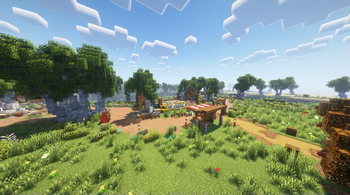
About this Modpack
Experience the best of Cobblemon and modded Minecraft!
This modpack is heavily inspired by Cobblemon PokéFactory. (and maybe also Satisfactory)
In this modpack, you can build an automated PokéBall farm, harvest a variety of crops, make delicious food for your virtual tastebuds, catch Pokémon to fill out your CobbleDex and more!
(Formerly Project PokéFactory)
Which mods are included?
The modlist is very long, with the modcount being over 200. You can check the modlist below for a full list.
However the core mods of the modpack are:
Cobblemon - the perfect Pokemon mod for Minecraft, PokeFactory is designed for and around Cobblemon
Create - the partner to Cobblemon, Create is the basis for the majority of the other mods, automate everything, rival Silph Co, and never have to mine anything again
Applied Energistics 2 - sick of rotation? Turn it into energy, AE2 complements Create in every way and provides the main storage methods for PokeFactory
Farmer's Delight - PokeFactory isn't just for players who want to build huge factories, with Farmer's Delights we offer the peaceful Pokemon Homestead of your dreams
(The list above was taken directly from the Cobblemon PokeFactory modrinth page, as this modpack aims to replicate it with additional tweaks.)
Additionally, this modpack uses Cobblemon's Official Modpack as a base, so the mods from that modpack are included aswell.
Performance
The performance for this modpack isn't exactly a kitchen sink optimization pack, however I, like any other sane developer like to have good performance. At the moment, it runs well enough. If I had to give it a score, I'd say it's about 7/10.
What to expect in the future?
Generally more extensions for existing mods, QoL improvements, optimization and more configs for existing mods.
Here's a list of things that will be included in updates to the modpack:
- Further optimization
- More configurations for existing mods
- Music update
- QoL updates
- Documentation page
Notes
The description for this modpack reflects the state of the latest version of the modpack ONLY.
Also, it's recommended to put the modpack onto an SSD if you're impatient. Sometimes saving your singleplayer world can take a long time on harddisks.
Bootup and world loading may take a while, I currently don't have any idea what's causing it other than a general "It's probably loading a lot of mods".
The assets for this modpack are under construction.
About
When starting the modpack, you'll notice that there are an overwhelming amount of controls and information that you may not know about. This is what this section is supposed to provide.
I like to imagine that this music plays when players read this page.
Controls
This is the part of the section that explains the controls.
Cobblemon
- M - Open Pokemon Party List / Summary
- R - Throw out Pokemon
- Use Potions / Items - Right Click on Pokemon during battles
- Arrow Keys - Cycle selected Pokemon
Guilds (Odyssey Claims and Allies)
- F6 - Open Claim Map
- Guild Commands (Doesn't have a GUI) - Type "/guild" (not to be confused with "/guilds")
- F9 - Open Guild Chat
Backpacks (Sophisticated Backpacks)
- H - Open Backpack
Xaero's World Map
- J - Open Map
- V - Create Waypoint
Zoom
- C - Zoom
Simple Voice Chat
- N - Unmute Mic
Advancements
I recommend that you use the achievements/advancements page if you are looking for a sense of progression.
- L - Open Advancements Page
Vein Mining (Diggus Maximus)
- Hold ~ / " (on some keyboard layouts) + Left Mouse Button - Vein Mine
Parkour (FastMove)
- Shift while running - Slide
- Jump in the middle of a slide - Slide Jump
- Hold SPACE While hugging a wall - Wall-Slide
Server Hosting
As for server hosting, you can remove the following mods:
- Essential
and simply run the default fabric server with all of its configs.
Resources
Some mods in this modpack have a lot of mechanics to learn about even on their own, hence the section.
Create
Tinker's Construct
Credits
- Cobblemon Modpack
- Mercurium
- Cobblemon PokéFactory
- BANanaDEV (for helping with some optimizations)
Modlist
- 3d-Skin-Layers by tr7zw
- AE2 EMI Crafting Integration by roridev
- Accessories by Blodhgarm, chyzman, Dr.Zeal
- Ad Astra by Alex Nijjar
- Advanced Netherite by Autovw
- Alternate Current by Space Walker
- Anvian's Lib by anvian
- AppleSkin by squeek502
- Applied Energistics 2 by TeamAppliedEnergistics
- Architectury by shedaniel
- Argonauts by Alex Nijjar, ThatGravyBoat
- Ascension Megamons by Dragonhowl Development
- Axiom by Moulberry
- AzureLib Armor by AzureDoom, Gecko, Eliot, Hydos, DerToaster, Tslat, KyoSleep, Bvanseg
- BCLib by Quiqueck, paulevs, Bulldog83
- Bad Wither No Cookie Reloaded by Kreezxil, Eleksploded
- BadOptimizations by Thosea
- Balm by BlayTheNinth
- Bartering Station by Fuzs
- BedrockIfy by juancarloscp52, lonefelidae16
- Better End by Quiqueck (code), paulevs (code & art), Bulldog83 (code & art), Edos (building), Yuki (art), Seaward (art), Firel (music)
- Better Nether by quiqueck, paulevs (original author)
- Better Nether Map by Jummit
- Better Ping Display by Quintinity
- BetterF3 by cominixo, TreyRuffy
- Bookshelf by Darkhax
- Botania by Vazkii, wiiv, williewillus, dylan4ever, Hubry, Alwinfy, artemisSystem, Falkory220
- Botarium by CodexAdrian
- CICADA by enjarai
- Cadmus by Alex Nijjar, ThatGravyBoat
- Cardinal Components API by UpcraftLP, Pyrofab
- Carry On by Tschipp, Purplicious_Cow, cy4n
- Cave Dust by LizIsTired
- Cerbons API by CerbonXD
- CleanCut by Rongmario
- Clear Despawn by StrikerRocker
- Cloth Config v11 by shedaniel
- Clumps by Jaredlll08
- Cobbled Shiny Particles by Tyzillion
- Cobbledex by Rafa
- Cobblemon by The Cobblemon Team
- Cobblemon - Visual Held Items by joshxviii
- Cobblemon Capture EXP by TimInc aka Timothy Metcalfe
- Cobblemon Counter by TimInc aka Timothy Metcalfe
- Cobblemon Fight or Flight Fabric by rufia
- Cobblemon Fixed Starter IVs by TimInc aka Timothy Metcalfe
- Cobblemon Integrations by Arcaryx
- Cobblemon Loot Balls by Ripio
- Cobblemon Pasture Collector by TimInc aka Timothy Metcalfe
- Cobblemon Plant Apricorns by TimInc aka Timothy Metcalfe
- Cobblemon Repel by deuli
- Cobblemon Spawn Notification by timinc aka Timothy Metcalfe
- Cobblemon UI Tweaks by landonjw
- Cobblemon Wiki Gui by LuÃsMaia
- Cobblemon: Legendary Structures by TSFlareon
- Cobblenav by gatekeep
- Cobblepedia by VinnyStalck
- Cobbreeding by ZeroxyDev, Fuzuki
- Collective by Rick South
- Common Network by Mysticdrew
- Concentration by DeeChael
- Continuity by PepperCode1
- Controlling For Fabric by Jaredlll08
- CorgiLib by Corgi Taco, Joseph T. McQuigg (JT122406)
- Cosmetic Armor by Apace
- CraftPresence by CDAGaming
- CraftTweaker by Jaredlll08, Kindlich, StanHebben, TheSilkMiner
- Crafting Tweaks by BlayTheNinth
- Create by Fabricators of Create, Creators of Create
- Create Big Cannons by rbasamoyai
- Create Cobblestone by MrStickyPiston
- Create Crafts & Additions by MRH0
- Create Deco by Kayla, Talrey
- Create Goggles by Robocraft999
- Create Jetpack by possible_triangle
- Create Ore Excavation by tom5454
- Create Slice & Dice by possible_triangle
- Create: Bells & Whistles by sudolev
- Create: Big Contraptions by MuriPlz
- Create: Cobblemon Industrialized by Lord_Of_Crumbs, Bracken40
- Create: Compat BetterEnd & BetterNether by collinfranckena77
- Create: Connected [Fabric] by Lysine, sashafiesta
- Create: Cooking by Me!
- Create: Copycats+ by Lysine, Bennyboy1695, Redcat_XVIII
- Create: Dreams & Desires by LopyLuna (Original Creator, The Sappho Company (Fabric port)
- Create: Food by average_anime
- Create: High Pressure by Aweeri
- Create: Interiors by sudolev, rdh
- Create: Let The Adventure Begin
- Create: Oxidized by Pyzpre
- Create: Steam 'n' Rails by The Railways Team
- Create: Stones by 0xDED
- Create: Structures by FusionSwarly
- Create: Structures Arise by SmartStreamLabs
- Create: Trimmed by TorNato
- CreeperFireworks by wendall911
- Ctrl Q by PolishKrowa
- Cull Leaves by Motschen, TeamMidnightDust
- Cull Less Leaves by isXander
- Daily Rewards by Markus Bordihn
- DarkInventory - Keep Inventory On by GamerPotion, Rav115
- Debugify by isXander
- Diggus Maximus by kyrptonaught
- Dismount Entity by Rick South
- Drip Sounds by PieKing1215
- Drops into Shulker by onebacon
- Dynamic Crosshair by Crendgrim
- Dynamic FPS by juliand665, LostLuma
- Dynamic Fullbright by Provismet
- EMI by Emi
- EMI Enchanting by fzzyhmstrs
- EMI Loot by fzzyhmstrs, lxly9 (art), unilock (ports)
- EMI Ores by Abbie
- EMI Trades by Prismwork, Flamarine
- EMIffect by Prismwork
- Elytra Slot by Illusive Soulworks
- EnchantmentDescriptions by Darkhax
- Ender Dragon Fight Remastered by MrGenie151
- Ender's Delight Refabricated by Axedgaming, Furti Two
- Enhanced Attack Indicator by Minenash
- Enhanced Block Entities by FoundationGames
- Entity Model Features by Traben
- Entity Texture Features by Traben
- EntityCulling-Fabric by tr7zw
- Extra Mod Integrations by Kneelawk
- Fabric API by FabricMC
- Fabric Language Kotlin by FabricMC
- Fabric Seasons by D4rkness_King
- Fabric Seasons: Delight Compat by D4rkness_King
- Fabric Seasons: Extras by D4rkness_King
- Fadeless by UltimateBoomer, DerpDerpling
- Faithful Mace by PVP Ranked
- Falling Leaves by Fourmisain, BrekiTomasson, RandomMcSomethin
- Farmer's Cutting: BetterEnd by Joshcraft2002
- Farmer's Cutting: BetterNether by Joshcraft2002
- Farmer's Cutting: Oh The Biomes We've Gone by Joshcraft2002
- Farmer's Delight by MehVahdJukaar, MerchantPug
- Farmer's Delight Expansion by Kacey__
- Farmer's Knives by ianm1647
- Fast IP Ping by Fallen_Breath
- Fast Items by Noryea
- Fast Load by StockiesLad [Owner], JoostMSoftware [Co-Owner], AbdElAziz [Forge], kennytv [Indirect Contributor], VidTu [Indirect Contributor]
- FastAnim by Lunade
- FastMove - Parkour Movement
- FastQuit by KingContaria
- Faster Random by AnOpenSauceDev
- Faux-Custom-Entity-Data
- FerriteCore by malte0811
- FeyTweaks by Feytox
- Forge Config API Port by Fuzs
- Friendly Phantoms by fabbe50
- Fzzy Config by fzzyhmstrs
- Galaxy's Mailboxes by GalaxyByne
- Galaxy's Server Economy by GalaxyByne
- GamemodeOverhaul by marcus8448
- GeckoLib 4 by Gecko, Eliot, AzureDoom, DerToaster, Tslat, Witixin
- GlitchCore by Adubbz
- GooeyLibs by landonjw
- Grappling Hook Mod by Yyon, Nyfaria, Mayesnake, CG360
- Hephaestus by Slime Knights, AlphaMode
- Highlight by ThatGravyBoat
- Highlighter by Grend
- Hold That Chunk by dlee13
- HorseBuff by CodeF53#0241
- Hunt
- Icarus by Cammie, Up
- Iceberg by Grend
- ImmediatelyFast by RK_01
- Immersive Paintings by Luke100000
- Impactor by NickImpact
- Indium by comp500
- InvMove by PieKing1215
- Inventory Sorter by kyrptonaught
- Iris by coderbot, IMS212, Justsnoopy30, FoundationGames
- Jade by Snownee
- Jewelry (RPG Series) by Daedelus
- Krypton by tuxed
- LambDynamicLights by LambdAurora
- Language Reload by Jerozgen
- LazyDFU by tuxed
- Leaves Us In Peace by Tfarecnim, supersaiyansubtlety
- Let Me Despawn by frikinjay
- Lexiconfig by CodinGlitch
- Lighty by andi_makes, agnor99
- Lithium by JellySquid, 2No2Name
- Longer Chat History by Golem
- MC Dungeons Armors by Chronosacaria, Kluzzio, SeaOfPixels (Art), SattesKrokodil (Art), Patreons (Support)
- MC Dungeons Artifacts by Chronosacaria, Kluzzio, SeaOfPixels (Art), SattesKrokodil (Art), Patreons (Support)
- MC Dungeons Weapons by Chronosacaria, Kluzzio
- MaLiLib by masa
- MacOS Input Fixes by hamarb123
- Magic Mirror by QuitinDev
- Magnum Torch by Fuzs
- Make Bubbles Pop Mod by Tschipcraft
- Memory Leak Fix by FX - PR0CESS
- MidnightControls by LambdAurora, Motschen
- MidnightLib by Motschen, TeamMidnightDust
- Mod Menu by Prospector, haykam821, TerraformersMC
- Model Gap Fix by Mehvahdjukaar
- ModernFix by embeddedt
- ModpackUtils by UltimatChamp
- Monsters in the Closet by Minenash
- More Culling by FX - PR0CESS
- More Geodes by TheDeathlyCow
- MoreCobblemonTweaks by JustAHuman
- Mouse Tweaks by Ivan Molodetskikh (YaLTeR)
- Move Subtitles by Crendgrim
- Myths and Legends by D0ctorLeon, DawnFelstar
- Nature's Compass by ChaosTheDude
- Nether Coords by CaelenO42
- NetherPortalFix by BlayTheNinth
- Night Lights by Joosh and samgj15
- No Chat Reports by Aizistral
- No Report Button by Lucaslah
- No Telemetry by kb1000
- Noisium by Steveplays28
- Not Enough Crashes by Fourmisain, Fudge, Liach, Madis0, Runemoro, Siuolplex, WuzgXY, the456gamer, wafflecoffee
- NotEnoughAnimations by tr7zw
- Oh The Biomes We've Gone by Joseph T. McQuigg (JT122406), AOCAWOL, YaBoiChips, Corgi Taco
- Oh The Trees You'll Grow by Corgi Taco
- Overgrown's Cobblemon: Darkrai by Overgrown
- Packet Fixer by TonimatasDEV
- Patchouli by Vazkii, williewillus
- Ping Wheel by Luken
- Player Animator by KosmX
- PokemonToItem by Sreeraj S
- Presence Footsteps by Hurricaaane (Ha3), Sollace
- Puzzle by PuzzleMC, Motschen
- Puzzles Lib by Fuzs
- Quick Right-Click by Rick South
- QuickStack by 2Retr0
- RTP by The_WereF0X
- RangedWeaponAPI by Daedelus
- RecallBeams
- Reese's Sodium Options by FlashyReese
- Resourceful Lib by ThatGravyBoat, Epic_Oreo
- Resourcefulconfig by ThatGravyBoat
- RotomPhoneCobblemon[Fabric] by Mur1lu
- Runes by Daedelus
- Searchables by Jaredlll08
- ServerSleep by Aninuscsalas
- Shield API by TheRedBrain
- Shoulder Surfing Reloaded by Exopandora
- Show Me Your Skin! by enjarai
- Shulker Box Tooltip by MisterPeModder
- Shulker Drops Two by Rick South
- Silk (All modules) by jakobkmar, _F0X
- Silk Touch-less Enderchest by Walls
- Simple Voice Chat by Max Henkel
- SimpleRadio by CodinGlitch
- SkinRestorer by Lionarius
- Slimy Floor by Pouille
- Smooth Scrolling Refurbished by JustAlittleWolf
- Sodium by JellySquid (jellysquid3)
- Sodium Dynamic Lights by toni, LambdAurora
- Sodium Extra by FlashyReese
- Sodium Options API by toni
- Sodium Shadowy Path Blocks by Rynnavinx
- Sophisticated Backpacks by P3pp3rF1y, Ridanisaurus, Salandora
- Sophisticated Core by P3pp3rF1y, Salandora
- Spell Power Attribute by Daedelus
- Stacked Blocks by Axperty
- Stacked Blocks: Farmer's Delight by Axperty
- Starlight by Spottedleaf
- Stendhal by NebSpacefarer
- Structure Pool API by Daedelus
- Superflat World No Slimes by Rick South
- Sus Saver by CurtisDoesADig
- TPA++ by SuperRicky14
- Tempad by CodexAdrian
- TerraBlender by Adubbz
- The Aether by AlphaMode, bconlon, Blodhgarm, Burning Cactus, Drullkus, Hugo Payn, Jaryt, Oscar Payn, quek, Raptor, reetam, RENREN, sunsette
- ThreadTweak by getchoo, UltimateBoomer, fantahund
- Title Fixer by TheGameratorT
- ToadLib by Mr.Toad
- ToolStats by Darkhax
- ToolTip Fix by kyrptonaught
- TrashSlot by BlayTheNinth
- TriQue API by TriQue
- Trinkets by Emi, C4
- Turkish Delight by Wolter, MCreator
- TxniLib by Toni
- VibrativeVoice by CodinGlitch
- Villager Souls by trashoflevillage
- Visuality by PinkGoosik
- VoicechatBroadcastPlugin
- Warden Tools by TriQue
- Way2Way by lack
- Waystones by BlayTheNinth
- When Dungeons Arise by Aureljz, DiamondTown & Zephyrusj
- Xaero's Minimap by xaero96
- Xaero's World Map by xaero96
- YOSBR by shedaniel
- YetAnotherChanceBooster by gatekeep06
- YetAnotherConfigLib by isXander
- YetAnotherConfigLib by isXander
- Zenith by ShadowsOfFire (Forge), Safro (original port), TheWinABagel
- Zenith Attributes by ShadowsOfFire (Forge), TheWinABagel (Fabric Port)
- Zoomify by isXander
- essential-container
- fakerlib by ShadowsOfFire (forge version), TheWinABagel
- gts
- oωo by glisco, BasiqueEvangelist, Noaaan
Available Versions
How to Set Up a PokéFactory Alpha Server
Order Server
Choose at least 6 GB RAM (8 GB recommended for PokéFactory Alpha). Based on player count: per 5 players.
Install Modpack in Dashboard
Open the modpack browser in the dashboard, search for "PokéFactory Alpha" and click "Install". The fabric loader and Minecraft 1.20.1 are configured automatically.
Start Server & Play
Start the server – all mods are loaded automatically. Share the server IP with friends and play together!
Frequently Asked Questions
PokéFactory Alpha server crashes or won't start – what to do?
Most common causes: insufficient RAM or wrong fabric loader. Check latest.log for "OutOfMemoryError" → increase RAM to at least 8 GB. For "Mixin" or "ClassNotFoundException" errors: modpack version and loader don't match. With Mado Hosting, loader and Minecraft version are auto-configured on modpack install – preventing most startup issues.
How much RAM does a PokéFactory Alpha server really need?
Minimum 6 GB, recommended 8 GB for stable performance. per 5 players. Important: Minecraft modpacks need more RAM than vanilla – plan extra per additional player. With Mado Hosting, you can scale RAM up live at any time without data loss (from €12/month).
Can I add custom mods to PokéFactory Alpha without conflicts?
Yes, but check compatibility: only use mods for the same loader (fabric) and same Minecraft version (1.20.1). Common issues: ID conflicts with recipe mods and incompatible coremod versions. The Mado dashboard mod browser only shows compatible mods and warns about known conflicts.
PokéFactory Alpha server lagging – performance tips
1) Increase RAM to 8 GB+. 2) Reduce server view-distance to 8 (server.properties). 3) Pre-generate chunks with the "Chunky" plugin. 4) Use /spark profiler to check which mods consume the most tick time. With Mado Hosting, all servers run on NVMe SSDs with dedicated CPU cores – eliminating hardware as a bottleneck.
Similar Modpacks
![Cobblemon Official Modpack [Fabric]](https://cdn.modrinth.com/data/5FFgwNNP/e7f9ee2e9d361623847853fe2ddce42f519ee64f.png)
![COBBLEVERSE - Pokemon Adventure [Cobblemon]](https://cdn.modrinth.com/data/Jkb29YJU/581ecf54530972afb18a04660afd820f2f24f6c7.png)
![Better MC [FABRIC] - BMC2](https://cdn.modrinth.com/data/shFhR8Vx/a19c2bcb51d38f32f138d3607e91cb2b7b8e387f_96.webp)


![Better MC [FORGE] - BMC4](https://cdn.modrinth.com/data/4BV47HRn/7f5ef7cc61b2593609aabef3ed07a866a4f11b73_96.webp)
Rent PokéFactory Alpha Server
Start your own server with automatic modpack installation.
Details
- License
- GNU General Public License v2.0 or later
- Server-side
- Required
- Client-side
- Required
Supported Versions
Start your PokéFactory Alpha Server now
From €12.00/month with 8 GB RAM for the best performance.
Configure Server →