
Poko
Minecraft Mod Pack aims to balance performance and ability with vanilla compatibility!
Screenshots
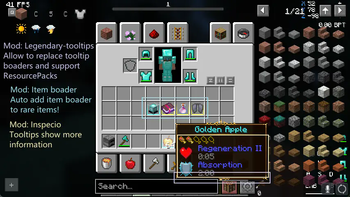
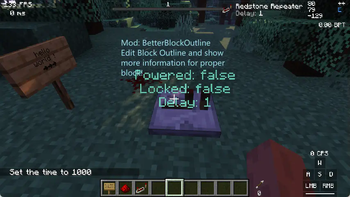

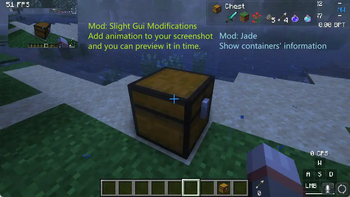
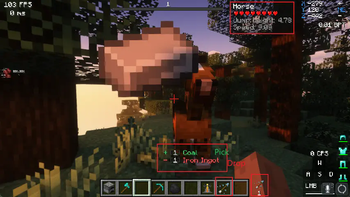
About this Modpack

Poko is an ModPack dedicated to compatibility with the vanilla server, committed to introducing elegant tools and maintaining high performance, providing you with a highly customized gaming experience.




Examples speak louder than words, Lead me to showcases!
- It's fast. --- Even there are lots of mods in this mod pack, it still can load very fast.
- Reserve modifications space and practical priority --- We added many useful tweaks that you wouldn't notice, and we did Not add mods like
Map/Litematica/IBE Editor..., because we want to let it be your choice. - Almost full OptiFine Support --- Thanks to awesome mod creators, Now you can enjoy
Shaders, ResoucePack, Connected textures, PBR, Custom Model...on Fabric/Quilt Loaders! - The pursuit of experience, but abide by the principles --- We avoid adding other visual effects to f**k your FPS, but we still recommend those mods for you!(But you need a GOOD PC)
- Highly pre-configured ---All we want for you, is you can configure everything you see in the game, even disable it or make it personalize.
- We know your pain --- We don't do the whole fancy, You can modify anything comfortably. Thanks to awesome mod creators, you can
type command in portals,switch languages in 1s,resize scoreboard/bossbar/actionbarand do more things with these comfortable modifications! Fully Documented--- Not Yet, We want to tell how to configure everything as you want, but it's a big work, so coming soon!
🎁 Credits
- Mod --- Please check our Mod List, we link
every mods to its origin pages. Without these awesome creators, this mod pack would not exist! - Eclectic Trove --- Created by Grend_G, A resource pack enriches your tooltips!
- GUI Retextures --- Created by flatjim_ , make Minecraft's GUIs look a bit more vibrant and interesting.
Available Versions
How to Set Up a Poko Server
Order Server
Choose at least 4 GB RAM (6 GB recommended for Poko). Based on player count: per 8 players.
Install Modpack in Dashboard
Open the modpack browser in the dashboard, search for "Poko" and click "Install". The quilt loader and Minecraft 1.19.3 are configured automatically.
Start Server & Play
Start the server – all mods are loaded automatically. Share the server IP with friends and play together!
Frequently Asked Questions
Poko server crashes or won't start – what to do?
Most common causes: insufficient RAM or wrong quilt loader. Check latest.log for "OutOfMemoryError" → increase RAM to at least 6 GB. For "Mixin" or "ClassNotFoundException" errors: modpack version and loader don't match. With Mado Hosting, loader and Minecraft version are auto-configured on modpack install – preventing most startup issues.
How much RAM does a Poko server really need?
Minimum 4 GB, recommended 6 GB for stable performance. per 8 players. Important: Minecraft modpacks need more RAM than vanilla – plan extra per additional player. With Mado Hosting, you can scale RAM up live at any time without data loss (from €8/month).
Can I add custom mods to Poko without conflicts?
Yes, but check compatibility: only use mods for the same loader (quilt) and same Minecraft version (1.19.3). Common issues: ID conflicts with recipe mods and incompatible coremod versions. The Mado dashboard mod browser only shows compatible mods and warns about known conflicts.
Poko server lagging – performance tips
1) Increase RAM to 6 GB+. 2) Reduce server view-distance to 8 (server.properties). 3) Pre-generate chunks with the "Chunky" plugin. 4) Use /spark profiler to check which mods consume the most tick time. With Mado Hosting, all servers run on NVMe SSDs with dedicated CPU cores – eliminating hardware as a bottleneck.
Similar Modpacks
![Better MC [FABRIC] - BMC2](https://cdn.modrinth.com/data/shFhR8Vx/a19c2bcb51d38f32f138d3607e91cb2b7b8e387f_96.webp)
![Better MC [FORGE] - BMC4](https://cdn.modrinth.com/data/4BV47HRn/7f5ef7cc61b2593609aabef3ed07a866a4f11b73_96.webp)


![Better MC [FABRIC] - BMC3](https://cdn.modrinth.com/data/NHUidpfR/327e0749bb6d160c41799fd77bf6d3d631569dc8_96.webp)

Rent Poko Server
Start your own server with automatic modpack installation.
Details
- License
- GNU Lesser General Public License v3.0 only
- Server-side
- Unsupported
- Client-side
- Required
Supported Versions
Start your Poko Server now
From €8.00/month with 6 GB RAM for the best performance.
Configure Server →