
PrimeBlocks.net Modpack
🎮 PrimeBlocks Modpack Das offizielle PrimeBlocks Modpack optimiert dein Spielerlebnis mit Mods für bessere Performance, mehr Übersicht und maximalen Komfort. Perfekt abgestimmt auf unseren Server - für ein flüssiges, effizientes Gameplay.
Screenshots

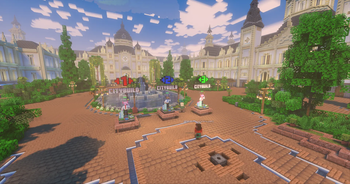



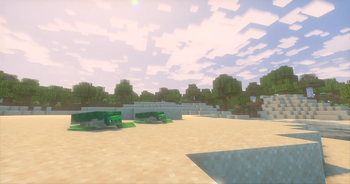
About this Modpack
🎮 PrimeBlocks Modpack
Das offizielle PrimeBlocks Modpack wurde speziell entwickelt, um dein Spielerlebnis auf unserem Wirtschafts CityBuild Server technisch und visuell zu optimieren.
Eine detaillierte Auflistung aller Mods findet ihr unter:
https://modrinth.com/modpack/primeblocks-modpack/version/1.0.1 (bei "Dependencies")
Das Modpack kann von euch selbst erweitert oder verkleinert werden. Dafür ist es gemacht. Fehlen euch Mods? Fügt sie einfach über den Modrinth Launcher hinzu. Sind Mods drin, die ihr nicht haben wollt? Entfernt sie einfach aus dem Modpack! Bastelt euch euer perfektes PrimeBlocks Modpack zusammen - das hier ist nur eine Grundlage mit den von uns ausgewählten wichtigsten Mods für CityBuild Qualität und hohe Performance!
⚙️ Fokus des Modpacks
Dieses Modpack kombiniert gezielt ausgewählte Mods und Resourcepacks, um:
- Performance deutlich zu verbessern (höhere FPS, weniger Lag)
- Rendering effizienter zu gestalten (z. B. durch Culling & optimierte Grafik)
- Übersicht und Komfort zu erhöhen
- Animationen und visuelle Qualität aufzuwerten
🚀 Performance & Stabilität
Durch moderne Rendering-Optimierungen und intelligente Entlastung der GPU sorgt das Modpack für ein flüssiges und stabiles Spielerlebnis, selbst auf großen CityBuild-Projekten mit vielen Entities und Lagersystemen.
🎨 Visuelle Verbesserungen
Überarbeitete Animationen, verbesserte Texturen und optionale Shader-Unterstützung sorgen für eine moderne, immersive Vanilla-Optik, ohne das Spielgefühl zu verfälschen.
🧠 Quality of Life
Zahlreiche Features verbessern dein Gameplay spürbar:
- Präziseres Bauen
- Bessere HUD-Informationen
- Zoom & Übersicht
- Erweiterte Spielerinteraktionen
🔊 Multiplayer & Community
Mit integriertem Voice Chat und optimierten Client-Funktionen wird die Interaktion mit anderen Spielern einfacher und direkter.
📌 Ziel des Modpacks
Das PrimeBlocks Modpack ist darauf ausgelegt, dir ein flüssiges, übersichtliches und technisch optimiertes Spielerlebnis zu bieten - perfekt abgestimmt auf alle Features unseres Servers.
Egal ob du baust, handelst oder an Events teilnimmst - dieses Modpack sorgt dafür, dass du PrimeBlocks so performant und komfortabel wie möglich erleben kannst.
Available Versions
How to Set Up a PrimeBlocks.net Modpack Server
Order Server
Choose at least 4 GB RAM (6 GB recommended for PrimeBlocks.net Modpack). Based on player count: per 8 players.
Install Modpack in Dashboard
Open the modpack browser in the dashboard, search for "PrimeBlocks.net Modpack" and click "Install". The fabric loader and Minecraft 1.21.11 are configured automatically.
Start Server & Play
Start the server – all mods are loaded automatically. Share the server IP with friends and play together!
Frequently Asked Questions
PrimeBlocks.net Modpack server crashes or won't start – what to do?
Most common causes: insufficient RAM or wrong fabric loader. Check latest.log for "OutOfMemoryError" → increase RAM to at least 6 GB. For "Mixin" or "ClassNotFoundException" errors: modpack version and loader don't match. With Mado Hosting, loader and Minecraft version are auto-configured on modpack install – preventing most startup issues.
How much RAM does a PrimeBlocks.net Modpack server really need?
Minimum 4 GB, recommended 6 GB for stable performance. per 8 players. Important: Minecraft modpacks need more RAM than vanilla – plan extra per additional player. With Mado Hosting, you can scale RAM up live at any time without data loss (from €8/month).
Can I add custom mods to PrimeBlocks.net Modpack without conflicts?
Yes, but check compatibility: only use mods for the same loader (fabric) and same Minecraft version (1.21.11). Common issues: ID conflicts with recipe mods and incompatible coremod versions. The Mado dashboard mod browser only shows compatible mods and warns about known conflicts.
PrimeBlocks.net Modpack server lagging – performance tips
1) Increase RAM to 6 GB+. 2) Reduce server view-distance to 8 (server.properties). 3) Pre-generate chunks with the "Chunky" plugin. 4) Use /spark profiler to check which mods consume the most tick time. With Mado Hosting, all servers run on NVMe SSDs with dedicated CPU cores – eliminating hardware as a bottleneck.
Similar Modpacks


![Cobblemon Official Modpack [Fabric]](https://cdn.modrinth.com/data/5FFgwNNP/e7f9ee2e9d361623847853fe2ddce42f519ee64f.png)
![COBBLEVERSE - Pokemon Adventure [Cobblemon]](https://cdn.modrinth.com/data/Jkb29YJU/581ecf54530972afb18a04660afd820f2f24f6c7.png)
![Better MC [FABRIC] - BMC2](https://cdn.modrinth.com/data/shFhR8Vx/a19c2bcb51d38f32f138d3607e91cb2b7b8e387f_96.webp)

Rent PrimeBlocks.net Modpack Server
Start your own server with automatic modpack installation.
Details
- License
- LicenseRef-All-Rights-Reserved
- Server-side
- Unsupported
- Client-side
- Required
Supported Versions
Start your PrimeBlocks.net Modpack Server now
From €8.00/month with 6 GB RAM for the best performance.
Configure Server →