
Pristine Performance
Fantastic performance with quality-of-life changes to textures, GUI and more
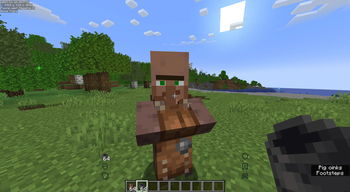
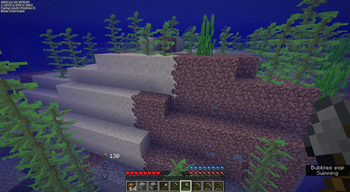
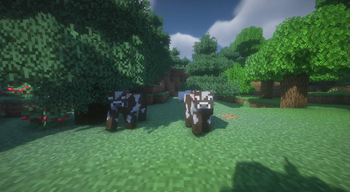
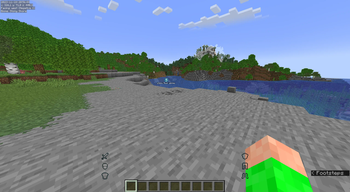
Screenshots
About this Modpack
Pristine Performance
General Information
Pristine Performance is a modpack made by me which features mods that all fulfill the following criteria:
- Unarguably allowed on any survival server*
There should be no argument that using a this pack gives an unfair advantage on an SMP. - **Either improve performance or don't affect it**
I mean, the mod's **called** *"Pristine Performance"*. Making it slow would kind of undercut that whole thing - **Keep Minecraft feeling like Minecraft**
I mean, if you *want* a 1024x pack, you can use it. You just gotta add it yourself.
*Exceptions occur. Read more in the Questionables chapter
Server functionality
Two mods might directly give you issues on servers; Simple Voice Chat and No Chat Reports. If a server doesn't allow sending encrypted messages, you can use the buttons in the chat to essentially turn No Chat Reports off.
Simple Voice Chat will only work on a server if it has been set up there. To see more information about this, visit Simple Voice Chat's official page for this
You can still join any vanilla Minecraft server with these mods enabled with no issues other than potentially hindered functionality of those mods specifically
Pack Contents
Mods used
AppleSkin by squeek502- Adds hunger preview plus a few extra nice things
- Makes other mods work
- Should make player hunger and exp bar visible while riding an animal. Right now this does not work in this pack. If you know why, please contact me
Better Ping Display [Fabric] by vladmarica
- Lets you see players' actual pings on multiplayer servers instead of the standard bars.
Better Statistics Screen by TheCSDev
- Vanilla Minecraft's statistics screen is a mess. This fixes that.
- Enables you to see the items in your hands while rowing. Useful for following buried treasure maps. This mod is classified as questionable
- Enables you to see further than the server's render distance by caching the chunks. Does not enable you to see entities further than the server's render distance. This mod is classified as questionable
- Makes other mods work
- Makes fullscreen minecraft work better in ways I do not understand. Go to their page to learn more
- Makes players' heads appear next to their chat messages. Can be turned off if it isn't your groove
Cherished Worlds by TheIllusiveC4
- Enables you to pin your favorite worlds to the top of the world selection screen.
- One of two config libraries used by mods in this pack. Enables you to change mod settings
- Makes other mods work
Concurrent Chunk Management Engine (C2ME) by ishland
- Improves performance by making chunks work good.
- Fabric alternative for Optifine's connected textures
- Enables you to search for keybinds in the keybinds menu
- Adds more details to your armor bar, mainly the ability to see what armor fills up what armor points
- Improves performance by making Minecraft run at 1 fps when it's not focused. Also fixes an issue with the game rendering while loading stuff.
ESSENTIAL Mod by SparkUniverse
- Adds TONS of features like hosting a world from your laptop, cosmetics, out-of-world chatting and much more
- Adds animations for eating and drinking
- Improves performance by preventing entities from rendering when you can't see them
- Makes mods work
Fabric Language Kotlin by modmuss50
- Makes mods work
- Improves performance by optimizing RAM
Full Brightness Toggle by Serilum
- Creates a keybind to toggle full brightness. This mod is classified as questionable
GeckoLib by Gecko, Tslat, Kyosleep, mchorse, and DerToaster98
- Makes mods work
- Improves performance by optimizing rendering
- Makes mods work
Inventory HUD + for Fabric by dmitrylovin
- Adds useful HUD elements like potion stats and tool and armor durability
- Adds shader support
- Modern "What am I looking at?". Turned off by default, but practical at times.
Just Enough Items (JEI) by mezz
- Adds huge item menu to inventory. Like recipe book but better.
LambDynamicLights by LambdAurora
- Adds dynamic lighting to Fabric
- THE optimization mod for Fabric. Improves performance drastically
- Makes mods work
Make Bubbles Pop by Tschipcraft
- Makes actions underwater make pretty bubbles
- Adds customizable HUD as well as fantastic tools for making mob farms. This mod is classified as questionable
- Adds a mod menu to the main menu and the esc menu
- Patches a whole bunch of bugs
- Adds customizability to how the mouse interacts with the GUI
- Adds the ability to encrypt your messages and make yourself immune to getting banned from accessing all Minecraft servers by Mojang. Server OPs can still ban you from their server if they so please.
Not Enough Animations by tr7zw
- Adds more animations in third person view and on other players
- Improves performance on Nvidia graphics cards. If you don't have one of those, do not worry - the mod will turn itself off and your gameplay will not be affected at all
Reese's Sodium Options by FlashyReese
- Makes the option menus look nicer
- Makes mods' search fields work
Simple Voice Chat by henkelmax
- Adds voice chat to Minecraft with features such as proximity chat. Turned off by default, keybind to change is V
- Forget what I said about Lithium - THIS is THE ULTIMATE performance enhancement mod
- Adds more texture customizability
- Slightly improves performance with lighting changes. Changes are more noticeable if the mod is installed server-side
- Improves performance by improving thread scheduling. Don't ask me what that is, all I know is, it works
Very Many Players (Fabric) by ishland
- Improves performance on crowded servers and multiplayer worlds
- Adds nice particles like skeletons getting bony when you hit them and slimes splish-sploshing on the ground
WorldEdit by me4502, octylFractal, and wizjany
- Adds amazing world editing features in single player worlds if you have cheats enabled
Zaero's Minimap (Fair-Play) by thexaero
- Adds the ability to set and manage waypoints. It also adds a minimap, which is disabled by default. This mod is classified as questionable
- Adds a map of everything you have discovered. This mod is classified as questionable
YetAnotherConfigLib by isxander
- Another library for mod configuration
- Highly customizable zoom mod. This mod is classified as questionable
[EMF] Entity Model Features by Traben
- Allows for custom entity models in resource pack. Installed because of Fresh Animations but is just an overall nice-to-have
[ETF] Entity Texture Features by Traben
- Exact same as EMF, but with textures
- Helps diagnose problems if something's up, performance-wise.
Resource packs used
- Makes creatures a lot more living
Fresh Animations Extenstions by Fresh__LX
- Makes mobs very varied and animate. Turned off by default, as it might feel a little un-vanilla
xali's Enhanced Vanilla by xalixilax
- Adds nice textures. Especially noticeable in the connected textures on the ground
xali's Bushy Leaves by xalixilax
- Adds nice, bushy leaves. This one might feel a bit un-Minecrafty, so consider removing it if you feel like it
- Makes the potions' textures more unique
xali's Enchanted Books by xalixilax
- Makes each type of enchanted book's texture unique
Xali's Enhanced Biome: River and Pond by xalixilax
- Makes the water more interesting by adding things like seahorses
xali's Enhanced Jungle Wood by xalixilax
- Makes jungle wood desirable
Shaders used
- Is disabled by default. Commonly accepted as the best Minecraft shader pack
Credit to Simply Optimized by HyperSoop - most of the performance mods are only here because they are there
Keybinds
- G for full brightness toggle
- ¨ for world map
- R for zoom
- V for voice chat settings
- ctrl+enter in chat to send an unencrypted message. Beware of Mojang when doing this.
- Numpad 1 to toggle the "What Am I Looking At" HUD overlay
- N to make new waypoint
- M to see overview of waypoints
Questionables
What are questionables?
Questionables are mods that arguably have the potential to give you unfair advantages. While the feature you installed the mod for may be perfectly balanced in a multiplayer environment, the mod may allow for a gain of unfair advantages. It is therefore important that you discuss the use of questionable mods with the server owner.
I disabled the questionable part of a mod, but the owner still disagrees with me having it installed. What do I do?
NEVER argue with server staff about these mods. Comply if they tell you a certain mod isn't allowed.
Questionable Mods
- Boat Item View
Being able to see maps while rowing may give you an unfair advantage over players that can't - **Bobby**
By having a better idea of what's ahead, you gain an edge over others in many scenarios - **Full Brightness Toggle**
Being able to see everything at the bottom of the ocean from the surface or being able to navigate a dark cave with 20/20 vision will obviously make the game easier for you than it is for people who can not do these things. The reason I still include this is that speedrunners are allowed to have full brightness and use it to find shipwrecks easier. I usually do a balancing act: Have it on in the ocean, but not in the caves. Consult with server owner (or friends, if it's just you and them running the server) before using - **MiniHUD**
While adding many harmless quality-of-life features, MiniHUD also adds the ability to see which chunks are spawn chunks. This is information is otherwise only readily available to people with the server seed, and while not impossible to find in vanilla survival, knowing where the spawn chunks are immediately and with this certainty is definitely unfair. Just stick to the harmless stuff and give the server owner a heads up that you are using the mod. If they still don't allow it, just disable it. Do not argue. - **Xaero's Minimap (Fair Play)**
Knowing what's around you from a bird's eye view can give you certain advantages, like locating a lava lake behind a mountain that others would never find. The waypoint system is the same as writing the coordinates down, so you shouldn't get any trouble with that part. - **Xaero's World Map**
Knowing where everything you have explored is is quite a lot of information to have. Just consult with you server owner about the usage of this. I personally only use it to see how much I've explored - not to backtrack to find a certain biome or structure. - **Zoomify**
Being able to see things far away in more detail than others could be considered unfair
Contact Me
E-mail: [email protected]
Need Help?
Join the Pristine Performance discord server to discuss and get help with Pristine Performance!
Disclaimer
None of the modpacks, resource packs or shaders in this modpack are in any way affiliated with me. None of the mods, resource packs or shaders in this modpack are in any way affiliated with- or endorsed by Mojang, nor is this modpack. I take no responsibility for server bans due to the use of any of the listed mods and urge you to speak with a server OP before using this modpack. DO NOT turn it into a discussion.
Available Versions
How to Set Up a Pristine Performance Server
Order Server
Choose at least 4 GB RAM (6 GB recommended for Pristine Performance). Based on player count: per 8 players.
Install Modpack in Dashboard
Open the modpack browser in the dashboard, search for "Pristine Performance" and click "Install". The fabric loader and Minecraft 1.20.2 are configured automatically.
Start Server & Play
Start the server – all mods are loaded automatically. Share the server IP with friends and play together!
Frequently Asked Questions
Pristine Performance server crashes or won't start – what to do?
Most common causes: insufficient RAM or wrong fabric loader. Check latest.log for "OutOfMemoryError" → increase RAM to at least 6 GB. For "Mixin" or "ClassNotFoundException" errors: modpack version and loader don't match. With Mado Hosting, loader and Minecraft version are auto-configured on modpack install – preventing most startup issues.
How much RAM does a Pristine Performance server really need?
Minimum 4 GB, recommended 6 GB for stable performance. per 8 players. Important: Minecraft modpacks need more RAM than vanilla – plan extra per additional player. With Mado Hosting, you can scale RAM up live at any time without data loss (from €8/month).
Can I add custom mods to Pristine Performance without conflicts?
Yes, but check compatibility: only use mods for the same loader (fabric) and same Minecraft version (1.20.2). Common issues: ID conflicts with recipe mods and incompatible coremod versions. The Mado dashboard mod browser only shows compatible mods and warns about known conflicts.
Pristine Performance server lagging – performance tips
1) Increase RAM to 6 GB+. 2) Reduce server view-distance to 8 (server.properties). 3) Pre-generate chunks with the "Chunky" plugin. 4) Use /spark profiler to check which mods consume the most tick time. With Mado Hosting, all servers run on NVMe SSDs with dedicated CPU cores – eliminating hardware as a bottleneck.
Similar Modpacks

![Cobblemon Official Modpack [Fabric]](https://cdn.modrinth.com/data/5FFgwNNP/e7f9ee2e9d361623847853fe2ddce42f519ee64f.png)
![COBBLEVERSE - Pokemon Adventure [Cobblemon]](https://cdn.modrinth.com/data/Jkb29YJU/581ecf54530972afb18a04660afd820f2f24f6c7.png)
![Better MC [FABRIC] - BMC2](https://cdn.modrinth.com/data/shFhR8Vx/a19c2bcb51d38f32f138d3607e91cb2b7b8e387f_96.webp)


Rent Pristine Performance Server
Start your own server with automatic modpack installation.
Details
- License
- BSD 3-Clause "New" or "Revised" License
- Server-side
- Unsupported
- Client-side
- Required
Supported Versions
Start your Pristine Performance Server now
From €8.00/month with 6 GB RAM for the best performance.
Configure Server →