
project Moa.
the most perfect modpack in Minecraft history.
Screenshots
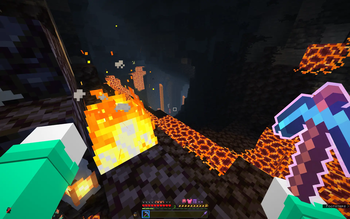
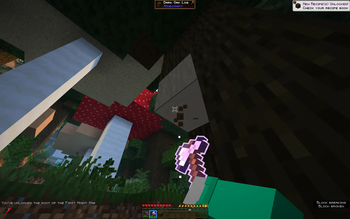
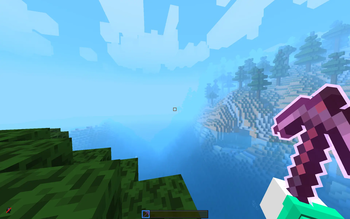
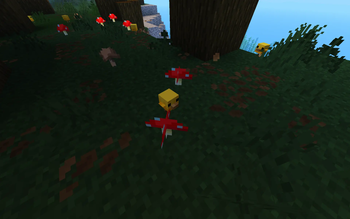
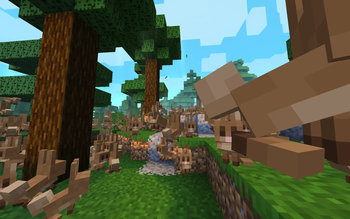
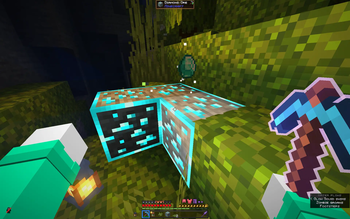
About this Modpack
projectMoa (https://projectmoa.framer.wiki) is a chonk of a Minecraft modpack, packing over 250 mods—because why settle for basic when you can have next-level, butter-smooth, ultra-optimized chaos? 🚀 this bad boy is built to boost your performance, enhance your experience, and make vanilla minecraft feel like it’s been hitting the gym (but, like, without the sweat).

projectMoa is client-sided—yes, i said it again, and i’ll say it louder for the people in the back. client. sided. 🎤✨ that means you can flex all these fancy upgrades without breaking multiplayer. sure, there might be some optional singleplayer server-sided bits, but at its core, it’s all about you, your game, and an experience so smooth it could sell skincare products.

projectMoa isn’t just some random pile of mods thrown together like my sister's first fruit salad—every single mod, every tweak, every setting has been hand-tuned, manually configured, and carefully optimized to squeeze out every drop of performance and immersion. 🛠️✨
this ain't no "drag-and-drop" modpack. nope. each piece has been fine-tuned one by one, by hand, like a master chef crafting the perfect dish—except instead of food, it's pure, unfiltered Minecraft goodness. 🍽️🎮

- performance upgrades—because fps drops are illegal 🚫
- visual tweaks—so minecraft looks less like a powerpoint slideshow and more like a modern masterpiece 🎨
- immersive changes—so you can lose yourself in the game and forget the real world exists
- zero extra steps—no messing with configs, no tech wizardry needed. just create world, play, and go into heaven.
the result? a smooth, ultra-immersive, and crisp experience that makes vanilla minecraft feel like it was running on a potato this whole time. no extra setup, no headaches—just install and enjoy the upgrade.

whether you’re a casual player, a builder, or a redstone mastermind, projectMoa is here to make your minecraft experience feel like the true upgrade it deserves to be.
wanna see get more in-depth details? check it out: nice website link 🚀
Available Versions
How to Set Up a project Moa. Server
Order Server
Choose at least 4 GB RAM (6 GB recommended for project Moa.). Based on player count: per 8 players.
Install Modpack in Dashboard
Open the modpack browser in the dashboard, search for "project Moa." and click "Install". The fabric loader and Minecraft 26.1.2 are configured automatically.
Start Server & Play
Start the server – all mods are loaded automatically. Share the server IP with friends and play together!
Frequently Asked Questions
project Moa. server crashes or won't start – what to do?
Most common causes: insufficient RAM or wrong fabric loader. Check latest.log for "OutOfMemoryError" → increase RAM to at least 6 GB. For "Mixin" or "ClassNotFoundException" errors: modpack version and loader don't match. With Mado Hosting, loader and Minecraft version are auto-configured on modpack install – preventing most startup issues.
How much RAM does a project Moa. server really need?
Minimum 4 GB, recommended 6 GB for stable performance. per 8 players. Important: Minecraft modpacks need more RAM than vanilla – plan extra per additional player. With Mado Hosting, you can scale RAM up live at any time without data loss (from €8/month).
Can I add custom mods to project Moa. without conflicts?
Yes, but check compatibility: only use mods for the same loader (fabric) and same Minecraft version (26.1.2). Common issues: ID conflicts with recipe mods and incompatible coremod versions. The Mado dashboard mod browser only shows compatible mods and warns about known conflicts.
project Moa. server lagging – performance tips
1) Increase RAM to 6 GB+. 2) Reduce server view-distance to 8 (server.properties). 3) Pre-generate chunks with the "Chunky" plugin. 4) Use /spark profiler to check which mods consume the most tick time. With Mado Hosting, all servers run on NVMe SSDs with dedicated CPU cores – eliminating hardware as a bottleneck.
Similar Modpacks
![Better MC [FABRIC] - BMC2](https://cdn.modrinth.com/data/shFhR8Vx/a19c2bcb51d38f32f138d3607e91cb2b7b8e387f_96.webp)
![Better MC [FORGE] - BMC4](https://cdn.modrinth.com/data/4BV47HRn/7f5ef7cc61b2593609aabef3ed07a866a4f11b73_96.webp)


![Better MC [FABRIC] - BMC3](https://cdn.modrinth.com/data/NHUidpfR/327e0749bb6d160c41799fd77bf6d3d631569dc8_96.webp)

Rent project Moa. Server
Start your own server with automatic modpack installation.
Details
- License
- GNU General Public License v2.0 or later
- Server-side
- Optional
- Client-side
- Optional
Supported Versions
Start your project Moa. Server now
From €8.00/month with 6 GB RAM for the best performance.
Configure Server →