Provi's Monumenta Modpack
Another modpack designed for the CTM-MMO Minecraft server Monumenta.
Screenshots
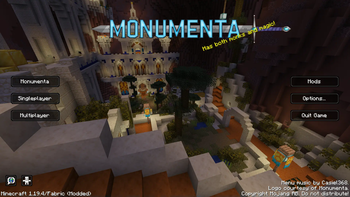
About this Modpack
Provi's Monumenta Modpack
Inspired by Noelle's modpack, this is a feature-complete plug-and-play modpack that is designed for the CTM-MMO Minecraft server Monumenta.
License
This modpack (custom menu layouts, configuration files, etc) is licensed as MIT, feel free to disect and reuse parts of it.
The contents of this modpack (mods, resourcepacks, music, logos, etc) are not covered by the modpack's license and instead have separate licenses to respect.
Contents
- Performance improvement mods.
- Monumenta Official Resource Pack
- Monumenta General Music Pack v2.6.0 (check the official discord for the latest release).
- Contains open world, dungeon, boss, and town music.
- Monumenta Custom Music Pack v1.2.0 (check the official discord for the latest release).
- Allows you to set custom music to play in Monumenta.
- General gameplay enhancement mods.
- Tooltip Scroll
- Shulkerbox Tooltips
- Xaero's Minimap/Worldmap (Fair-Play)
- Provi's Health Bars
- Monumenta specific gameplay enhancement mods.
- Unofficial Monumenta Mod
- Dynamic Fullbright (disabled by default)
Installation
Vanilla Launcher
- Modrinth Modpack Installer (zero setup required)
- I made this one, so just tell me if it breaks somehow.
- It will set up a folder with all the mods and configs from the
.mrpackfile, then you can just tell Minecraft to launch an installation from that folder.
- There are also several command line tools you can try that have the ability to set up the modpack for you.
- Manual Installation (lots of setup required)
- The
.mrpackfile is just a zip folder with a fancy extension. Rename the file to change the filetype to.zip. - Unzip the folder.
- If you have 7zip, you can use that to open the
.mrpackdirectly and skip step 1.
- If you have 7zip, you can use that to open the
- The "overrides" folder contains configs, resourcepacks, etc in the exact format they need to be for a standard Minecraft profile.
- Either use this folder as the profile/installation folder or copy its contents into your chosen folder.
modrinth.index.jsonis a json file containing URLs to every mod to download.- These URLs are direct download links, so just click all of them and let your web browser do the rest.
- Move all the downloaded mods into your mods folder.
- Create a Minecraft profile pointing at the location of the folder you set up (the same folder you dumped the contents of override into).
- Play, let Minecraft and the mods generate all remaining files.
- The
3rd Party Launchers
The instructions will be different per 3rd party launcher, but any launcher that supports Modrinth modpacks should be able to set everything up:
- Modrinth Launcher
- Prism Launcher
- ATLauncher
- MultiMC
Available Versions
How to Set Up a Provi's Monumenta Modpack Server
Order Server
Choose at least 4 GB RAM (6 GB recommended for Provi's Monumenta Modpack). Based on player count: per 8 players.
Install Modpack in Dashboard
Open the modpack browser in the dashboard, search for "Provi's Monumenta Modpack" and click "Install". The fabric loader and Minecraft 1.20.4 are configured automatically.
Start Server & Play
Start the server – all mods are loaded automatically. Share the server IP with friends and play together!
Frequently Asked Questions
Provi's Monumenta Modpack server crashes or won't start – what to do?
Most common causes: insufficient RAM or wrong fabric loader. Check latest.log for "OutOfMemoryError" → increase RAM to at least 6 GB. For "Mixin" or "ClassNotFoundException" errors: modpack version and loader don't match. With Mado Hosting, loader and Minecraft version are auto-configured on modpack install – preventing most startup issues.
How much RAM does a Provi's Monumenta Modpack server really need?
Minimum 4 GB, recommended 6 GB for stable performance. per 8 players. Important: Minecraft modpacks need more RAM than vanilla – plan extra per additional player. With Mado Hosting, you can scale RAM up live at any time without data loss (from €8/month).
Can I add custom mods to Provi's Monumenta Modpack without conflicts?
Yes, but check compatibility: only use mods for the same loader (fabric) and same Minecraft version (1.20.4). Common issues: ID conflicts with recipe mods and incompatible coremod versions. The Mado dashboard mod browser only shows compatible mods and warns about known conflicts.
Provi's Monumenta Modpack server lagging – performance tips
1) Increase RAM to 6 GB+. 2) Reduce server view-distance to 8 (server.properties). 3) Pre-generate chunks with the "Chunky" plugin. 4) Use /spark profiler to check which mods consume the most tick time. With Mado Hosting, all servers run on NVMe SSDs with dedicated CPU cores – eliminating hardware as a bottleneck.
Similar Modpacks

![COBBLEVERSE - Pokemon Adventure [Cobblemon]](https://cdn.modrinth.com/data/Jkb29YJU/581ecf54530972afb18a04660afd820f2f24f6c7.png)




Rent Provi's Monumenta Modpack Server
Start your own server with automatic modpack installation.
Supported Versions
Start your Provi's Monumenta Modpack Server now
From €8.00/month with 6 GB RAM for the best performance.
Configure Server →