
Proximity Optimized Vanilla
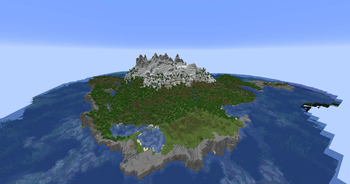
Contains a select number of optimization and building mods, Photon Shaders, and Fresh Animations Resource Pack. Everything can be configured In-Game.
Screenshots


About this Modpack
Proximity Optimized Vanilla
Elevate your Minecraft experience with enhanced performance, long-distance rendering, and proximity voice chat.
Overview
Proximity Optimized Vanilla is a carefully curated Minecraft modpack that blends vanilla gameplay with modern performance improvements, high-quality shaders, long-distance terrain rendering, building tools, and utility features. Featuring Voxy for extended views, vibrant shaders for breathtaking visuals, and the Fresh Animations resource pack for revamped mob movement, this pack is optimized for both performance and immersion. Configure everything easily in-game for a tailored experience, and enjoy a powerful, beautiful, and eccentric Minecraft experience with friends.
Mod List
🔧 Optimization
- Sodium: Powerful rendering engine and optimization mod.
- Lithium: General-purpose optimization mod that improves multiple systems.
- FerriteCore: Reduces Minecraft's memory usage.
- ImmediatelyFast: Speeds up rendering on modern GPUs.
- Entity Culling: Skips rendering blocks and entities that aren’t visible.
- Dynamic FPS: Lowers resource usage when Minecraft is in the background.
- Cull Leaves: Provides a huge performance boost at the cost of some vanilla visuals; not enabled by default.
- Stfu: Improves performance and loading times while removing some minor annoyances.
- Concurrent Chunk Management: Improves the vanilla implementation of chunk management.
- ModernFix: Various improvements to performance and memory usage.
🖼️ Shaders & Visuals
- Iris: Shader mod compatible with OptiFine shader packs.
- Simple Fog Control: Allows manual control over fog at the edge of your render distance.
- Complementary Reimagined: High-quality shader pack for vibrant visuals.
- MakeUp – Ultra Fast: Lightweight shader pack with nice visuals and high frame rates.
- I Like Vanilla (Voxy-enabled): Simple vanilla-style shader pack with customization options.
- Photon (Voxy-enabled): Semi-realistic style with incredible visuals.
- Solas Shader (Voxy-enabled): Moderate-intensity fantasy-stylized shader pack.
- Fresh Animations (resource pack): Makes mob animations more dynamic.
- Motschen's Better Leaves (resource pack): Nice leaf texture pack. Enable Cull Leaves via Mod Menu if using it.
- Vanilla Tweaks (resource pack): My preferred Vanilla Tweaks settings.
- 3D Skin Layers: Adds depth to second skin layers for player models.
- Continuity: Enables resource packs with connected textures.
- Smoke Signals: Changes campfire smoke color based on the wool beneath it.
🌍 World Enhancements
- Voxy: Renders distant terrain with LOD (Level of Detail) for long-range views.
- Bobby: Caches distant terrain client-side to extend view distance beyond the server limit.
- Chunky: Allows force-loading distant chunks for greater view distance with Voxy.
🎙️ Multiplayer & Social
- Simple Voice Chat: Adds low-latency, proximity-based voice chat.
- REPO Heads: Your head opens and closes when you speak in proximity chat (can be disabled in the Simple Voice Chat menu).
- Essential: Enables LAN/world sharing and other quality-of-life multiplayer features.
🧱 Building & Replay
- Axiom: Blender-like toolset that elevates Minecraft building.
- Litematica: Schematic-based building tool for massive projects.
- WorldEdit: Useful tool for large builds with brushes and scripting.
- ReplayMod: Records your gameplay for cinematic replays and time-lapses.
🛠️ UI & Utility
- Simple HUD Enhanced: Displays helpful stats in a customizable HUD.
- Freecam: Lets you set up cameras and view builds from different angles.
- Full Brightness Toggle: Allows you to see clearly in the dark.
- Auto Clicker: Easy-to-configure auto-clicker for AFK farms.
- Light Overlay: Lets you see where lighting is needed.
- Amecs Reborn: Lets you add modifier keys and manage keybinds in the controls menu.
- Mod Menu: Allows easy viewing and configuration of installed mods.
- Client Sort: Sorts the contents of a chest or shulker box with a middle click.
- Better Fullscreen: Improves fullscreen configurability.
- Shulker Box Tooltip: Shows the contents of a shulker box from your inventory.
- Tweakeroo: Adds miscellaneous quality-of-life tweaks.
To change mod configs, click the Mods button, search for the mod you want to configure, and then click its icon. If no settings icon appears over the mod icon, that mod is not configurable through this menu.
All information above is sourced directly from each mod’s respective Modrinth or CurseForge page.
Available Versions
How to Set Up a Proximity Optimized Vanilla Server
Order Server
Choose at least 4 GB RAM (6 GB recommended for Proximity Optimized Vanilla). Based on player count: per 8 players.
Install Modpack in Dashboard
Open the modpack browser in the dashboard, search for "Proximity Optimized Vanilla" and click "Install". The fabric loader and Minecraft 26.1.1 are configured automatically.
Start Server & Play
Start the server – all mods are loaded automatically. Share the server IP with friends and play together!
Frequently Asked Questions
Proximity Optimized Vanilla server crashes or won't start – what to do?
Most common causes: insufficient RAM or wrong fabric loader. Check latest.log for "OutOfMemoryError" → increase RAM to at least 6 GB. For "Mixin" or "ClassNotFoundException" errors: modpack version and loader don't match. With Mado Hosting, loader and Minecraft version are auto-configured on modpack install – preventing most startup issues.
How much RAM does a Proximity Optimized Vanilla server really need?
Minimum 4 GB, recommended 6 GB for stable performance. per 8 players. Important: Minecraft modpacks need more RAM than vanilla – plan extra per additional player. With Mado Hosting, you can scale RAM up live at any time without data loss (from €8/month).
Can I add custom mods to Proximity Optimized Vanilla without conflicts?
Yes, but check compatibility: only use mods for the same loader (fabric) and same Minecraft version (26.1.1). Common issues: ID conflicts with recipe mods and incompatible coremod versions. The Mado dashboard mod browser only shows compatible mods and warns about known conflicts.
Proximity Optimized Vanilla server lagging – performance tips
1) Increase RAM to 6 GB+. 2) Reduce server view-distance to 8 (server.properties). 3) Pre-generate chunks with the "Chunky" plugin. 4) Use /spark profiler to check which mods consume the most tick time. With Mado Hosting, all servers run on NVMe SSDs with dedicated CPU cores – eliminating hardware as a bottleneck.
Similar Modpacks

![Cobblemon Official Modpack [Fabric]](https://cdn.modrinth.com/data/5FFgwNNP/e7f9ee2e9d361623847853fe2ddce42f519ee64f.png)
![COBBLEVERSE - Pokemon Adventure [Cobblemon]](https://cdn.modrinth.com/data/Jkb29YJU/581ecf54530972afb18a04660afd820f2f24f6c7.png)
![Better MC [FABRIC] - BMC2](https://cdn.modrinth.com/data/shFhR8Vx/a19c2bcb51d38f32f138d3607e91cb2b7b8e387f_96.webp)


Rent Proximity Optimized Vanilla Server
Start your own server with automatic modpack installation.
Supported Versions
Start your Proximity Optimized Vanilla Server now
From €8.00/month with 6 GB RAM for the best performance.
Configure Server →