
Pupis: Strive
Explore what should be
Screenshots
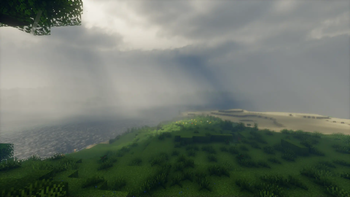
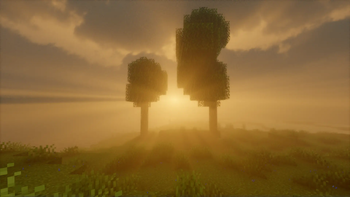
About this Modpack
Want to relax?
Spend quality time playing Minecraft but lost your drive to play?
Welcome to Strive
Relive that nostalgic feeling you had when you first launched Minecraft.
That feeling when you broke your first tree, placed your first block, and built your first home.
Welcome back Home.
Why Strive?
Strive is aimed to bring back that love you had way back when, and more.
With mods like Sodium to bring the best performance,
shaders like Bliss shaders to bring the best visuals along with Distant Horizons to relive with nostalgia.
Create to make anything possible and Botania to dabble in the arts.
In Strive, anything is possible
Wiki
What to see here?
Inside the Wiki you can see some things that may not be that noticable from the get-go, things like pinging items, free cams, etc!
Recommendations
It's recommended to use at least 8gb RAM
Pinging
You can ping items, entities and locations by using Mouse 5 (this is configurable)
Free Cam
Want to see your builds or explore around you? Press F4 to enable freecam!
Why Pupis?
Puppis is one of the 88 recognized constellations in the night sky. It represents the stern of a ship and was originally part of a larger constellation called Argo Navis, which symbolized the mythical ship of the Argonauts.
- Location: Puppis is situated in the southern hemisphere and can be observed from latitudes between +40° and -90°.
- Named Stars:
- Naos (ζ Pup): Also known as “Naos,” this bright star represents the Greek word for “ship.”
- Tureis (ρ Pup): Its name comes from the Arabic term for “shield.”
- Asmidiske (ξ Pup): Named after the Greek word for the “gunwale” of a ship.
- Extrasolar Planets: Several planetary systems have been discovered around stars in Puppis, including Neptune-mass planets and even ice giant exoplanets.
Credits
Available Versions
How to Set Up a Pupis: Strive Server
Order Server
Choose at least 6 GB RAM (8 GB recommended for Pupis: Strive). Based on player count: per 5 players.
Install Modpack in Dashboard
Open the modpack browser in the dashboard, search for "Pupis: Strive" and click "Install". The fabric loader and Minecraft 1.20.1 are configured automatically.
Start Server & Play
Start the server – all mods are loaded automatically. Share the server IP with friends and play together!
Frequently Asked Questions
Pupis: Strive server crashes or won't start – what to do?
Most common causes: insufficient RAM or wrong fabric loader. Check latest.log for "OutOfMemoryError" → increase RAM to at least 8 GB. For "Mixin" or "ClassNotFoundException" errors: modpack version and loader don't match. With Mado Hosting, loader and Minecraft version are auto-configured on modpack install – preventing most startup issues.
How much RAM does a Pupis: Strive server really need?
Minimum 6 GB, recommended 8 GB for stable performance. per 5 players. Important: Minecraft modpacks need more RAM than vanilla – plan extra per additional player. With Mado Hosting, you can scale RAM up live at any time without data loss (from €12/month).
Can I add custom mods to Pupis: Strive without conflicts?
Yes, but check compatibility: only use mods for the same loader (fabric) and same Minecraft version (1.20.1). Common issues: ID conflicts with recipe mods and incompatible coremod versions. The Mado dashboard mod browser only shows compatible mods and warns about known conflicts.
Pupis: Strive server lagging – performance tips
1) Increase RAM to 8 GB+. 2) Reduce server view-distance to 8 (server.properties). 3) Pre-generate chunks with the "Chunky" plugin. 4) Use /spark profiler to check which mods consume the most tick time. With Mado Hosting, all servers run on NVMe SSDs with dedicated CPU cores – eliminating hardware as a bottleneck.
Similar Modpacks
![Cobblemon Official Modpack [Fabric]](https://cdn.modrinth.com/data/5FFgwNNP/e7f9ee2e9d361623847853fe2ddce42f519ee64f.png)
![COBBLEVERSE - Pokemon Adventure [Cobblemon]](https://cdn.modrinth.com/data/Jkb29YJU/581ecf54530972afb18a04660afd820f2f24f6c7.png)
![Better MC [FABRIC] - BMC2](https://cdn.modrinth.com/data/shFhR8Vx/a19c2bcb51d38f32f138d3607e91cb2b7b8e387f_96.webp)


![Better MC [FORGE] - BMC4](https://cdn.modrinth.com/data/4BV47HRn/7f5ef7cc61b2593609aabef3ed07a866a4f11b73_96.webp)
Rent Pupis: Strive Server
Start your own server with automatic modpack installation.
Supported Versions
Start your Pupis: Strive Server now
From €12.00/month with 8 GB RAM for the best performance.
Configure Server →