
PurpleCupa
The PurpleCupa is a meticulously curated collection of mods focused on optimizing performance and bringing back Optifine features. With Iris and PlasmoVoice.
Screenshots
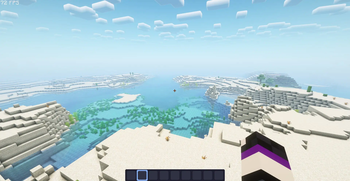
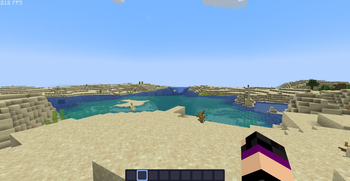
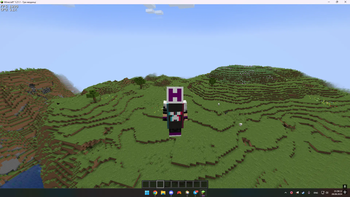

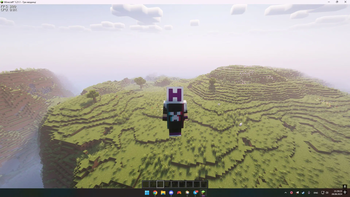
About this Modpack
The PurpleCupa for version 1.19.4-1.21.1 is a carefully curated collection of mods designed to optimize and enhance the gameplay experience. This compilation focuses on maximizing performance while reintroducing key features from Optifine. Additionally, it includes mods for shader support (Iris) and voice chat functionality (PlasmoVoice). The compilation will be regularly updated to ensure compatibility with future Minecraft versions.
Testing Results:
During testing, the compilation consistently achieved impressive performance results. On a laptop equipped with an Intel i5-9300H processor and a GTX 1650 graphics card, with the ComplementaryReimagined_r2.1 shader pack enabled, the compilation delivered a steady 60-80 frames per second (fps). This is a testament to the optimization efforts and the efficient utilization of system resources.
Moreover, the compilation showcased its capability to deliver exceptional performance even without shader effects. On the same laptop, with the shaders disabled, the compilation yielded a remarkable 100-150 fps. This demonstrates the mod compilation's ability to adapt to different user preferences and hardware configurations while maintaining smooth gameplay.
The inclusion of the Iris mod for shader support allows players to enhance their visual experience by applying a wide range of shaders to create stunning in-game environments. With the easy-to-use shader management provided by the Iris mod, players can explore various visual styles and effects, tailoring the game's aesthetics to their liking.
Additionally, the integration of the PlasmoVoice mod introduces a voice chat feature to facilitate communication among players. This enhances multiplayer experiences by enabling real-time voice communication, fostering collaboration, and enabling quick and efficient coordination within Minecraft gameplay.
The development team is committed to continuously updating the mod compilation to ensure compatibility with future Minecraft versions, as well as incorporating new optimizations and feature enhancements. Players can expect ongoing support and improvements, guaranteeing a seamless and enjoyable Minecraft experience.
Note: The performance results mentioned above are based on testing conducted on a laptop with an Intel i5-9300H processor and a GTX 1650 graphics card. Actual performance may vary depending on individual system configurations and the presence of other resource-intensive mods or external factors.
Available Versions
How to Set Up a PurpleCupa Server
Order Server
Choose at least 4 GB RAM (6 GB recommended for PurpleCupa). Based on player count: per 8 players.
Install Modpack in Dashboard
Open the modpack browser in the dashboard, search for "PurpleCupa" and click "Install". The fabric loader and Minecraft 1.21.5 are configured automatically.
Start Server & Play
Start the server – all mods are loaded automatically. Share the server IP with friends and play together!
Frequently Asked Questions
PurpleCupa server crashes or won't start – what to do?
Most common causes: insufficient RAM or wrong fabric loader. Check latest.log for "OutOfMemoryError" → increase RAM to at least 6 GB. For "Mixin" or "ClassNotFoundException" errors: modpack version and loader don't match. With Mado Hosting, loader and Minecraft version are auto-configured on modpack install – preventing most startup issues.
How much RAM does a PurpleCupa server really need?
Minimum 4 GB, recommended 6 GB for stable performance. per 8 players. Important: Minecraft modpacks need more RAM than vanilla – plan extra per additional player. With Mado Hosting, you can scale RAM up live at any time without data loss (from €8/month).
Can I add custom mods to PurpleCupa without conflicts?
Yes, but check compatibility: only use mods for the same loader (fabric) and same Minecraft version (1.21.5). Common issues: ID conflicts with recipe mods and incompatible coremod versions. The Mado dashboard mod browser only shows compatible mods and warns about known conflicts.
PurpleCupa server lagging – performance tips
1) Increase RAM to 6 GB+. 2) Reduce server view-distance to 8 (server.properties). 3) Pre-generate chunks with the "Chunky" plugin. 4) Use /spark profiler to check which mods consume the most tick time. With Mado Hosting, all servers run on NVMe SSDs with dedicated CPU cores – eliminating hardware as a bottleneck.
Similar Modpacks

![Cobblemon Official Modpack [Fabric]](https://cdn.modrinth.com/data/5FFgwNNP/e7f9ee2e9d361623847853fe2ddce42f519ee64f.png)
![COBBLEVERSE - Pokemon Adventure [Cobblemon]](https://cdn.modrinth.com/data/Jkb29YJU/581ecf54530972afb18a04660afd820f2f24f6c7.png)
![Better MC [FABRIC] - BMC2](https://cdn.modrinth.com/data/shFhR8Vx/a19c2bcb51d38f32f138d3607e91cb2b7b8e387f_96.webp)


Rent PurpleCupa Server
Start your own server with automatic modpack installation.
Supported Versions
Start your PurpleCupa Server now
From €8.00/month with 6 GB RAM for the best performance.
Configure Server →