
PVPify
A minimalist PVP modpack, essential PVP mods, optimization, no bannable mods, vanilla-looking
Screenshots
About this Modpack

What is it?
PVPify is a minimalist PVP-focused modpack that works out of the box with preconfigured settings (more info down below) optimization, quality of life features while keeping a vanilla appearance.
This modpack aims to be as non-bannable as possible, only including fair pvp mods.
Designed for only the Modrinth Launcher, not to be imported into Lunar Client.
Default Settings
90 FOV (very common range for PVPers)View Bobbing -> Off
Damage Tilt -> 5%
FOV Effects -> 0%
Toggle Sprint -> On (necessity!)
Keybinds & Sensitivity -> Your Preference!
Main Features
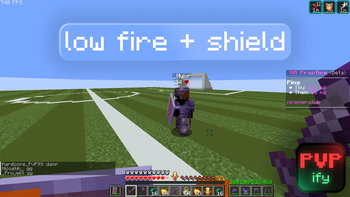
Low Shields/Fire
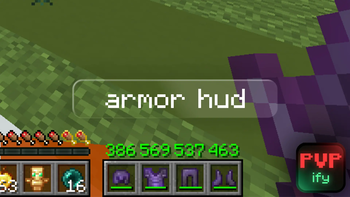
Armor Durability/HUD
Crosshair addons (Elytra and Crosshair Indicators)
Shield Fixes
Preconfigured and Optimized Settings
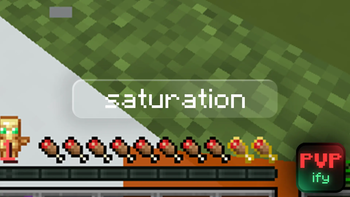
Saturation
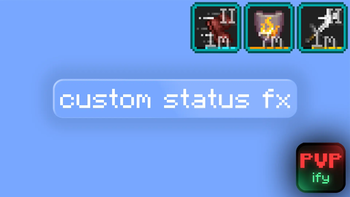
Tiers
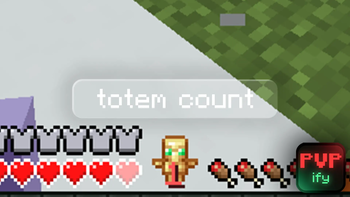
Totem Count
Shulkerbox Preview
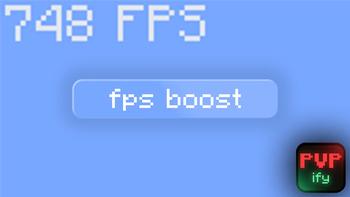
Great Preformance
Why Should I Choose PVPify Over Lunar Client/Other Modpacks?
Other modpacks use bannable mods.
Significantly more preformance (FPS) for lower-end PC's than Lunar Client.
More compatibility than Lunar Client.
More flexible than Lunar Client because you can add mods more effortlessly.
No weird, shady override mods you see in other modpacks.
It looks cooler than other modpacks.
Many modpacks are just pure lazy, they don't do research, have AI generated descriptions, and they arent as carefully crafted.
Its made by Ceyoh (check out my channel!)
⚠️Note: Marlow's Crystal Optimizer and other optimizers are not included due to it being bannable on certain servers. Also, Shield Statuses is banned on some tierlists. Add them to the modpack at your own risk.
Compatibility
To use Flashback Mod: Remove C2ME & the Very Many Players mod because they break it.
Officially distributed only on Modrinth. Other downloads are not supported and may be unsafe.
Any problems or bugs? Join the discord server, or submit an issue ticket on github.
Available Versions
How to Set Up a PVPify Server
Order Server
Choose at least 4 GB RAM (6 GB recommended for PVPify). Based on player count: per 8 players.
Install Modpack in Dashboard
Open the modpack browser in the dashboard, search for "PVPify" and click "Install". The fabric loader and Minecraft 26.1.2 are configured automatically.
Start Server & Play
Start the server – all mods are loaded automatically. Share the server IP with friends and play together!
Frequently Asked Questions
PVPify server crashes or won't start – what to do?
Most common causes: insufficient RAM or wrong fabric loader. Check latest.log for "OutOfMemoryError" → increase RAM to at least 6 GB. For "Mixin" or "ClassNotFoundException" errors: modpack version and loader don't match. With Mado Hosting, loader and Minecraft version are auto-configured on modpack install – preventing most startup issues.
How much RAM does a PVPify server really need?
Minimum 4 GB, recommended 6 GB for stable performance. per 8 players. Important: Minecraft modpacks need more RAM than vanilla – plan extra per additional player. With Mado Hosting, you can scale RAM up live at any time without data loss (from €8/month).
Can I add custom mods to PVPify without conflicts?
Yes, but check compatibility: only use mods for the same loader (fabric) and same Minecraft version (26.1.2). Common issues: ID conflicts with recipe mods and incompatible coremod versions. The Mado dashboard mod browser only shows compatible mods and warns about known conflicts.
PVPify server lagging – performance tips
1) Increase RAM to 6 GB+. 2) Reduce server view-distance to 8 (server.properties). 3) Pre-generate chunks with the "Chunky" plugin. 4) Use /spark profiler to check which mods consume the most tick time. With Mado Hosting, all servers run on NVMe SSDs with dedicated CPU cores – eliminating hardware as a bottleneck.
Similar Modpacks

![Better MC [FABRIC] - BMC2](https://cdn.modrinth.com/data/shFhR8Vx/a19c2bcb51d38f32f138d3607e91cb2b7b8e387f_96.webp)
![Better MC [FORGE] - BMC4](https://cdn.modrinth.com/data/4BV47HRn/7f5ef7cc61b2593609aabef3ed07a866a4f11b73_96.webp)


Rent PVPify Server
Start your own server with automatic modpack installation.
Supported Versions
Start your PVPify Server now
From €8.00/month with 6 GB RAM for the best performance.
Configure Server →