
QoL Client
Lighting fast performance and Quality of Life, all in a convenient and completely client-side package.
Screenshots

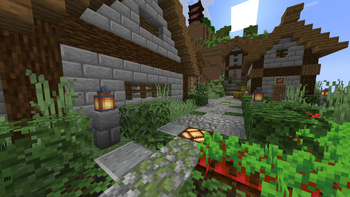
About this Modpack


The QoL Client is a fabric modpack which contains the fastest performance boosting mods and features a ton quality of life features.

Enhanced Clouds and Weather

A revamped options menu

An in-game Resource Pack, Datapack and Shader Pack browser

And much more!
- Play with your friends without a server using e4cm.
- Mods like REI and Jade can be optionally turned on by the player through configs or keybinds.
- Lighting fast performance!
- Many other QoL mods and visual improvements.
- Extra translations for mods bundled in.

As of now, 1.21.10 is the main supported version, with 1.21.11 having almost every mod as well.
1.0 and 2.0 are deprecated as neoforge + sinytra just isn't that performant and doesn't make sense for a pack like this. Use them at your own risk.
In 2026 Q1, Minecraft 26.1 will come out, and with that QoL Client 4.0, aiming to always support the latest versions, on both fabric and neoforge, along with a new pack aimed at content creators.

Show
Full breakdown of the 58 mods and 2 resource packs inside of QoL Client.
Performance (13)
For chunk rendering:
- C2ME
- Noisium
Client Side:
Sodium
Sodium Extra
Sodium Shadowy Path Blocks
Sodium Core Shaders
BadOptimizations
EntityCulling
ImmediatelyFast
Language Reload
Server & General:
- Lithium
- FerriteCore
- Very Many Players
Optifine Features Parity (4)
- Iris Shaders
- BetterGrassify
- LambDynamicLights
- Ok Zoomer
Optifine Resource Packs Parity (8)
- Continuity
- Entity Model Features
- Entity Sound Features
- Entity Texture Features
- OptiGUI
- Polytone*
- Puzzle
- Skyboxify
Quality Of Life (18)
Essential QoL:
- Appleskin
- Cubes Without Borders
- Mouse Tweaks
- No Chat reports
Chat Tweaks:
- Chat Heads
- Chat Animation
- Chat Patches*
Optional added info:
JEI // REI*
Jade
Durability Plus*
Shulker Box Tooltip
Better Advancements*
Nice to haves:
- Controlify
- Simple Voice Chat
- Resourcify
- e4mc
Fixes:
- MacOS Input Fix
- Universal Shortcuts*
Aesthetics / Ambience (6)
Better Clouds
Particle Rain
Not Enough Animations
Visuality
Blur Plus
Raised
Modpack Utilities (3)
- FancyMenu
- Mod Menu
- YOSBR
Libraries (6)
Architectury API*
Fabric API
Fabric Language Kotlin
Cloth Config
Konkrete
Melody
// Bundled in other mods so they don't need to be installed standalone.
- YetAnotherConfigLib
*Missing 26.1.2 version
Resource Packs (2)
- Translations for Sodium
- Parity Title
Reporting bugs or making suggestions on the discord server is greatly appreciated!
Available Versions
How to Set Up a QoL Client Server
Order Server
Choose at least 4 GB RAM (6 GB recommended for QoL Client). Based on player count: per 5 players.
Install Modpack in Dashboard
Open the modpack browser in the dashboard, search for "QoL Client" and click "Install". The fabric loader and Minecraft 26.1.2 are configured automatically.
Start Server & Play
Start the server – all mods are loaded automatically. Share the server IP with friends and play together!
Frequently Asked Questions
QoL Client server crashes or won't start – what to do?
Most common causes: insufficient RAM or wrong fabric loader. Check latest.log for "OutOfMemoryError" → increase RAM to at least 6 GB. For "Mixin" or "ClassNotFoundException" errors: modpack version and loader don't match. With Mado Hosting, loader and Minecraft version are auto-configured on modpack install – preventing most startup issues.
How much RAM does a QoL Client server really need?
Minimum 4 GB, recommended 6 GB for stable performance. per 5 players. Important: Minecraft modpacks need more RAM than vanilla – plan extra per additional player. With Mado Hosting, you can scale RAM up live at any time without data loss (from €8/month).
Can I add custom mods to QoL Client without conflicts?
Yes, but check compatibility: only use mods for the same loader (fabric) and same Minecraft version (26.1.2). Common issues: ID conflicts with recipe mods and incompatible coremod versions. The Mado dashboard mod browser only shows compatible mods and warns about known conflicts.
QoL Client server lagging – performance tips
1) Increase RAM to 6 GB+. 2) Reduce server view-distance to 8 (server.properties). 3) Pre-generate chunks with the "Chunky" plugin. 4) Use /spark profiler to check which mods consume the most tick time. With Mado Hosting, all servers run on NVMe SSDs with dedicated CPU cores – eliminating hardware as a bottleneck.
Similar Modpacks

![Cobblemon Official Modpack [Fabric]](https://cdn.modrinth.com/data/5FFgwNNP/e7f9ee2e9d361623847853fe2ddce42f519ee64f.png)
![COBBLEVERSE - Pokemon Adventure [Cobblemon]](https://cdn.modrinth.com/data/Jkb29YJU/581ecf54530972afb18a04660afd820f2f24f6c7.png)
![Better MC [FABRIC] - BMC2](https://cdn.modrinth.com/data/shFhR8Vx/a19c2bcb51d38f32f138d3607e91cb2b7b8e387f_96.webp)


Rent QoL Client Server
Start your own server with automatic modpack installation.
Supported Versions
Start your QoL Client Server now
From €8.00/month with 6 GB RAM for the best performance.
Configure Server →