
Flowstate
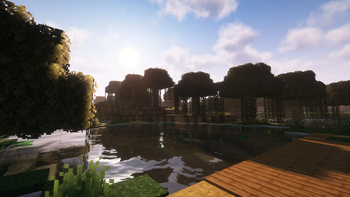
A plug-n-play, quality o' life modpack dedicated to keeping the vanilla gameplay with better visuals, performance, and convenience.
Screenshots
About this Modpack
This mod used to be known as Quality O' Life
Summary:
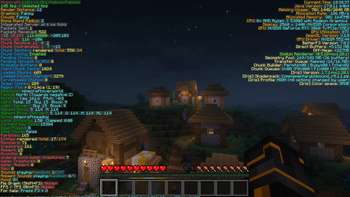
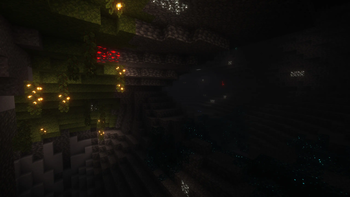
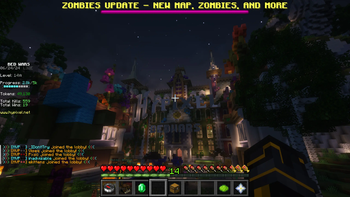
A plug-n-play modpack dedicated to keeping the vanilla gameplay with better visuals and performance. This includes better GUI, Shaders, Map, and Server & Singleplayer experience. This modpack is great for someone wishing for a better vanilla minecraft experience. This means you won't even have to change any settings or keybinds before playing; I set them for you!
Features:
Anything in brackets is a keybind, although I set them you can still change them. Everyone is different!
- FPS Increase
- Super Duper Vanilla Shaders (yes that is the name) + Extra Options
- Better GUI Scale and Design
- Freecam [F4] (Please only utilize in servers / worlds that allow this)
- Zoom Key for seeing far away [R]
- Tooltips for showing Shulker Box contents
- Auto-hides Shield to clear screen space
- Removes Delay Between Music Tracks
- World Map w/ Waypoints [C] (No Teleport)
- Click through signs and Item frames for easy container access
- Play Next Song [M]
- Controller Support
Installation:
This Modpack is avalible in several versions of Minecraft, Remember to consider both game and mod version! Check Changelog for more details
Use the Modrith App to easily install this pack!
Moving your singleplayer worlds to a new modpack version:
This mod is meant for general purpose use, meaning sometimes you have to move your singleplayer worlds to a new game version. This process is quite simple, on the modrinth app go to the modpack in your library and select "Folder" underneath the Modpack Icon. This will open the file manager for your operating system. Go to "saves" and you will find a folder for all of your singleplayer worlds in that modpack. Locate the updated modpack's saves folder with these instructions and move the world folders from the old modpack to the new!
Customization:
This Modpack has customizable options, you can learn how to change them here.
Using an optional shader pack:
We include optional shader packs to allow others to use the shader pack they perfer. To use an optional shader pack go to options > video settings > shader packs and then select the shader pack you want to use, then click apply.
Enabling/Disabling resource packs:
We include optional resource packs to allow others to use the resource pack they perfer. Enabling/Disabling resource packs is done in the menu options > resource packs. There you can switch resource packs between being used and disabled (right and left respectively). On the right or enabled side the packs found at the top have the highest priority, meaning put the packs you want to apply at the top.
Support:
Issues always happen, and if you have one I am always willing to help. Please join our discord server and create a forum in "modding-help" so I can help. In the meantime check the list of known issues below:
Known Issues:
There are currently no known issues!
Buy me a Tea!
If you really love this modpack or just want to support me, feel free to buy me a tea! It is always apreciated.
Available Versions
How to Set Up a Flowstate Server
Order Server
Choose at least 4 GB RAM (6 GB recommended for Flowstate). Based on player count: per 8 players.
Install Modpack in Dashboard
Open the modpack browser in the dashboard, search for "Flowstate" and click "Install". The fabric loader and Minecraft 26.1.2 are configured automatically.
Start Server & Play
Start the server – all mods are loaded automatically. Share the server IP with friends and play together!
Frequently Asked Questions
Flowstate server crashes or won't start – what to do?
Most common causes: insufficient RAM or wrong fabric loader. Check latest.log for "OutOfMemoryError" → increase RAM to at least 6 GB. For "Mixin" or "ClassNotFoundException" errors: modpack version and loader don't match. With Mado Hosting, loader and Minecraft version are auto-configured on modpack install – preventing most startup issues.
How much RAM does a Flowstate server really need?
Minimum 4 GB, recommended 6 GB for stable performance. per 8 players. Important: Minecraft modpacks need more RAM than vanilla – plan extra per additional player. With Mado Hosting, you can scale RAM up live at any time without data loss (from €8/month).
Can I add custom mods to Flowstate without conflicts?
Yes, but check compatibility: only use mods for the same loader (fabric) and same Minecraft version (26.1.2). Common issues: ID conflicts with recipe mods and incompatible coremod versions. The Mado dashboard mod browser only shows compatible mods and warns about known conflicts.
Flowstate server lagging – performance tips
1) Increase RAM to 6 GB+. 2) Reduce server view-distance to 8 (server.properties). 3) Pre-generate chunks with the "Chunky" plugin. 4) Use /spark profiler to check which mods consume the most tick time. With Mado Hosting, all servers run on NVMe SSDs with dedicated CPU cores – eliminating hardware as a bottleneck.
Similar Modpacks

![Cobblemon Official Modpack [Fabric]](https://cdn.modrinth.com/data/5FFgwNNP/e7f9ee2e9d361623847853fe2ddce42f519ee64f.png)
![COBBLEVERSE - Pokemon Adventure [Cobblemon]](https://cdn.modrinth.com/data/Jkb29YJU/581ecf54530972afb18a04660afd820f2f24f6c7.png)
![Better MC [FABRIC] - BMC2](https://cdn.modrinth.com/data/shFhR8Vx/a19c2bcb51d38f32f138d3607e91cb2b7b8e387f_96.webp)


Rent Flowstate Server
Start your own server with automatic modpack installation.
Supported Versions
Start your Flowstate Server now
From €8.00/month with 6 GB RAM for the best performance.
Configure Server →