
QoL Vanilla Boost
A Minecraft performance modpack with quality-of-life features, designed to keep the Vanilla feel.
Screenshots
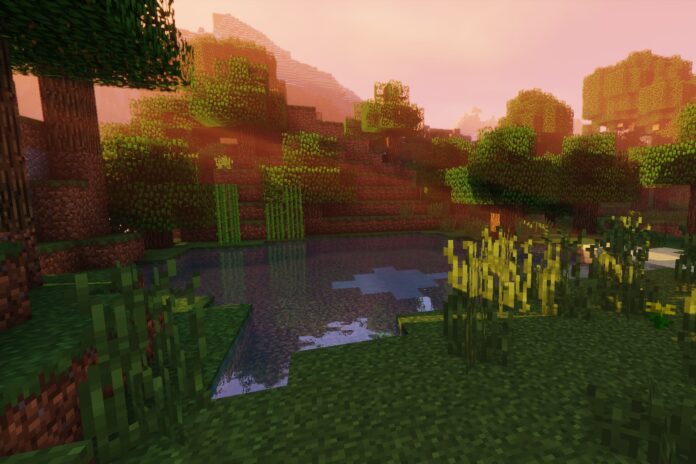
About this Modpack
Boost your Minecraft performance!
Experience smooth gameplay with my Performance Modpack. Lag-free and seamless through the world of Minecraft. Let's go!
Now that we have completed the introduction, here is a brief description of some of the mods included in my Performance Modpack.
Sodium
Sodium is a groundbreaking mod that significantly enhances your Minecraft experience by optimizing the game's rendering engine, as seen in the image below. Developed with a focus on performance, this mod drastically increases FPS (frames per second) and reduces rendering lag, resulting in an incredibly smooth gameplay.
With Sodium, you'll notice sharper graphics and improved loading times, even in densely populated areas or complex environments. This mod achieves its performance by utilizing advanced rendering techniques and fully leveraging your hardware capabilities.
Say goodbye to stutters and lag spikes, as Sodium ensures a lag-free and seamless exploration of the Minecraft world. Whether you're experiencing action-packed adventures or building intricate structures, this mod allows for an immersive and uninterrupted gaming experience.
Harness the power of Sodium and elevate your Minecraft performance to new heights, all while relishing in the beauty of a more fluid and visually stunning world. Get ready to experience Minecraft like never before!
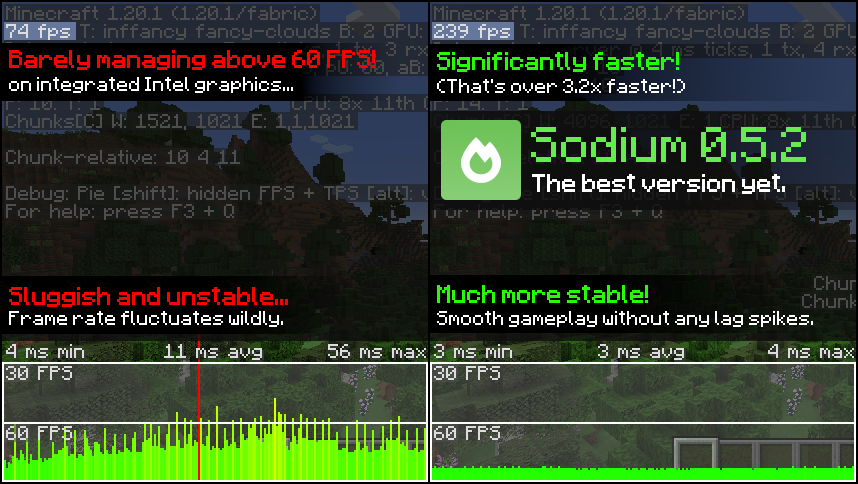
(Image from the original mod profile)
Iris
Iris is an extraordinary addon to the Sodium mod that takes your Minecraft graphics to a whole new level. Developed to complement Sodium's performance optimizations, Iris focuses on enhancing visual fidelity and delivering stunning graphical effects.
With Iris, you'll experience a more immersive and vibrant world, thanks to its improved lighting, shadows, and water reflections. This addon adds a touch of realism to your gameplay, making the environments come to life with breathtaking beauty.
Additionally, Iris introduces enhanced particle effects and dynamic weather systems, making rain, snow, and thunderstorms more realistic and visually captivating. Each in-game moment becomes a cinematic masterpiece, enhancing your overall gaming experience.
The best part is that Iris seamlessly integrates with Sodium, ensuring you get the best of both worlds - exceptional performance and stunning visuals. Whether you're an adventurer, a builder, or an artist, Iris will add a magical touch to your Minecraft journey.
Embrace the magic of Iris and witness Minecraft like never before, with visuals that will leave you mesmerized at every turn. Get ready to immerse yourself in a world of extraordinary beauty and performance, with the perfect combination of Sodium and Iris working together in harmony.
Discover a whole new Minecraft experience with Sodium and Iris, along with my carefully chosen collection of helpful mods. Unleash the magic of enhanced visuals and elevate your gaming journey to new heights. This concludes the description.
Available Versions
How to Set Up a QoL Vanilla Boost Server
Order Server
Choose at least 4 GB RAM (6 GB recommended for QoL Vanilla Boost). Based on player count: per 8 players.
Install Modpack in Dashboard
Open the modpack browser in the dashboard, search for "QoL Vanilla Boost" and click "Install". The fabric loader and Minecraft 1.21.11 are configured automatically.
Start Server & Play
Start the server – all mods are loaded automatically. Share the server IP with friends and play together!
Frequently Asked Questions
QoL Vanilla Boost server crashes or won't start – what to do?
Most common causes: insufficient RAM or wrong fabric loader. Check latest.log for "OutOfMemoryError" → increase RAM to at least 6 GB. For "Mixin" or "ClassNotFoundException" errors: modpack version and loader don't match. With Mado Hosting, loader and Minecraft version are auto-configured on modpack install – preventing most startup issues.
How much RAM does a QoL Vanilla Boost server really need?
Minimum 4 GB, recommended 6 GB for stable performance. per 8 players. Important: Minecraft modpacks need more RAM than vanilla – plan extra per additional player. With Mado Hosting, you can scale RAM up live at any time without data loss (from €8/month).
Can I add custom mods to QoL Vanilla Boost without conflicts?
Yes, but check compatibility: only use mods for the same loader (fabric) and same Minecraft version (1.21.11). Common issues: ID conflicts with recipe mods and incompatible coremod versions. The Mado dashboard mod browser only shows compatible mods and warns about known conflicts.
QoL Vanilla Boost server lagging – performance tips
1) Increase RAM to 6 GB+. 2) Reduce server view-distance to 8 (server.properties). 3) Pre-generate chunks with the "Chunky" plugin. 4) Use /spark profiler to check which mods consume the most tick time. With Mado Hosting, all servers run on NVMe SSDs with dedicated CPU cores – eliminating hardware as a bottleneck.
Similar Modpacks

![Cobblemon Official Modpack [Fabric]](https://cdn.modrinth.com/data/5FFgwNNP/e7f9ee2e9d361623847853fe2ddce42f519ee64f.png)
![COBBLEVERSE - Pokemon Adventure [Cobblemon]](https://cdn.modrinth.com/data/Jkb29YJU/581ecf54530972afb18a04660afd820f2f24f6c7.png)
![Better MC [FABRIC] - BMC2](https://cdn.modrinth.com/data/shFhR8Vx/a19c2bcb51d38f32f138d3607e91cb2b7b8e387f_96.webp)


Rent QoL Vanilla Boost Server
Start your own server with automatic modpack installation.
Supported Versions
Start your QoL Vanilla Boost Server now
From €8.00/month with 6 GB RAM for the best performance.
Configure Server →