
QUTMC Quick
QUTMC Quick is a PVP and building client based on the popular Additive performance pack, it includes compatibility with most optifine features and enhances the gameplay on our server network. This client also includes qutmc.club's server side mods.
Screenshots
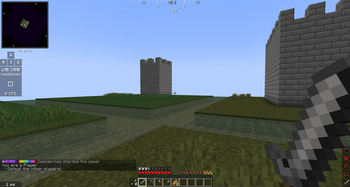
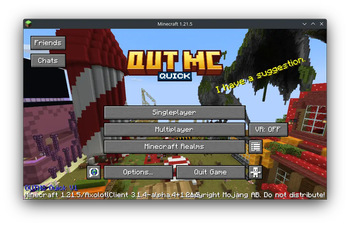
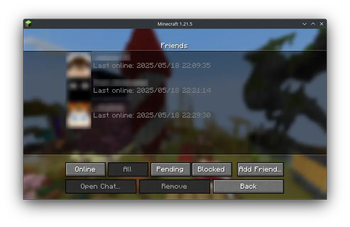
About this Modpack
Additive Based PVP and building client for the qutmc.club server
Explore the documentation
·
Report Bugs
·
Request Features


QUTMC Quick is a PVP and building client based on the popular Additive performance pack, it includes compatibility with most optifine features and enhances the gameplay on our server network. This client also includes the server side mods allowing you to use polydecor and such in a singleplayer world.
⭐ Features
🔗 Integration with QUTMC Club
This modpack is designed to provide a performant and enjoyable experience on our server network. It includes multiple integrations on the server side to this client such as inventory sorting, maps and minimaps, litematica and tweakaroo. It also serves as a baseline for the mods we have approved for usage on the server.
🎤 Voice chat
QUTMC Quick includes plasmo voice chat which is installed on the qutmc.club network allowing for push to talk in game!
🪑 Server mods on client
QUTMC quick includes all of the server side mods from qutmc.club. This means you can play around with chairs, tables, plushies and more as you plan out your next major build in creative or just play with friends!
🧑🤝🧑 Multiplayer features
QUTMC Quick utlizes Axolotl Client and e4mc including a seamless friends system which allows you to join eachothers singleplayer worlds, share screenshots, chats and identify other QUTMC Quick (and Axolotl) users in multiplayer servers.
🚀 Major performance improvement
QUTMC Quick is based on Additive which is based on and kept in sync with the Adrenaline modpack. Adrenaline's aim is to significantly improve rendering and game logic performance, along with memory and hardware usage, without compromising on the game's looks or features in any way. This is done with various optimization mods that are actively tested for stability and improvement. Some mods are also pre-configured. Adrenaline wouldn't exist without projects like Sodium, so I advise you to donate to mod authors and contributors if you can.
For the list of performance mods that are included, see this wiki page.
🔍 OptiFine alternatives
QUTMC Quick includes Additive's various mods that offers the same features that OptiFine did while also being modular so that you can remove features you don't want or features that are incompatible with other mods. This includes, but is not limited to:
- Major performance boost from Adrenaline
- OptiFine resource pack features
- Built-in shaders support
- Dynamic lighting from held objects
- Better grass and snow
- OptiFine donator capes (and free capes)
- All OptiFine features and more information on the wiki
⚙️ Mod Sourcing
QUTMC Quick attempts to provide mods that make their source available or are open source however there is excpetions such as the Xaero's map mods. You can view the source for QUTMC Quick on our github
✅ Hardware Compatibility
QUTMC Quick supports the use of graphics cards with drivers that are compatible with OpenGL 4.6. Most graphics cards released in 2010 or later are compatible. This includes the following hardware:
- Intel HD Graphics 500 Series (Skylake) or newer
- Nvidia GeForce 400 Series (Fermi) or newer
- AMD Radeon HD 7000 Series (GCN 1) or newer
In some cases, older graphics cards may also work (as long as they have drivers which support OpenGL 3.3) but they are not officially supported and may not be compatible in the future.
Android devices that use OpenGL translation layers (such as GL4ES, ANGLE, etc) are not supported and will likely not work with QUTMC Quick's set of mods. These translation layers do not implement required functionality and suffer from underlying driver bugs which cannot be worked around.
If you are running into problems, you should make sure that your graphics drivers are up-to-date. I also recommend taking a look at this page on the Sodium wiki.
The majority of this was taken from Addivites compatibility section which was taken from Sodium's hardware compatibility section. I'll update this accordingly if anything is changed.
🐛 How to Report Issues
Experiencing bugs, crashes, or other issues? Feel free to open an issue on the issue tracker. Be sure to include necessary information like your hardware/software (e.g. GPU and CPU, modpack version and OS) so that it's easier for us to find issues and resolve them.
❓ Frequently Asked Questions
For a few frequently asked questions, along with tons of other information, consider visiting the documentation. It has a few other helpful resources that I suggest you read, such as troubleshooting info and more. This wiki is often updated with new information.
Available Versions
How to Set Up a QUTMC Quick Server
Order Server
Choose at least 4 GB RAM (6 GB recommended for QUTMC Quick). Based on player count: per 8 players.
Install Modpack in Dashboard
Open the modpack browser in the dashboard, search for "QUTMC Quick" and click "Install". The fabric loader and Minecraft 1.21.8 are configured automatically.
Start Server & Play
Start the server – all mods are loaded automatically. Share the server IP with friends and play together!
Frequently Asked Questions
QUTMC Quick server crashes or won't start – what to do?
Most common causes: insufficient RAM or wrong fabric loader. Check latest.log for "OutOfMemoryError" → increase RAM to at least 6 GB. For "Mixin" or "ClassNotFoundException" errors: modpack version and loader don't match. With Mado Hosting, loader and Minecraft version are auto-configured on modpack install – preventing most startup issues.
How much RAM does a QUTMC Quick server really need?
Minimum 4 GB, recommended 6 GB for stable performance. per 8 players. Important: Minecraft modpacks need more RAM than vanilla – plan extra per additional player. With Mado Hosting, you can scale RAM up live at any time without data loss (from €8/month).
Can I add custom mods to QUTMC Quick without conflicts?
Yes, but check compatibility: only use mods for the same loader (fabric) and same Minecraft version (1.21.8). Common issues: ID conflicts with recipe mods and incompatible coremod versions. The Mado dashboard mod browser only shows compatible mods and warns about known conflicts.
QUTMC Quick server lagging – performance tips
1) Increase RAM to 6 GB+. 2) Reduce server view-distance to 8 (server.properties). 3) Pre-generate chunks with the "Chunky" plugin. 4) Use /spark profiler to check which mods consume the most tick time. With Mado Hosting, all servers run on NVMe SSDs with dedicated CPU cores – eliminating hardware as a bottleneck.
Similar Modpacks

![Better MC [FABRIC] - BMC2](https://cdn.modrinth.com/data/shFhR8Vx/a19c2bcb51d38f32f138d3607e91cb2b7b8e387f_96.webp)
![Better MC [FORGE] - BMC4](https://cdn.modrinth.com/data/4BV47HRn/7f5ef7cc61b2593609aabef3ed07a866a4f11b73_96.webp)


Rent QUTMC Quick Server
Start your own server with automatic modpack installation.
Supported Versions
Start your QUTMC Quick Server now
From €8.00/month with 6 GB RAM for the best performance.
Configure Server →