
Rascal Modpack
A carefully crafted modpack for those seeking a deeper, more lively Minecraft experience.
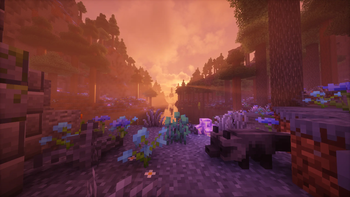
Screenshots



About this Modpack



Rascal modpack is a vanilla-plus pack aiming to enhance the Minecraft experience. It was designed with gameplay, balance, quality of life, and performance in mind. It was crafted with passion and I hope that you enjoy it.

Features
Here are some of the major features included in this modpack:
- A new immersive experience in a world that feels alive
- Greatly enhanced visuals - even without the shaders
- Overhauled sound system
- Terralith world generation
- Overhauled existing structures
- Plenty of new structures, wildlife, and biomes
- Backpacks
- Waystones
- Vanity armor slots
- Vanilla-friendly minimaps
- Interactive item physics
- Expanded farming and cooking
- Wide selection of new furniture and building blocks
- Experience storage (at a cost)
- Numerous quality of life features
A full list of mods are credited here and here for resource packs.
Guide
A written guide is available to help players orient themselves with basic gameplay mechanics and explore the best features in this modpack. It is highly recommended to utilize the guide.
Installation
Modrinth App
If you don't know what you're doing, use this method.
- Install the latest version of the Modrinth App.
- Navigate to "Discover content" on the left-hand bar and search for "Rascal Modpack" and install it.
- In your instance settings, manually set your memory allocation to at least 8 GiB. You can also set a default for all instances in your general Modrinth settings, if you don't want to do this every time.
- Launch the game. Shaders will be disabled by default but can be accessed with
CTRL+Owhile in a world.
Other launchers
- Using another launcher that supports Modrinth packfiles (
.mrpack). If you're using a launcher doesn't support.mrpackfiles, you must manually build the packfiles. - Download the latest release of the packfiles from Modrinth. Then, create a new Minecraft instance in your launcher by importing the packfiles.
- In your instance settings, manually set your memory allocation to at least 8 GiB.
- Launch the game. Shaders will be disabled by default but can be accessed with
CTRL+Owhile in a world.
Build guide
A platform independent build guide for those looking to run a server instance.
- Clone Rascal Modpack on your system and swap to the desired branch:
git checkout [branch]. - Install packwiz following their installation guide.
- Run
packwiz mr exportto generate Modrinth packfiles (.mrpack). - Alternatively, run
packwiz cf exportto generate packfiles with.jarfiles. - Drop the contents of the
overridesfolder into your instance.
Support
Please refer to the FAQ for help. For suggestions and bug reports, please submit an issue.
Available Versions
How to Set Up a Rascal Modpack Server
Order Server
Choose at least 6 GB RAM (8 GB recommended for Rascal Modpack). Based on player count: per 5 players.
Install Modpack in Dashboard
Open the modpack browser in the dashboard, search for "Rascal Modpack" and click "Install". The fabric loader and Minecraft 1.21.1 are configured automatically.
Start Server & Play
Start the server – all mods are loaded automatically. Share the server IP with friends and play together!
Frequently Asked Questions
Rascal Modpack server crashes or won't start – what to do?
Most common causes: insufficient RAM or wrong fabric loader. Check latest.log for "OutOfMemoryError" → increase RAM to at least 8 GB. For "Mixin" or "ClassNotFoundException" errors: modpack version and loader don't match. With Mado Hosting, loader and Minecraft version are auto-configured on modpack install – preventing most startup issues.
How much RAM does a Rascal Modpack server really need?
Minimum 6 GB, recommended 8 GB for stable performance. per 5 players. Important: Minecraft modpacks need more RAM than vanilla – plan extra per additional player. With Mado Hosting, you can scale RAM up live at any time without data loss (from €12/month).
Can I add custom mods to Rascal Modpack without conflicts?
Yes, but check compatibility: only use mods for the same loader (fabric) and same Minecraft version (1.21.1). Common issues: ID conflicts with recipe mods and incompatible coremod versions. The Mado dashboard mod browser only shows compatible mods and warns about known conflicts.
Rascal Modpack server lagging – performance tips
1) Increase RAM to 8 GB+. 2) Reduce server view-distance to 8 (server.properties). 3) Pre-generate chunks with the "Chunky" plugin. 4) Use /spark profiler to check which mods consume the most tick time. With Mado Hosting, all servers run on NVMe SSDs with dedicated CPU cores – eliminating hardware as a bottleneck.
Similar Modpacks
![Cobblemon Official Modpack [Fabric]](https://cdn.modrinth.com/data/5FFgwNNP/e7f9ee2e9d361623847853fe2ddce42f519ee64f.png)
![COBBLEVERSE - Pokemon Adventure [Cobblemon]](https://cdn.modrinth.com/data/Jkb29YJU/581ecf54530972afb18a04660afd820f2f24f6c7.png)
![Better MC [FABRIC] - BMC2](https://cdn.modrinth.com/data/shFhR8Vx/a19c2bcb51d38f32f138d3607e91cb2b7b8e387f_96.webp)


![Better MC [FORGE] - BMC4](https://cdn.modrinth.com/data/4BV47HRn/7f5ef7cc61b2593609aabef3ed07a866a4f11b73_96.webp)
Rent Rascal Modpack Server
Start your own server with automatic modpack installation.
Supported Versions
Start your Rascal Modpack Server now
From €12.00/month with 8 GB RAM for the best performance.
Configure Server →