
Re: Optimized
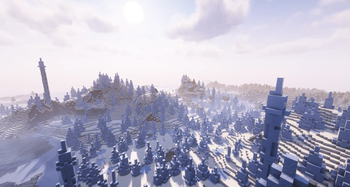
An optimized version of Minecraft with great graphics and rich resource packs.
Screenshots



About this Modpack

Description of Minecraft Modpack: Re: Optimized
Welcome to Re: Optimized, a modpack for Minecraft designed for players who want to maximize their enjoyment with enhanced performance and graphics quality. This pack includes numerous useful mods that optimize your gameplay experience and add new features without overloading your system.
Key Mods:
- Sodium + Sodium Extra: Significantly improves game performance by reducing CPU and GPU load.
- Iris: Enables the use of shaders, creating stunningly beautiful landscapes.
- Lithium: Further optimizes the world, making it more responsive and faster.
- Entity Culling: Reduces rendering of objects outside your field of view, increasing FPS.
- Dynamic FPS: Automatically lowers frame rates when inactive to save energy.
- Mod Menu: A convenient interface for managing all installed mods.
Interface Enhancements:
- BetterPingDisplay: Displays player ping next to their usernames.
- Inventory Profiles Next: Adds advanced inventory management features.
- Xaeros Minimap & World Map: Reliable minimap and world map with extensive customization options.
- Zoomify: Allows you to zoom in on the camera for better visibility.
Graphics Quality:
- BetterGrassify: Improves grass textures, making them more realistic.
- Continuity: Adds smooth transitions between biomes.
- Entity Texture Features: Expands texture capabilities for mobs and items.
- ModelFix: Fixes issues with block and item models.
Useful Tools:
- CalcMod: An in-game calculator for quick computations.
- MoreChatHistory: Saves chat history for easy review.
- NoChatReports: Blocks chat-based error reports from being sent.
- ModernFix: Addresses numerous performance and stability issues.
Additional Features:
- BlockMeter: Measures distances between blocks.
- ImmediatelyFast: Speeds up world and texture loading.
- PaginatedAdvancements: Organizes advancements into convenient pages.
This pack is perfect for both everyday gameplay and content creation, offering high performance and excellent graphics quality. Download Re: Optimized and enjoy Minecraft like never before!
Search Keywords:
Minecraft, Fabric, modpack, mods, performance, graphics, optimization, interface, calculator, maps, chat, textures, biomes, fps, ping, inventory, shaders, sodium, iris, lithium, entity culling, dynamic fps, mod menu, xaeros, zoomify, bettergrassify, continuity, entity texture features, blockmeter, immediatelyfast, paginatedadvancements, morechathistory, noreports, modernfix, calcmod.
Available Versions
How to Set Up a Re: Optimized Server
Order Server
Choose at least 4 GB RAM (6 GB recommended for Re: Optimized). Based on player count: per 8 players.
Install Modpack in Dashboard
Open the modpack browser in the dashboard, search for "Re: Optimized" and click "Install". The fabric loader and Minecraft 1.21.4 are configured automatically.
Start Server & Play
Start the server – all mods are loaded automatically. Share the server IP with friends and play together!
Frequently Asked Questions
Re: Optimized server crashes or won't start – what to do?
Most common causes: insufficient RAM or wrong fabric loader. Check latest.log for "OutOfMemoryError" → increase RAM to at least 6 GB. For "Mixin" or "ClassNotFoundException" errors: modpack version and loader don't match. With Mado Hosting, loader and Minecraft version are auto-configured on modpack install – preventing most startup issues.
How much RAM does a Re: Optimized server really need?
Minimum 4 GB, recommended 6 GB for stable performance. per 8 players. Important: Minecraft modpacks need more RAM than vanilla – plan extra per additional player. With Mado Hosting, you can scale RAM up live at any time without data loss (from €8/month).
Can I add custom mods to Re: Optimized without conflicts?
Yes, but check compatibility: only use mods for the same loader (fabric) and same Minecraft version (1.21.4). Common issues: ID conflicts with recipe mods and incompatible coremod versions. The Mado dashboard mod browser only shows compatible mods and warns about known conflicts.
Re: Optimized server lagging – performance tips
1) Increase RAM to 6 GB+. 2) Reduce server view-distance to 8 (server.properties). 3) Pre-generate chunks with the "Chunky" plugin. 4) Use /spark profiler to check which mods consume the most tick time. With Mado Hosting, all servers run on NVMe SSDs with dedicated CPU cores – eliminating hardware as a bottleneck.
Rent Re: Optimized Server
Start your own server with automatic modpack installation.
Supported Versions
Start your Re: Optimized Server now
From €8.00/month with 6 GB RAM for the best performance.
Configure Server →