
RealistifyLITE
Vanilla Minecraft. Just actually beautiful.
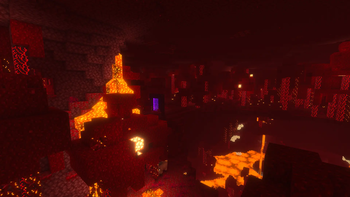
Screenshots

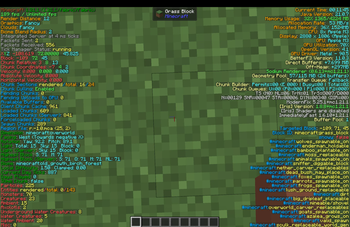
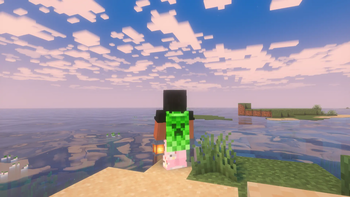
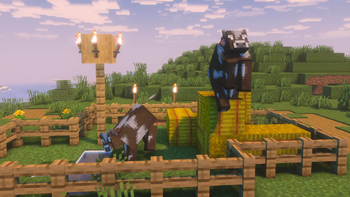
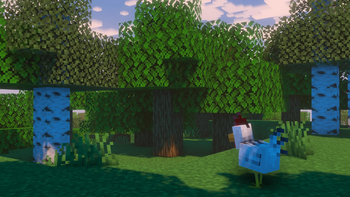
About this Modpack


Realistify - Lite Edition

Vanilla Minecraft. Just actually beautiful.
✨ Overview
Realistify LITE is a Vanilla+ modpack for Minecraft 1.21.1 on Fabric that turns the base game into a visually stunning experience — without changing how it plays.
Every visual system has been rebuilt from the ground up: connected glass, realistic grass edges, dynamic lighting from held torches, falling leaf particles, custom skies, 3D player skin layers, random entity textures, and full shader support via Iris. You're still playing Minecraft. It just looks like you aren't.
This modpack is fully client-side — it works on any Vanilla server or SMP without requiring server-side installation.
This modpack focuses on:
- Maximum visual realism within the Vanilla+ philosophy
- Complete OptiFine replacement with modern Fabric mods
- High-performance rendering so realism doesn't tank your FPS
- Full Iris shader support with curated shader recommendations
- Zero gameplay changes — pure immersion upgrade
🔥 LITE vs FULL comparison
| Realistify Lite | Realistify | |
|---|---|---|
| Target hardware | Mid-range (4–8 GB) | High-end (8 GB+) |
| Sound | Vanilla | Footsteps + reverb + biome audio |
| Terrain | Vanilla | Terralith — 85+ biomes, realistic cliffs |
| Seasons | None | Spring, Summer, Autumn, Winter |
| Animals | Vanilla | Naturalist — realistic animal behaviors |
| LOD rendering | None | Distant Horizons — see for 128+ chunks |
| Rain | Vanilla | Particle Rain — physics-accurate droplets |
| Food | Vanilla | Farmer's Delight — full cooking system |
| Mod count | ~47 | ~70 |
🚀 Features
- 🌿 Falling Leaves — Leaf blocks emit soft ambient leaf particles
- 💡 Dynamic Lighting — Held torches, glowing items, and more light up the world around you
- 🔲 Connected Textures — Glass, bookshelves, and more connect seamlessly via Continuity
- 🌄 Custom Sky Support — FabricSkyboxes enables custom skyboxes from compatible resource packs
- 🦊 3D Entities — EMF + ETF bring random, emissive, and custom entity textures and models
- 🧍 3D Skin Layers — Player skin outer layers fully rendered in 3D
- 🌱 Better Grass — Grass realistically spreads to the sides of dirt blocks
- 🎮 Full Shader Support — Iris Shaders with Complementary Reimagined recommended for mid-range PCs
- 🗺️ Minimap + World Map — Xaero's Minimap and World Map included
- ✅ Zero OptiFine — Completely OptiFine-free. All features are covered by modern replacements.
⚡ Performance
Realistify LITE is built on the current Fabric performance mod meta — the same stack used by top optimization packs. Visual realism upgrades are layered on top of a fully optimized engine, so your FPS stays high even with shaders.
Performance mods included:
- Sodium — Rendering engine replacement
- Lithium — Game logic optimization
- FerriteCore — Memory reduction
- ImmediatelyFast — Immediate mode rendering boost
- Entity Culling + More Culling — Skip rendering what you can't see
- C2ME — Multi-core chunk generation
- ModernFix — Faster startup and lower memory baseline
- Dynamic FPS — Caps FPS when Minecraft is unfocused
- Exordium, Noisium, ScalableLux, BadOptimizations, Krypton — Full optimization stack
🎨 Shader Recommendations
RealistifyLITE ships with Iris Shaders — no shader is selected by default. Recommended shaders:
| Performance Level | Recommended Shader |
|---|---|
| Mid-range (recommended) | SuperDuperVanilla |
| High-end | Complemntary Reimagined |
| Lower-end | Sildur's Vibrant Shaders Lite |
SuperDuperVanilla are included.
🧩 Included Mods
Performance (17 mods)
Sodium, Sodium Extra, Lithium, FerriteCore, ImmediatelyFast, Entity Culling, More Culling, ModernFix, Memory Leak Fix, Dynamic FPS, Krypton, FastQuit, BadOptimizations, C2ME, Noisium, ScalableLux, Exordium
Visual Realism (10 mods)
Iris Shaders, Continuity, LambDynamicLights, LambdaBetterGrass, Falling Leaves, Entity Model Features (EMF), Entity Texture Features (ETF), 3D Skin Layers, FabricSkyboxes, OptiGUI
Quality of Life (14 mods)
Jade, AppleSkin, Xaero's Minimap, Xaero's World Map, Inventory Profiles Next, BetterF3, Mouse Tweaks, ShulkerBoxTooltip, Mod Menu, Reese's Sodium Options, No Chat Reports, Better Statistics Screen, Enchantment Descriptions, Zoomify
Optional
Nvidium (NVIDIA GPUs only), Capes, Dark Loading Screen, Better Ping Display, ThreadTweak
Libraries
Fabric API, Cloth Config, YetAnotherConfigLib, Architectury API
💻 System Requirements
Minimum (no shaders):
- RAM: 4 GB allocated
- CPU: Any quad-core
- GPU: Dedicated GPU recommended (integrated graphics may work without shaders)
- Java: 21 (Adoptium / Eclipse Temurin)
Recommended (with shaders):
- RAM: 6 GB allocated
- CPU: Modern quad-core or better
- GPU: Any dedicated mid-range GPU (GTX 1060 / RX 580 or better)
- Java: 21 (Adoptium / Eclipse Temurin)
⚙️ JVM Arguments
Add these to your launcher for best performance:
XX:MaxGCPauseMillis=200 -XX:+UnlockExperimentalVMOptions -XX:+DisableExplicitGC -XX:G1NewSizePercent=30 -XX:G1MaxNewSizePercent=40 -XX:G1HeapRegionSize=8M -XX:G1ReservePercent=20 -XX:G1HeapWastePercent=5 -XX:G1MixedGCCountTarget=4 -XX:InitiatingHeapOccupancyPercent=15 -XX:G1MixedGCLiveThresholdPercent=90 -XX:G1RSetUpdatingPauseTimePercent=5 -XX:SurvivorRatio=32 -XX:+PerfDisableSharedMem -XX:MaxTenuringThreshold=1
Launcher locations: Prism → Edit Instance > Settings > Java | Modrinth App → Instance > Settings > Java | CurseForge → Profile Settings > Java
🌐 Multiplayer
Realistify LITE is fully client-side — all visual and performance mods work without server-side installation. Join any Vanilla 1.21.1 server and enjoy full visual upgrades. No permissions needed from the server.
🎯 Perfect For
- Players who want Minecraft to look incredible without a modded overhaul
- SMP players who want client-side visual improvements on vanilla servers
- Shader enthusiasts who want a curated, optimized Fabric base
- Mid-range PC users who want high FPS with great visuals
- Vanilla fans who are curious about what the game can look like
🔧 OptiFine Replacement Notice
RealistifyLITE is 100% OptiFine-free. All OptiFine features are replaced:
| OptiFine Feature | Replacement |
|---|---|
| Shaders | Iris Shaders |
| Connected Textures | Continuity |
| Dynamic Lighting | LambDynamicLights |
| Custom Entity Models | Entity Model Features (EMF) |
| Custom Entity Textures | Entity Texture Features (ETF) |
| Custom GUI | OptiGUI |
| Zoom | Zoomify |
| Better Grass | LambdaBetterGrass |
| Custom Skies | FabricSkyboxes |
📦 Version
1.0.0 — Initial Release
- Full visual realism mod stack
- Complete performance optimization base
- Optimized configs pre-applied
- Shader support via Iris
- Client-side compatible
📝 Notes
- Shaders are included — if more are needed download separately
- Nvidium is marked optional — AMD/Intel GPU users should disable it
- All configs are pre-applied for best out-of-box experience
- No gameplay changes — 100% vanilla mechanics
NOT AN OFFICIAL MINECRAFT PRODUCT. NOT APPROVED BY OR ASSOCIATED WITH MOJANG OR MICROSOFT.
Available Versions
How to Set Up a RealistifyLITE Server
Order Server
Choose at least 6 GB RAM (8 GB recommended for RealistifyLITE). Based on player count: per 5 players.
Install Modpack in Dashboard
Open the modpack browser in the dashboard, search for "RealistifyLITE" and click "Install". The fabric loader and Minecraft 1.21.1 are configured automatically.
Start Server & Play
Start the server – all mods are loaded automatically. Share the server IP with friends and play together!
Frequently Asked Questions
RealistifyLITE server crashes or won't start – what to do?
Most common causes: insufficient RAM or wrong fabric loader. Check latest.log for "OutOfMemoryError" → increase RAM to at least 8 GB. For "Mixin" or "ClassNotFoundException" errors: modpack version and loader don't match. With Mado Hosting, loader and Minecraft version are auto-configured on modpack install – preventing most startup issues.
How much RAM does a RealistifyLITE server really need?
Minimum 6 GB, recommended 8 GB for stable performance. per 5 players. Important: Minecraft modpacks need more RAM than vanilla – plan extra per additional player. With Mado Hosting, you can scale RAM up live at any time without data loss (from €12/month).
Can I add custom mods to RealistifyLITE without conflicts?
Yes, but check compatibility: only use mods for the same loader (fabric) and same Minecraft version (1.21.1). Common issues: ID conflicts with recipe mods and incompatible coremod versions. The Mado dashboard mod browser only shows compatible mods and warns about known conflicts.
RealistifyLITE server lagging – performance tips
1) Increase RAM to 8 GB+. 2) Reduce server view-distance to 8 (server.properties). 3) Pre-generate chunks with the "Chunky" plugin. 4) Use /spark profiler to check which mods consume the most tick time. With Mado Hosting, all servers run on NVMe SSDs with dedicated CPU cores – eliminating hardware as a bottleneck.
Similar Modpacks
![Cobblemon Official Modpack [Fabric]](https://cdn.modrinth.com/data/5FFgwNNP/e7f9ee2e9d361623847853fe2ddce42f519ee64f.png)
![COBBLEVERSE - Pokemon Adventure [Cobblemon]](https://cdn.modrinth.com/data/Jkb29YJU/581ecf54530972afb18a04660afd820f2f24f6c7.png)
![Better MC [FABRIC] - BMC2](https://cdn.modrinth.com/data/shFhR8Vx/a19c2bcb51d38f32f138d3607e91cb2b7b8e387f_96.webp)


![Better MC [FORGE] - BMC4](https://cdn.modrinth.com/data/4BV47HRn/7f5ef7cc61b2593609aabef3ed07a866a4f11b73_96.webp)
Rent RealistifyLITE Server
Start your own server with automatic modpack installation.
Supported Versions
Start your RealistifyLITE Server now
From €12.00/month with 8 GB RAM for the best performance.
Configure Server →