
The Recording Pack
This pack is just for me and my friends when we go to record!
Screenshots
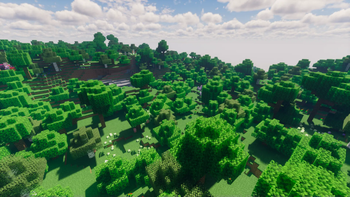

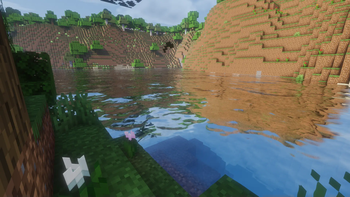

About this Modpack
The Recording Pack is designed to enhance your Minecraft experience, making it easier and more enjoyable to record sessions with friends.
Includes:
Essential Tools
- ffmpeg 7.0.1 essentials: Essential for rendering replays within Minecraft, ensuring high-quality video captures of your sessions.
Mods
- 3D Skin Layers 1.6.5: Adds depth to player skins, making them appear more three-dimensional and detailed.
- Cloth Config API 13.0.121+fabric: A required library for many mods to provide easy configuration options.
- Continuity 3.0.0-beta.5+1.20.2: Improves the appearance of connected textures, enhancing the visual appeal of blocks.
- Entity Culling 1.6.5: Optimizes rendering by not drawing entities outside of your view, boosting performance.
- Essential Mod 1.3.2.7: Adds essential multiplayer features, including friends, skin switching, and profile switching.
- Fabric API 0.97.1+1.20.4: Core library for running Fabric mods, ensuring compatibility and functionality.
- Kotlin Language Fabric 1.11.0+kotlin.2.0.0: Required for mods written in Kotlin, providing language support.
- Falling Leaves 1.15.6+1.20.1: Adds falling leaves to the game, creating a more immersive environment.
- Immediatelyfast 1.2.18+1.20.4-fabric: Enhances performance by optimizing various aspects of rendering.
- Iris Shaders 1.7.1+1.20.4: Allows for the use of shaders, improving the visual quality of the game.
- LambDynamicLights 2.3.4+1.20.4: Adds dynamic lighting effects, making light sources like torches more realistic.
- Lithium mc1.20.4-0.12.1: Optimizes many aspects of the game to improve performance without compromising features.
- Mod Menu 9.2.0-beta.2: Adds a menu for managing installed mods, making it easier to configure and troubleshoot.
- Not Enough Animations 1.7.3: Adds more animations to the game, enhancing character movements and interactions.
- Presence Footsteps 1.9.4+1.20.4: Adds immersive footstep sounds, varying based on the surface and player actions.
- ReplayMod 1.20.4-2.6.15: Allows you to record, replay, and share your Minecraft sessions with ease.
- Sodium mc1.20.4-0.5.8: A performance mod that significantly improves frame rates and reduces lag.
- Toggle Nametags 2.0.5: Allows you to toggle player nametags on and off for a cleaner recording.
- Visuality 0.7.4+1.20.4: Adds various particle effects, enhancing visual immersion.
- Wavey Capes 1.4.7: Adds physics to capes, making them wave more realistically as you move.
- YetAnotherConfigLib 3.5.0+1.20.4-fabric: Provides a library for easy mod configuration.
- Zoomify 2.13.5+1.20.4: Adds a smooth zoom feature, perfect for highlighting details during recordings.
- [ETF] Entity Texture Features 6.1: Enhances entity textures with additional customization options.
- e4mc 5.0.0: Allows users to open their singleplayer world to LAN and create a temporary IP for others to join.
Shaders
- BSL 8.2.09: A high-quality shader pack that enhances lighting, shadows, and overall visual fidelity.
- Complementary Shaders - Reimagined r5.2.1: A balanced shader pack that improves visuals while maintaining good performance.
- Kappa Shader 5.2: A beautiful shader pack known for its realistic lighting and vibrant colors.
- Solas Shader 2.0: Offers stunning visual effects, including realistic water, lighting, and atmospheric effects.
Disclaimer: None of the content in this pack is my own creation. All rights and ownership of the included mods belong to their respective authors.
Note: Before you start using this modpack, please change your settings and keybinds. Many keys overlap with each other by default, and adjusting them will ensure a smoother experience.
Available Versions
How to Set Up a The Recording Pack Server
Order Server
Choose at least 4 GB RAM (6 GB recommended for The Recording Pack). Based on player count: per 8 players.
Install Modpack in Dashboard
Open the modpack browser in the dashboard, search for "The Recording Pack" and click "Install". The fabric loader and Minecraft 1.20.4 are configured automatically.
Start Server & Play
Start the server – all mods are loaded automatically. Share the server IP with friends and play together!
Frequently Asked Questions
The Recording Pack server crashes or won't start – what to do?
Most common causes: insufficient RAM or wrong fabric loader. Check latest.log for "OutOfMemoryError" → increase RAM to at least 6 GB. For "Mixin" or "ClassNotFoundException" errors: modpack version and loader don't match. With Mado Hosting, loader and Minecraft version are auto-configured on modpack install – preventing most startup issues.
How much RAM does a The Recording Pack server really need?
Minimum 4 GB, recommended 6 GB for stable performance. per 8 players. Important: Minecraft modpacks need more RAM than vanilla – plan extra per additional player. With Mado Hosting, you can scale RAM up live at any time without data loss (from €8/month).
Can I add custom mods to The Recording Pack without conflicts?
Yes, but check compatibility: only use mods for the same loader (fabric) and same Minecraft version (1.20.4). Common issues: ID conflicts with recipe mods and incompatible coremod versions. The Mado dashboard mod browser only shows compatible mods and warns about known conflicts.
The Recording Pack server lagging – performance tips
1) Increase RAM to 6 GB+. 2) Reduce server view-distance to 8 (server.properties). 3) Pre-generate chunks with the "Chunky" plugin. 4) Use /spark profiler to check which mods consume the most tick time. With Mado Hosting, all servers run on NVMe SSDs with dedicated CPU cores – eliminating hardware as a bottleneck.
Similar Modpacks


![Cobblemon Official Modpack [Fabric]](https://cdn.modrinth.com/data/5FFgwNNP/e7f9ee2e9d361623847853fe2ddce42f519ee64f.png)
![COBBLEVERSE - Pokemon Adventure [Cobblemon]](https://cdn.modrinth.com/data/Jkb29YJU/581ecf54530972afb18a04660afd820f2f24f6c7.png)
![Better MC [FABRIC] - BMC2](https://cdn.modrinth.com/data/shFhR8Vx/a19c2bcb51d38f32f138d3607e91cb2b7b8e387f_96.webp)

Rent The Recording Pack Server
Start your own server with automatic modpack installation.
Supported Versions
Start your The Recording Pack Server now
From €8.00/month with 6 GB RAM for the best performance.
Configure Server →