
Refined Essentials
This pack is engineered for one purpose. To double your Minecraft performance while equipping you with the essential HUD features you need to play better
Screenshots
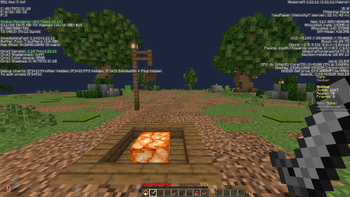


About this Modpack
⚡ Refined Essentials
Double Your FPS | Essential Client-Side Pack
Stop lagging. Start dominating.
This pack is engineered for one purpose: to double your Minecraft performance while equipping you with the essential HUD features you need to play better. Whether you are grinding PvP, exploring vast worlds, or building end-game bases, this pack strips away the bloat and keeps the power.
We have combined heavy-weight optimization mods with practical utilities like a Minimap, Armor Hud, and Zoom to give you a competitive edge without sacrificing your FPS.
Perfect for: PvP, Survival, Low-end PCs, and competitive gameplay.
🚀 "Double Your Performance" — The Reality
We take performance seriously. By combining industry-standard optimization mods, this pack drastically reduces rendering lag and stuttering. You aren't just gaining a few FPS; you are fundamentally changing how the game renders.
Why you get double the speed:
Sodium : The gold standard for rendering optimization. Rewrites the rendering engine to be incredibly fast.
Modern Fix & FerriteCore: Drastically reduces RAM usage (Memory leaks are gone).
Entity Culling: Stops the game from rendering things behind you or inside walls. Boosts FPS instantly.
Result: Smoother chunk loading, higher FPS in dense forests, and stable frame times in PvP._
🗺️ Essential HUD & Utility Features
While the pack is a speed demon, it doesn't forget the user experience. You get the "must-have" mods without the clutter.
🧭 Xaero's Minimap & World Map
Never get lost again. Fully customizable fair-play map.
Waypoints to mark your base, nether fortress, or friend's house.
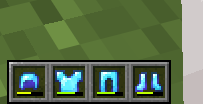
🛡️ Armor Hud & Status Effects
Displays your armor durability, tool health right next to your hotbar and potion timer on top.
🔍 Zoomify
Bind it to a key (Default: C) and instantly zoom into the distance.
Perfect for spotting enemies, reading signs, or scouting a village.
✨ Visual & Quality of Life
Dynamic FPS: Reduces lag when tabbed out.
📦 Included Mods Overview
This pack is built on Fabric for maximum speed.
📥 Installation & Requirements
Download: Use the Modrinth App (Recommended) or manual download.
Loader: Fabric (Installed automatically by the App).
Memory: Allocate at least 2GB (4GB Recommended).
Compatibility: Fully Client-Side. You can join any vanilla or paper server!
Credits:
All mods included are the work of their respective creators
Traben: EMF, ETF
squeek502: AppleSkin
Bactrosaurus: Bactromod
Johni0702: Bobby
altrisi: Carpet
caffeineMC: Sodium
…and many more (full mod list included in the pack)
Available Versions
How to Set Up a Refined Essentials Server
Order Server
Choose at least 4 GB RAM (6 GB recommended for Refined Essentials). Based on player count: per 8 players.
Install Modpack in Dashboard
Open the modpack browser in the dashboard, search for "Refined Essentials" and click "Install". The fabric loader and Minecraft 26.1 are configured automatically.
Start Server & Play
Start the server – all mods are loaded automatically. Share the server IP with friends and play together!
Frequently Asked Questions
Refined Essentials server crashes or won't start – what to do?
Most common causes: insufficient RAM or wrong fabric loader. Check latest.log for "OutOfMemoryError" → increase RAM to at least 6 GB. For "Mixin" or "ClassNotFoundException" errors: modpack version and loader don't match. With Mado Hosting, loader and Minecraft version are auto-configured on modpack install – preventing most startup issues.
How much RAM does a Refined Essentials server really need?
Minimum 4 GB, recommended 6 GB for stable performance. per 8 players. Important: Minecraft modpacks need more RAM than vanilla – plan extra per additional player. With Mado Hosting, you can scale RAM up live at any time without data loss (from €8/month).
Can I add custom mods to Refined Essentials without conflicts?
Yes, but check compatibility: only use mods for the same loader (fabric) and same Minecraft version (26.1). Common issues: ID conflicts with recipe mods and incompatible coremod versions. The Mado dashboard mod browser only shows compatible mods and warns about known conflicts.
Refined Essentials server lagging – performance tips
1) Increase RAM to 6 GB+. 2) Reduce server view-distance to 8 (server.properties). 3) Pre-generate chunks with the "Chunky" plugin. 4) Use /spark profiler to check which mods consume the most tick time. With Mado Hosting, all servers run on NVMe SSDs with dedicated CPU cores – eliminating hardware as a bottleneck.
Rent Refined Essentials Server
Start your own server with automatic modpack installation.
Supported Versions
Start your Refined Essentials Server now
From €8.00/month with 6 GB RAM for the best performance.
Configure Server →