
reViva
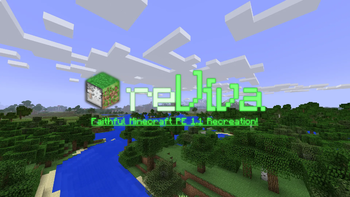
reViva aims to recreate Minecraft Pocket Edition 1.1, in look, feel, features, and mechanics.
Screenshots
About this Modpack
Welcome to reViva!
reViva aims to recreate Minecraft Pocket Edition 1.1 inside of Minecraft Java 1.20.1, in look, feel, features, and mechanics.
▶️ Watch the trailer! (Click Me!) ▶️
reViva stays faithful to Pocket Edition in many aspects. It is a recreation of MCPE, but it's not a continuation, meaning that the feature set inside the game is also reverted to the old.
If Modrinth App gives you an error, install the MRPACK manually via the Modrinth website and import it into Modrinth. If you're still experiencing issues, use Prism Launcher I will be attempting to fix this bug in the next update ASAP.
reViva changes the game in many ways, with great attention to detail:

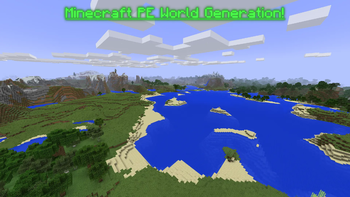
- Worlds will generate similarly to how they do in Minecraft PE
- Caves will no longer generate with biomes or deepslate (they will still go down to Y = -64, but the MCPE cave generation is used).
- Grass blends between biomes smoothly like in Pocket
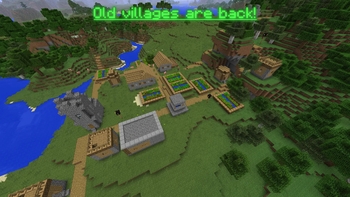
- Biomes and villages are brought back to their old state.
- Structures not present in MCPE 1.1 have been removed.
- Oceans are completely reverted to their pre-Aquatic Update state.
- The Nether is reverted to the one before the Nether Update.

- All blocks and items in the game have been reverted to those accessible in MCPE 1.1
- The combat has been reverted to the old Java 1.8 system (except for sword blocking and fishing rods)
- Zombie Pigmen have been brought back
- Quasi connectivity is removed
- Tile entities can now be pushed by pistons
- The Wither fight now resembles the one from MCPE
- Enchanted golden apples can be crafted again, with 8 gold blocks around an apple.
- The fishing loot is reverted to the old loot pool
- Item frames are now blocks instead of entities
- Bedrock bridging is now in the game
- The stonecutter is back in the game, and has the modern-day functionality.
- Carved pumpkins replace pumpkins and can be used to craft pumpkin seeds.
- Use color codes when typing in signs via a GUI
- The swimming mechanics are reverted to pre-Aquatic Update
- The MCPE mushroom stem is in the game (Creative mode only)
- Distant Horizons has been added to simulate MCPE's stunning render distances
- Choose your skin (client side only) via the Quick Skin mod
- Villager trading has been disabled (This is only until I find a system that matches MCPE well! It will be brought back when I find one.)

- When hovering over a block in the world, the block gets highlighted like in MCPE
- All textures have been reverted to Programmer Art
- Wool textures and shulker box textures have been reverted to the old colors
- Beds now have 2D icons instead of showing the 3D item
- Creeper/Zombie/Skeleton/Wither Skeleton/Dragon heads now have the 2D item icons from MCPE (player heads were not edited for ease of use with custom heads)
- The Sponge and Wet Sponge are reverted to their old texture
- Dropped items now render in 2D
- Water now is more similar to MCPE's opacity
- Spawn eggs now have their MCPE names of Spawn [Entity]
- Carved Pumpkin is renamed to Pumpkin, Dirt Path is renamed to Grass Path, and Enchanting Table is renamed to Enchantment Table
- Shulker spawn egg has been reverted to MCPE 1.0
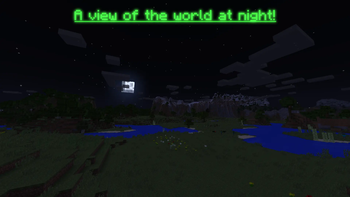
- Lighting matches MCPE more closely
- The glass/glowstone/sea lantern/redstone lamp placing sounds are reverted to the MCPE sound
- The netherrack and nether bricks sounds are reverted to the MCPE sounds
- The water splash sound is reverted to the old
- The sounds for doors, trapdoors, fence gates and chests have also been reverted
- Lava is reverted back to the old texture from MCPE
- Piston arms are from MCPE
- Jungle leaves are opaque
- MCPE splash texts have been brought back

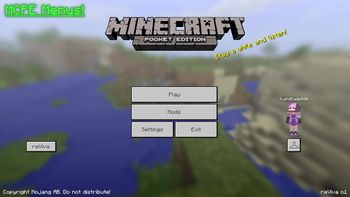
Several menus feature MCPE-like interfaces, such as:
- Menu screen
- Pause screen
- Skin Customizer
- Sign editor
- "Profile" section of the Settings menu
- Add Server & Direct Connect menus
- Death screen
Many other menus feature MCPE themed interfaces (there is a limit to how much I can customize menus), such as:
- Create World
- World Selector
- Multiplayer Server Selector
- Chat & Online Settings
- Invite menu
Keep in mind - many texts on buttons in reViva are not re-colored. This is because only static texts can be colored with a custom hex code and have the text shadow disabled, this is not a bug.
Some static texts, though, have not been colored for consistency.

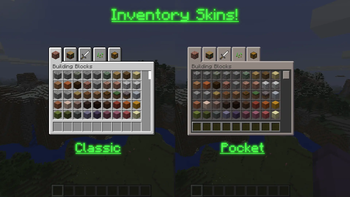
- The inventories have 2 UI choices: Pocket and Classic.
- The Pocket UI is a skin of the Java UI, to match Pocket Edition closely. Lots of attention to detail was put into the colors for the slots. This affects all inventories - Creative, Survival, and all blocks which have a GUI.
- The Classic UI is an imitation of the Windows 10 and Apple TV editions of the game. This only affects the Creative inventory, Beacon menu, and Stonecutter menu.
- Additionally, the Creative inventory has the old Minecraft PE tabs with the exact same order of items.
The Pocket UI is automatically enabled. You can change this in the resource pack settings.

You can invite players to your world again via the e4mc mod!
In the pause screen, just click Invite via e4mc, set up the world, and enjoy playing with friends!

- Infested stone blocks are marked with the border for the item model only (this isn't an MCPE feature but I added it for convenience).
- F3 Debug screen matches the screen from Minecraft Beta.
- The Grass Path and Farmland have been added to the Creative inventory.
- You can activate a coordinates HUD per-world via
/trigger ch_toggle

I hope you enjoy playing reViva as much as I enjoyed making it!
If you want to see more of what I do, you should check out my YouTube!
I made this modpack in my own time, so if you'd like to, I'd really appreciate it if you would check out my socials and perhaps share reViva with friends!
Available Versions
How to Set Up a reViva Server
Order Server
Choose at least 6 GB RAM (8 GB recommended for reViva). Based on player count: per 5 players.
Install Modpack in Dashboard
Open the modpack browser in the dashboard, search for "reViva" and click "Install". The fabric loader and Minecraft 1.20.1 are configured automatically.
Start Server & Play
Start the server – all mods are loaded automatically. Share the server IP with friends and play together!
Frequently Asked Questions
reViva server crashes or won't start – what to do?
Most common causes: insufficient RAM or wrong fabric loader. Check latest.log for "OutOfMemoryError" → increase RAM to at least 8 GB. For "Mixin" or "ClassNotFoundException" errors: modpack version and loader don't match. With Mado Hosting, loader and Minecraft version are auto-configured on modpack install – preventing most startup issues.
How much RAM does a reViva server really need?
Minimum 6 GB, recommended 8 GB for stable performance. per 5 players. Important: Minecraft modpacks need more RAM than vanilla – plan extra per additional player. With Mado Hosting, you can scale RAM up live at any time without data loss (from €12/month).
Can I add custom mods to reViva without conflicts?
Yes, but check compatibility: only use mods for the same loader (fabric) and same Minecraft version (1.20.1). Common issues: ID conflicts with recipe mods and incompatible coremod versions. The Mado dashboard mod browser only shows compatible mods and warns about known conflicts.
reViva server lagging – performance tips
1) Increase RAM to 8 GB+. 2) Reduce server view-distance to 8 (server.properties). 3) Pre-generate chunks with the "Chunky" plugin. 4) Use /spark profiler to check which mods consume the most tick time. With Mado Hosting, all servers run on NVMe SSDs with dedicated CPU cores – eliminating hardware as a bottleneck.
Similar Modpacks
![Cobblemon Official Modpack [Fabric]](https://cdn.modrinth.com/data/5FFgwNNP/e7f9ee2e9d361623847853fe2ddce42f519ee64f.png)
![COBBLEVERSE - Pokemon Adventure [Cobblemon]](https://cdn.modrinth.com/data/Jkb29YJU/581ecf54530972afb18a04660afd820f2f24f6c7.png)
![Better MC [FABRIC] - BMC2](https://cdn.modrinth.com/data/shFhR8Vx/a19c2bcb51d38f32f138d3607e91cb2b7b8e387f_96.webp)


![Better MC [FORGE] - BMC4](https://cdn.modrinth.com/data/4BV47HRn/7f5ef7cc61b2593609aabef3ed07a866a4f11b73_96.webp)
Rent reViva Server
Start your own server with automatic modpack installation.
Details
- License
- Creative Commons Attribution 4.0 International
- Server-side
- Required
- Client-side
- Required
Supported Versions
Start your reViva Server now
From €12.00/month with 8 GB RAM for the best performance.
Configure Server →