
RivalCraft
This is a client assembly of modifications for playing on the private vanilla server.
Screenshots
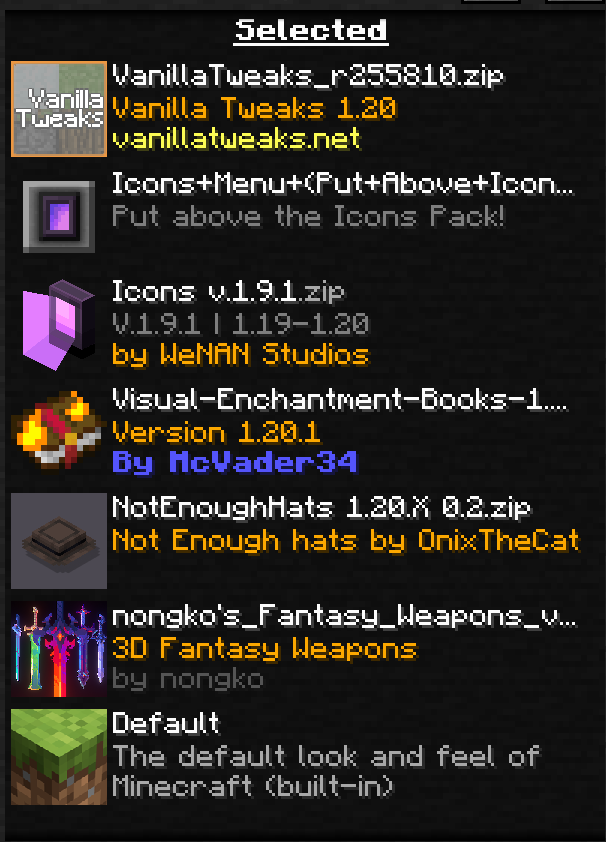
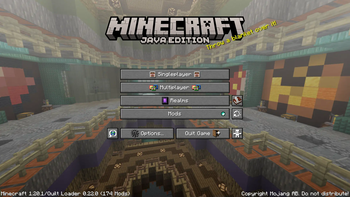
About this Modpack
Welcome
This project was created for playing on private vanilla servers.
Contains many modifications that do not affect the vanilla game, only auxiliary modifications with flexible settings.
This modpack is intended for playing on the Rival Craft private server, but can be used for playing on other servers
Mods
Mods
YetAnotherConfigLib - A builder-based configuration library for Minecraft.
Shulker Box Tooltip - View the contents of shulker boxes from your inventory
Litematica Printer - This fork adds the missing printing functionality for Litematica
SkinShuffle - Easily change your skin in-game without having to leave the world.
[EMF] Entity Model Features - is an, OptiFine format, Custom Entity Model replacement mod available for Fabric and Forge.
Dynamic Lights
BetterF3 - is a mod that replaces Minecraft's original debug HUD with a highly customizable, more human-readable HUD.
Simple Voice Chat - A working voice chat in Minecraft!
MinecraftCapes- Custom Capes anyone with the mod can see (To customize and install the cloak, we recommend visiting the modification page)
Sodium - A modern rendering engine for Minecraft which greatly improves performance
Tilt Break (Old Damage Tilting) - Reverts the Damage Tilt back to the pre-1.19.4 era
[ETF] Entity Texture Features - Emissive, Random & Custom texture support for entities in resourcepacks just like Optifine but for Fabric
Stendhal - is a client-side Fabric mod offering new and enhanced visual utilities for books, signs, anvil and the in-game chat.
Reese's Sodium Options - Alternative Options Menu for Sodium
Recursive Resources - Enhances the Resource Pack menu with folder support.
AppleSkin - Food/hunger-related HUD improvements
Chat Notify - Set up audio and visual notifications for when specified words or phrases appear in chat. (Never miss when someone says your name!)
Vanilla Notebook - A small vanilla-styled mod that adds a notebook into your GUI.
Chat Patches - A Minecraft Fabric client-side mod that touches up a few aspects of Minecraft's mundane chat, with as much configurability as possible!
Better Ping Display [Fabric] - Adds a configurable numerical ping display to the player list
Entity Culling - Using async path-tracing to hide Block-/Entities that are not visible
Memory Leak Fix - A mod that fixes random memory leaks for both the client and server
Xaero's World Map - Adds a full screen world map which shows you what you have explored in the world.
ReplayMod - A Minecraft Mod to record, relive and share your experience.
Inventory Profiles Next - Mod
Take control over you inventory. Sort. Move matching Items. Throw all. Locked slots. Gear sets! And much more.
Indium - Sodium addon providing support for the Fabric Rendering API, based on Indigo
Simple HUD Enhanced - A Fabric Minecraft mod that enhances the game's HUD by introducing customizable elements and features to display information
Sodium Extra - Features that shouldn't be in Sodium.
Resourcify - In-game resource pack, data pack and shader browser and updater
Better Trim Tooltips - Condenses the tooltips of Trimmed Armor items.
Chat Heads
LootBeams Fabric Updated - A Minecraft Fabric mod for 1.20.1 that adds colorful and customizable loot beams to dropped items!
Iris Shaders - A modern shaders mod for Minecraft intended to be compatible with existing OptiFine shader packs
ClickThrough - Click through signs and item frames to chests
Show Me Your Skin! - A mod to hide or customize armor rendering.
Lithium - No-compromises game logic/server optimization mod
RP Renames - Shows every renamed CIT and CEM in extra anvil menu for better usage of resource packs with renames
Armor Trim Item Fix - Adds more trimmed item textures
Quilt Kotlin Libraries (QKL) - Quilt's official Kotlin libraries
Mod Menu
Chest Tracker - Client side item storage - remember where you've put things.
Jade 🔍 - Shows information about what you are looking at. (Hwyla/Waila fork for Minecraft 1.16+)
libIPN - Inventory Profiles Next GUI/Config library
CIT Resewn - Re-implements MCPatcher's CIT (custom item textures from optifine resource packs)
Emotecraft - Create your own emotes in Minecraft.
Quilted Fabric API (QFAPI) / Quilt Standard Libraries (QSL) - The standard libraries of the Quilt ecosystem. Essential for your modding experience on Quilt!
Better Armor Swap - backport and enhancement of armor swapping introduced in 1.19.4
Just Enough Items - JEI - View Items and Recipes
Language Reload - Reduces load times and adds fallbacks for languages
FerriteCore - Memory usage optimizations
Chime - Adds predicates for more interactive item models
Zoomify - A zoom mod with infinite customizability.
3D Skin Layers - Render the player skin layer in 3d!
litematica - The main feature of a schematic mod is to display a "hologram" version of a structure, which shows you exactly how to build the structure and where to place the blocks
malilib - is a library mod containing shared code for masa's client-side mods.
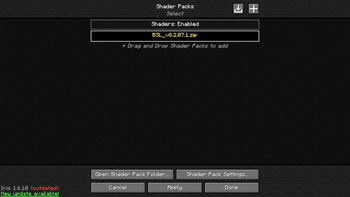
Shaders
Shaders
Complementary Shaders - Reimagined
BSL Shaders
Kappa Shader
Resource Packs
Resource Packs
CIT
Fantasy 3D Weapons CIT
Not Enough Hats 16/32x
Visual Enchantment Books
Utilities
Fullbright UB
Glowing Minimal Armor
Glowing
Vanila Tweaks
Available Versions
How to Set Up a RivalCraft Server
Order Server
Choose at least 4 GB RAM (6 GB recommended for RivalCraft). Based on player count: per 8 players.
Install Modpack in Dashboard
Open the modpack browser in the dashboard, search for "RivalCraft" and click "Install". The quilt loader and Minecraft 1.20.1 are configured automatically.
Start Server & Play
Start the server – all mods are loaded automatically. Share the server IP with friends and play together!
Frequently Asked Questions
RivalCraft server crashes or won't start – what to do?
Most common causes: insufficient RAM or wrong quilt loader. Check latest.log for "OutOfMemoryError" → increase RAM to at least 6 GB. For "Mixin" or "ClassNotFoundException" errors: modpack version and loader don't match. With Mado Hosting, loader and Minecraft version are auto-configured on modpack install – preventing most startup issues.
How much RAM does a RivalCraft server really need?
Minimum 4 GB, recommended 6 GB for stable performance. per 8 players. Important: Minecraft modpacks need more RAM than vanilla – plan extra per additional player. With Mado Hosting, you can scale RAM up live at any time without data loss (from €8/month).
Can I add custom mods to RivalCraft without conflicts?
Yes, but check compatibility: only use mods for the same loader (quilt) and same Minecraft version (1.20.1). Common issues: ID conflicts with recipe mods and incompatible coremod versions. The Mado dashboard mod browser only shows compatible mods and warns about known conflicts.
RivalCraft server lagging – performance tips
1) Increase RAM to 6 GB+. 2) Reduce server view-distance to 8 (server.properties). 3) Pre-generate chunks with the "Chunky" plugin. 4) Use /spark profiler to check which mods consume the most tick time. With Mado Hosting, all servers run on NVMe SSDs with dedicated CPU cores – eliminating hardware as a bottleneck.
Similar Modpacks

![Cobblemon Official Modpack [Fabric]](https://cdn.modrinth.com/data/5FFgwNNP/e7f9ee2e9d361623847853fe2ddce42f519ee64f.png)
![COBBLEVERSE - Pokemon Adventure [Cobblemon]](https://cdn.modrinth.com/data/Jkb29YJU/581ecf54530972afb18a04660afd820f2f24f6c7.png)
![Better MC [FABRIC] - BMC2](https://cdn.modrinth.com/data/shFhR8Vx/a19c2bcb51d38f32f138d3607e91cb2b7b8e387f_96.webp)


Rent RivalCraft Server
Start your own server with automatic modpack installation.
Details
- License
- Creative Commons Zero v1.0 Universal
- Server-side
- Unsupported
- Client-side
- Required
Supported Versions
Start your RivalCraft Server now
From €8.00/month with 6 GB RAM for the best performance.
Configure Server →