
Robert's Modpack
Amazing quality of life with slightly better than vanilla performance (1.21.3 alpha!)
Screenshots
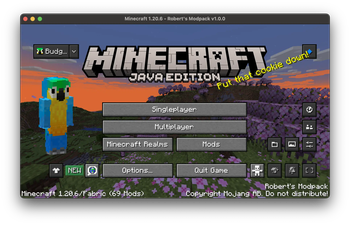
About this Modpack
Latest version - 1.21.1 - 1.0
Latest 1.21 version - 1.2 release!
Latest 1.20.6 version - 2.7!
THE OPTIMIZATION RELEASE IS OUT!
1.21.3 coming soon...
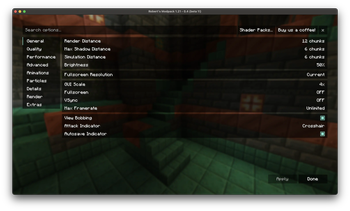
This modpack is designed to be a balance between QoL and performance. These mods were hand picked over many hours, and don't change vanilla mechanics. I tried to not go too far on the QoL, and I think in my opinion, other than maybe some performance improvements, this modpack is around good-perfect for players who like playing vanilla minecraft but want it to be a little nicer.
It's designed to work straight out of the box, with everything including shaders, updated animations and zoom ready to go!
Confirmed to work on macOS and Windows. Join the discord server to report any crashes!
Try blow up some tnt :3
Get Started
Big thanks to Simply Optimized because I used some of the config files to optimize significantly.
First, you can check resource packs to see all the good stuff I added! You can turn them on or off
If you go to the Mod Menu, you can configure the mod "Bobby" to let you turn up the render distance as much as you want!
There are some chat changes which you can see by sending a message. You also get a built in calculator (Chat Calc mod)
There are some built in shaders which you can access by pressing o (Iris Mod). Shaders basically make your game look more realistic with lighting.
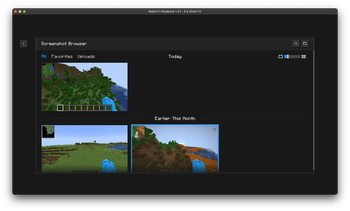
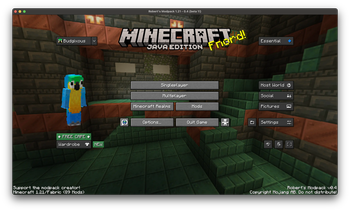
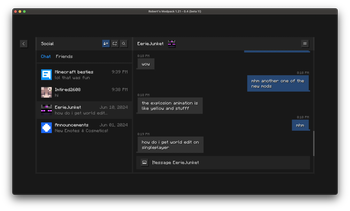
Essentials mod you can access in the pause menu and allows you to message minecraft friends who also use essentials! You also get a screenshot manager.
JEI allows you to easily see crafting or smelting recipes while using their tables
Jade lets you know what the block you're looking at is with a little tooltip at the top of your screen
Appleskin lets you see how much hunger and hearts you will go up by when holding food, and lets you see some usually hidden hunger info.
Press G to toggle being able to see in the dark
You have a minimap. Open it in fullscreen by pressing M. You can make waypoints, which are like markers that you can always see by pressing B.
This is only the basics. There is much more, which you can find out by looking around in the Mods Menu
Versioning system
x is the current minecraft version
y is the modpack major version
z is the modpack minor version
Major versions are released either every few minor versions, or when a big change to the modpack occurs
Minor versions are released every time a small change happens, such as the config changes or a few mods are added/removed
The version number is reset every time I support a new minecraft version
Available Versions
How to Set Up a Robert's Modpack Server
Order Server
Choose at least 4 GB RAM (6 GB recommended for Robert's Modpack). Based on player count: per 8 players.
Install Modpack in Dashboard
Open the modpack browser in the dashboard, search for "Robert's Modpack" and click "Install". The fabric loader and Minecraft 1.21.3 are configured automatically.
Start Server & Play
Start the server – all mods are loaded automatically. Share the server IP with friends and play together!
Frequently Asked Questions
Robert's Modpack server crashes or won't start – what to do?
Most common causes: insufficient RAM or wrong fabric loader. Check latest.log for "OutOfMemoryError" → increase RAM to at least 6 GB. For "Mixin" or "ClassNotFoundException" errors: modpack version and loader don't match. With Mado Hosting, loader and Minecraft version are auto-configured on modpack install – preventing most startup issues.
How much RAM does a Robert's Modpack server really need?
Minimum 4 GB, recommended 6 GB for stable performance. per 8 players. Important: Minecraft modpacks need more RAM than vanilla – plan extra per additional player. With Mado Hosting, you can scale RAM up live at any time without data loss (from €8/month).
Can I add custom mods to Robert's Modpack without conflicts?
Yes, but check compatibility: only use mods for the same loader (fabric) and same Minecraft version (1.21.3). Common issues: ID conflicts with recipe mods and incompatible coremod versions. The Mado dashboard mod browser only shows compatible mods and warns about known conflicts.
Robert's Modpack server lagging – performance tips
1) Increase RAM to 6 GB+. 2) Reduce server view-distance to 8 (server.properties). 3) Pre-generate chunks with the "Chunky" plugin. 4) Use /spark profiler to check which mods consume the most tick time. With Mado Hosting, all servers run on NVMe SSDs with dedicated CPU cores – eliminating hardware as a bottleneck.
Similar Modpacks

![Cobblemon Official Modpack [Fabric]](https://cdn.modrinth.com/data/5FFgwNNP/e7f9ee2e9d361623847853fe2ddce42f519ee64f.png)
![COBBLEVERSE - Pokemon Adventure [Cobblemon]](https://cdn.modrinth.com/data/Jkb29YJU/581ecf54530972afb18a04660afd820f2f24f6c7.png)
![Better MC [FABRIC] - BMC2](https://cdn.modrinth.com/data/shFhR8Vx/a19c2bcb51d38f32f138d3607e91cb2b7b8e387f_96.webp)


Rent Robert's Modpack Server
Start your own server with automatic modpack installation.
Supported Versions
Start your Robert's Modpack Server now
From €8.00/month with 6 GB RAM for the best performance.
Configure Server →