
Rooted Realm Modpack
This is the official modpack for the Rooted Realm server providing optimisations and QOL features that make it all the easier to enjoy playing on our server.
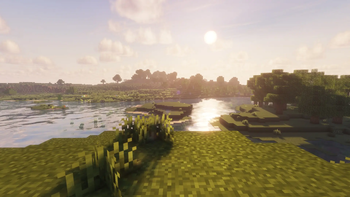
Screenshots


About this Modpack
Rooted Realm Client
The Rooted Realm Client is the official client-side modpack for the Rooted Realm Server.
It focuses on performance, visual upgrades, and quality-of-life improvements while keeping gameplay fully vanilla-friendly.
This pack enhances Minecraft with modern shaders, smoother animations, better UI tools, and powerful building utilities without changing the core mechanics of the game.
Whether you're exploring, building massive projects, or just hanging out on the server, this pack makes everything look better, run smoother, and feel more polished.
✨ Features
🚀 Performance Optimized
Built around Sodium and FerriteCore to dramatically improve FPS and memory usage while maintaining compatibility with visual enhancements.
Performance mods include:
- Sodium
- Sodium Extra
- FerriteCore
- Entity Culling
- Reese's Sodium Options
🌅 Beautiful Graphics & Shaders
Fully compatible with modern shaders using Iris, letting you choose from popular shader packs like:
- BSL
- Complementary
- Solas
Visual improvements include:
- Dynamic lights when holding torches
- Connected textures
- Custom entity models and textures
- Enhanced animations
Visual mods:
- Iris Shaders
- LambDynamicLights
- Fusion (Connected Textures)
- Entity Model Features (EMF)
- Entity Texture Features (ETF)
🎮 Gameplay Quality of Life
A variety of mods make everyday gameplay smoother and more convenient.
Quality-of-life improvements include:
- Inventory sorting
- Shulker box previews
- Ping display
- Smooth chat animations
- Free camera mode
- Zoom functionality
Mods included:
- Nemo's Inventory Sorting
- Shulker Box Tooltip
- Numeral Ping
- Smooth Chat
- Freecam
- Zoomify
🗺️ Navigation & Exploration
Never get lost again with powerful mapping tools.
- Xaero's Minimap
- Xaero's World Map
Perfect for exploring large builds or planning projects across the server.
🏗️ Building Tools
Builders get access to professional-grade schematic tools.
- Litematica
- MaLiLib
Plan, preview, and construct large builds with precision.
🎨 Interface Improvements
A cleaner and more modern interface with customization options.
- FancyMenu
- Chat Heads
- Chat Animation
- Mod Menu
- Moreoverlays
- Drippy Loading Screen
📦 Full Mod List
Core
- Fabric API
- Fabric Language Kotlin
Performance
- Sodium
- Sodium Extra
- FerriteCore
- Entity Culling
- Reese's Sodium Options
Visual Enhancements
- Iris Shaders
- LambDynamicLights
- Fusion (Connected Textures)
- Entity Model Features (EMF)
- Entity Texture Features (ETF)
UI & Interface
- FancyMenu
- Mod Menu
- Chat Heads
- Smooth Chat
- Drippy Loading Screen
- Moreoverlays
- Text Placeholder API
Gameplay & Utility
- Zoomify
- Numeral Ping
- Nemo's Inventory Sorting
- Shulker Box Tooltip
Building Tools
- Litematica
- MaLiLib
Maps
- Xaero's Minimap
- Xaero's World Map
Library Mods
- Konkrete
- Melody
- YetAnotherConfigLib (YACL)
- oωo-lib
Animations
- Fresh Animations
🎨 Included Shader Packs
This modpack includes several popular shader packs so you can easily choose the visual style and performance level that suits your system.
High Quality Cinematic Shaders
BSL Shaders
Complementary Shaders Reimagined
Complementary Shaders Unbound
Solas Shader
Performance Friendly Options
MakeUp Ultra Fast
Miniature Shader
These shaders work through Iris Shaders, allowing you to switch between them easily in game depending on your preferred visuals or performance.
You can change shaders in game from:
Options → Video Settings → Shader Packs
🖥️ Recommended Settings
For the best experience on Rooted Realm:
- Enable shaders through Iris
- Allocate 4–6GB RAM
- Use Sodium graphics settings for performance tuning
🌳 Rooted Realm Server
This modpack is designed specifically for the Rooted Realm Server to provide:
- Smooth performance
- Beautiful visuals
- Helpful building tools
- Vanilla-compatible gameplay
Join the server and experience Minecraft with a polished client built for the community.
⚠️ Notes
- This is a client-side modpack.
- All mods are server-compatible and do not change gameplay mechanics.
Available Versions
How to Set Up a Rooted Realm Modpack Server
Order Server
Choose at least 4 GB RAM (6 GB recommended for Rooted Realm Modpack). Based on player count: per 8 players.
Install Modpack in Dashboard
Open the modpack browser in the dashboard, search for "Rooted Realm Modpack" and click "Install". The fabric loader and Minecraft 1.21.11 are configured automatically.
Start Server & Play
Start the server – all mods are loaded automatically. Share the server IP with friends and play together!
Frequently Asked Questions
Rooted Realm Modpack server crashes or won't start – what to do?
Most common causes: insufficient RAM or wrong fabric loader. Check latest.log for "OutOfMemoryError" → increase RAM to at least 6 GB. For "Mixin" or "ClassNotFoundException" errors: modpack version and loader don't match. With Mado Hosting, loader and Minecraft version are auto-configured on modpack install – preventing most startup issues.
How much RAM does a Rooted Realm Modpack server really need?
Minimum 4 GB, recommended 6 GB for stable performance. per 8 players. Important: Minecraft modpacks need more RAM than vanilla – plan extra per additional player. With Mado Hosting, you can scale RAM up live at any time without data loss (from €8/month).
Can I add custom mods to Rooted Realm Modpack without conflicts?
Yes, but check compatibility: only use mods for the same loader (fabric) and same Minecraft version (1.21.11). Common issues: ID conflicts with recipe mods and incompatible coremod versions. The Mado dashboard mod browser only shows compatible mods and warns about known conflicts.
Rooted Realm Modpack server lagging – performance tips
1) Increase RAM to 6 GB+. 2) Reduce server view-distance to 8 (server.properties). 3) Pre-generate chunks with the "Chunky" plugin. 4) Use /spark profiler to check which mods consume the most tick time. With Mado Hosting, all servers run on NVMe SSDs with dedicated CPU cores – eliminating hardware as a bottleneck.
Rent Rooted Realm Modpack Server
Start your own server with automatic modpack installation.
Supported Versions
Start your Rooted Realm Modpack Server now
From €8.00/month with 6 GB RAM for the best performance.
Configure Server →