
Ryan Cliffords VR Experience 3
After 3 Years Ive finally made my next full VR modpack and I dare say its my best one yet!
Screenshots
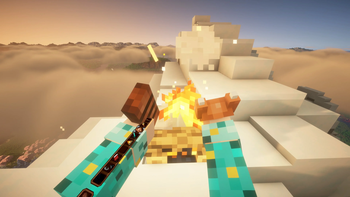
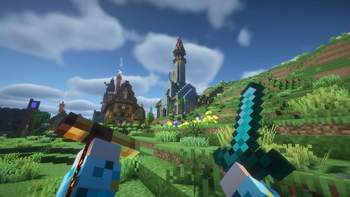
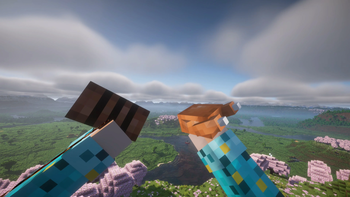
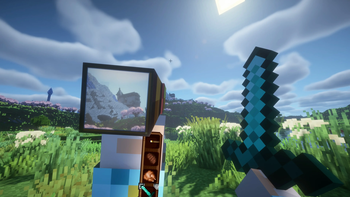
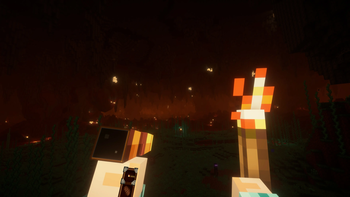
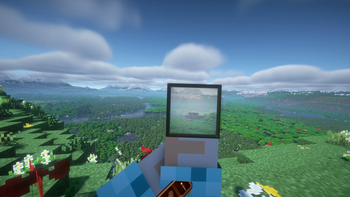
About this Modpack
Thank you for checking out Ryans VR Experience 3!
Its been 3 years since I made my last VR Experience modpack and part of the reason why its taken me so long is I was waiting for something to come out to make the next modpack worthwhile.
And for me that moment came when I discovered Voxy. It completley changes the way you play Minecraft in VR and therefore I wanted to design it around Voxy. I basiclaly wanted to make minecraft almost feel like Zelda BOTW where if you see something cool in the distance you can go to it.
So for this pack I wanted to do 4 things:
1 - As with the last 2 Experience modpacks I wanted it to be Vanilla plus.
2 - Add more mods to make MC even better in Virtual Reality.
3 - Make you as players want to explore and make use of the massive render distances.
4 - Make the modpack as Sastisfying as possible.
And what I came up with is this pack. There are well over 100 mods and resource packs in this and I think they all complement each other really well.
- There are new VR mechanics/mods to hopefully improve the VR Experience
- Tectonic makes the overworld feel grand and because I've added New large structures and dungeons it makes the world feel lived and hopefully makes you want to explore!
- Many particle mods working together to make the world feel more alive some of which you can interact with!
- Changes to sleep, menus, sound effects and more!
If you would like the full rundown on all the mods and things in this pack you can checkout my youtube video here:
There are some important things to note:
1 - DO NOT UPDATE THE MODS IN THIS PACK! If you do it will cause the modpack to break (mainly voxy to break)
2 - When you are done loading the chunks with Voxy WorldGen make sure to turn it off in mod menu or it will cause your game to stutter.
But yeah if you would like help with preformance I am also going to make a tutorial video for this pack which I will link here:
And if anyone has any other questions please feel free to message on my communities discord and Im sure either myself or one of our members will be able to help:
Thank you all for watching and downloading and I hope you have a fantastic time with this modpack! :)
Available Versions
How to Set Up a Ryan Cliffords VR Experience 3 Server
Order Server
Choose at least 6 GB RAM (8 GB recommended for Ryan Cliffords VR Experience 3). Based on player count: per 5 players.
Install Modpack in Dashboard
Open the modpack browser in the dashboard, search for "Ryan Cliffords VR Experience 3" and click "Install". The fabric loader and Minecraft 1.21.11 are configured automatically.
Start Server & Play
Start the server – all mods are loaded automatically. Share the server IP with friends and play together!
Frequently Asked Questions
Ryan Cliffords VR Experience 3 server crashes or won't start – what to do?
Most common causes: insufficient RAM or wrong fabric loader. Check latest.log for "OutOfMemoryError" → increase RAM to at least 8 GB. For "Mixin" or "ClassNotFoundException" errors: modpack version and loader don't match. With Mado Hosting, loader and Minecraft version are auto-configured on modpack install – preventing most startup issues.
How much RAM does a Ryan Cliffords VR Experience 3 server really need?
Minimum 6 GB, recommended 8 GB for stable performance. per 5 players. Important: Minecraft modpacks need more RAM than vanilla – plan extra per additional player. With Mado Hosting, you can scale RAM up live at any time without data loss (from €12/month).
Can I add custom mods to Ryan Cliffords VR Experience 3 without conflicts?
Yes, but check compatibility: only use mods for the same loader (fabric) and same Minecraft version (1.21.11). Common issues: ID conflicts with recipe mods and incompatible coremod versions. The Mado dashboard mod browser only shows compatible mods and warns about known conflicts.
Ryan Cliffords VR Experience 3 server lagging – performance tips
1) Increase RAM to 8 GB+. 2) Reduce server view-distance to 8 (server.properties). 3) Pre-generate chunks with the "Chunky" plugin. 4) Use /spark profiler to check which mods consume the most tick time. With Mado Hosting, all servers run on NVMe SSDs with dedicated CPU cores – eliminating hardware as a bottleneck.
Similar Modpacks
![Cobblemon Official Modpack [Fabric]](https://cdn.modrinth.com/data/5FFgwNNP/e7f9ee2e9d361623847853fe2ddce42f519ee64f.png)
![COBBLEVERSE - Pokemon Adventure [Cobblemon]](https://cdn.modrinth.com/data/Jkb29YJU/581ecf54530972afb18a04660afd820f2f24f6c7.png)
![Better MC [FABRIC] - BMC2](https://cdn.modrinth.com/data/shFhR8Vx/a19c2bcb51d38f32f138d3607e91cb2b7b8e387f_96.webp)


![Better MC [FORGE] - BMC4](https://cdn.modrinth.com/data/4BV47HRn/7f5ef7cc61b2593609aabef3ed07a866a4f11b73_96.webp)
Rent Ryan Cliffords VR Experience 3 Server
Start your own server with automatic modpack installation.
Details
- License
- LicenseRef-All-Rights-Reserved
- Server-side
- Unsupported
- Client-side
- Required
Supported Versions
Start your Ryan Cliffords VR Experience 3 Server now
From €12.00/month with 8 GB RAM for the best performance.
Configure Server →