
S.W.O.R.D (Strong Weapons Of Rapid Destruction)
Swords that slice and smash enemies that are in your way! new biomes, structures and QOL mods for the best experience. look at description!
Screenshots
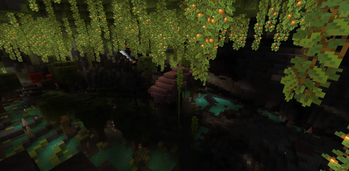
About this Modpack
What is the S.W.O.R.D MODPACK
Super cool, practically endless choices of weapons, like swords, katanas and crossbows that shoot almost any item! (with the OMNI enchant), there can also be gold, copper, diamond and even netherite crossbows. and as well you can gather artifacts to make weapons with the power of a god! pretty much anything you can imagine, its pretty universal when it comes to PVP and survival. and maybe this modpack is for you! also caves with the shaders and the mods look very cool too, there are also more biomes and structures with mobs protecting them! with the mod swords being able to be crafted!! There's not Only that but As well Voice chat so you could speak with whoever your trying to talk with!
SUP Mods
Supporting Mods is also embedded in this modpack, like sodium, ferrite core, essential, ETC
Tips if your instance crashed
if any CCCs (concern, comments and complaints) here is the discord server: https://discord.gg/WzRGgvMeRx, just in case, if you ever Do experience any difficulties with loading up the modpack, its either that, Number 1, downloaded some sort of custom mod that you wanted to add to the instance, you can do that, but at its limits, like some gun mods that ive tried to use actually stall the opening of the instance (due to LIB comprehension issues) but just try to avoid mods that have LIB models (with other LIB mods in specific). or that number 2, you probably updated something the a newer version which actually just crashes your instance. but dont worry, if this ever happens when you already gathered some progress by playing your world, you wont lose your progress when Your instance crashes, you will be fine, (but if you delete a mod thats not an optimizer then you May or may not be ok, but most of the time if you redownload it, you will be probably fine)
YT vid tutorial
Also if wondering about anything with the swords (personally, it helped myself) here is a vid:
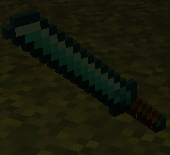
here is one of the swords! THE KATANA, this is only one of the many of swords the modpack has to bring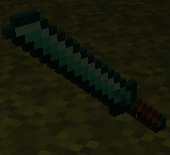
- Remember to never underestimate modpacks or mods that don't have much downloads (just because they do, Doesn't mean they are always are faulty or unliked) they might be secretly be something that would be perfect for you! (maybe like mine!)
Available Versions
How to Set Up a S.W.O.R.D (Strong Weapons Of Rapid Destruction) Server
Order Server
Choose at least 6 GB RAM (8 GB recommended for S.W.O.R.D (Strong Weapons Of Rapid Destruction)). Based on player count: per 5 players.
Install Modpack in Dashboard
Open the modpack browser in the dashboard, search for "S.W.O.R.D (Strong Weapons Of Rapid Destruction)" and click "Install". The fabric loader and Minecraft 1.21.1 are configured automatically.
Start Server & Play
Start the server – all mods are loaded automatically. Share the server IP with friends and play together!
Frequently Asked Questions
S.W.O.R.D (Strong Weapons Of Rapid Destruction) server crashes or won't start – what to do?
Most common causes: insufficient RAM or wrong fabric loader. Check latest.log for "OutOfMemoryError" → increase RAM to at least 8 GB. For "Mixin" or "ClassNotFoundException" errors: modpack version and loader don't match. With Mado Hosting, loader and Minecraft version are auto-configured on modpack install – preventing most startup issues.
How much RAM does a S.W.O.R.D (Strong Weapons Of Rapid Destruction) server really need?
Minimum 6 GB, recommended 8 GB for stable performance. per 5 players. Important: Minecraft modpacks need more RAM than vanilla – plan extra per additional player. With Mado Hosting, you can scale RAM up live at any time without data loss (from €12/month).
Can I add custom mods to S.W.O.R.D (Strong Weapons Of Rapid Destruction) without conflicts?
Yes, but check compatibility: only use mods for the same loader (fabric) and same Minecraft version (1.21.1). Common issues: ID conflicts with recipe mods and incompatible coremod versions. The Mado dashboard mod browser only shows compatible mods and warns about known conflicts.
S.W.O.R.D (Strong Weapons Of Rapid Destruction) server lagging – performance tips
1) Increase RAM to 8 GB+. 2) Reduce server view-distance to 8 (server.properties). 3) Pre-generate chunks with the "Chunky" plugin. 4) Use /spark profiler to check which mods consume the most tick time. With Mado Hosting, all servers run on NVMe SSDs with dedicated CPU cores – eliminating hardware as a bottleneck.
Similar Modpacks
![Cobblemon Official Modpack [Fabric]](https://cdn.modrinth.com/data/5FFgwNNP/e7f9ee2e9d361623847853fe2ddce42f519ee64f.png)
![COBBLEVERSE - Pokemon Adventure [Cobblemon]](https://cdn.modrinth.com/data/Jkb29YJU/581ecf54530972afb18a04660afd820f2f24f6c7.png)
![Better MC [FABRIC] - BMC2](https://cdn.modrinth.com/data/shFhR8Vx/a19c2bcb51d38f32f138d3607e91cb2b7b8e387f_96.webp)


![Better MC [FORGE] - BMC4](https://cdn.modrinth.com/data/4BV47HRn/7f5ef7cc61b2593609aabef3ed07a866a4f11b73_96.webp)
Rent S.W.O.R.D (Strong Weapons Of Rapid Destruction) Server
Start your own server with automatic modpack installation.
Supported Versions
Start your S.W.O.R.D (Strong Weapons Of Rapid Destruction) Server now
From €12.00/month with 8 GB RAM for the best performance.
Configure Server →