
Saro Create
This pack is perfect to have fun in Multiplayer with Friends
Screenshots
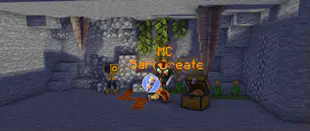



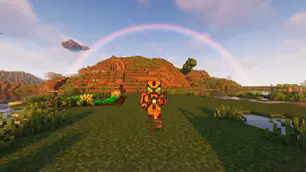
About this Modpack
CurseForge: https://www.curseforge.com/minecraft/modpacks/saro-create
This Modpack Is Perfectly Made For Playing With Friends In Multiplayer
The 3D Voice Chat And The 3D Audio Like Music Player Make This Even More Fun Than You Can Imagine
To Relax To Build And Just Have A Nice Time
For people who want to experience something more difficult can also sit on the Create Mod or the Minecraft Transit Railway Mod
A Nice Shader Mod Like A Nice Shader Make This Also A Very Nice Experience
This Modpack is based on Fabric
Info: Not Everything Is In The Forge Version
Hope you have fun with the pack
Modlist Fabric
- AppleSkin (by squeek502)
- Supplementaries (by MehVahdJukaar)
- Damage Tilt (by Charles445)
- Horse Expert (by Fuzs_)
- Indium (by comp500)
- Macaw's Roofs (by sketch_macaw)
- Create Fabric (by tropheusj)
- Saro´s Create [Fabric] (by Sarocesch)
- BetterF3 (by cominixo)
- CraftTweaker (by Jaredlll08)
- MmmMmmMmmMmm (Target Dummy) (by MehVahdJukaar)
- Decorative Blocks (by stohun)
- Advanced Netherite [FABRIC] (by AutovwDev)
- Farmer's Knives [Fabric] (by ianm1647)
- Naturalist (by Starfish_Studios)
- Just Enough Farmer's Recipes (by Anxxitty__)
- Sound Physics Remastered (by henkelmax)
- Cosmetic Armor [FABRIC] (by Apace100)
- Not Enough Animations (by tr9zw)
- Traveler's Backpack [Fabric] (by Tiviacz1337)
- Immersive Paintings [Fabric/Forge] (by Conczin)
- Moonlight Lib (by MehVahdJukaar)
- The Tube (by cherbert)
- Ingredient Extension API (by Jaredlll08)
- Basic Shields [Fabric] (by CrimsonDawn45)
- Iris Shaders (by coderbot)
- FallingTree (Forge&Fabric) (by rakambda)
- Mouse Tweaks (by YaLTeR)
- Cardinal Components (by UpcraftLP)
- Macaw's Lights and Lamps (by sketch_macaw)
- ValkyrieLib (by ValkyrieofNight)
- Lockable Doors (by Darmo_)
- Simple Voice Chat (by henkelmax)
- Inventory HUD+ (by dmitrylovin)
- Trinkets (Fabric) (by EmilyPloszaj)
- Carry On (by Tschipp)
- Ultimate Transport for Minecraft (Automated trains, planes, and more!) (by jonafanho)
- Better Animations Collection (by Fuzs_)
- Macaw's Bridges (by sketch_macaw)
- Controlling (by Jaredlll08)
- Farmer's Delight [Fabric] (by NewHoryzon)
- Replay Voice Chat (by henkelmax)
- Faux Custom Entity Data (by Jaredlll08)
- Clumps (by Jaredlll08)
- Sodium (by jellysquid3_)
- JourneyMap (by techbrew)
- GeckoLib (by ThanosGecko)
- Macaw's Windows (by sketch_macaw)
- Iron Chests (Fabric) (by cyberanner)
- Fabric API (by modmuss50)
- Architectury API (Fabric/Forge) (by shedaniel)
- FPS Reducer (by bre2el)
- Gravestones (by geometrically_)
- Automobility (by FoundationGames)
- JourneyMap Integration (by frankv_)
- WI Zoom (by alexander9892)
- Display Case (by ChappiePie)
- Fabric Enchantments (by safrodev)
- Macaw's Doors (by sketch_macaw)
- Macaw's Fences and Walls (by sketch_macaw)
- Another Furniture (by Starfish_Studios)
- Puzzles Lib [Forge & Fabric] (by Fuzs_)
- Paladin's Furniture (by UnlikePaladin)
- Joy of Painting (by xerca0)
- Automatic Path (by lebonq)
- Iris & Oculus Flywheel Compat (by leon_mout)
- Creeper Overhaul (by joosh_7889)
- Music Maker Mod (by xerca0)
- bad packets (by badasintended)
- Macaw's Trapdoors (by sketch_macaw)
- Shiny Horses (by Dragonostic)
- Pick Up Notifier [Forge & Fabric] (by Fuzs_)
- Farmer's Respite (Fabric) (by JustoPlayzz_)
- Emotecraft (Fabric) (by KosmX)
- Create Crafts & Additions (by MRHminer)
- Just Enough Resources (JER) (by way2muchnoise)
- Fabric Shield Lib (by CrimsonDawn45)
- Cloth Config API (Fabric/Forge) (by shedaniel)
- Eating Animation [Fabric] (by theone_ss)
- AudioPlayer (by henkelmax)
- Simple Voice Radio (by CodinGlitch)
- CustomSkinLoader (by xfl03)
- Create Deco Fabric (by talrey)
- WTHIT (by badasintended)
- Just Enough Items (JEI) (by mezz)
- Visual Workbench (by Fuzs_)
Modlist Forge
- Macaw's Doors (by sketch_macaw)
- Create Deco (by talrey)
- playerAnimator (by KosmX)
- Emotecraft (Forge) (by KosmX)
- Sound Physics Remastered (by henkelmax)
- Paladin's Furniture (by UnlikePaladin)
- Supplementaries (by MehVahdJukaar)
- Moonlight Lib (by MehVahdJukaar)
- GeckoLib (by Gecko)
- Music Maker Mod (by xerca0)
- Ultimate Transport for Minecraft (Automated trains, planes, and more!) (by jonafanho)
- Another Furniture (by Starfish_Studios)
- Saro´s Create [Forge] (by Sarocesch)
- Not Enough Animations (by tr7zw)
- Macaw's Fences and Walls (by sketch_macaw)
- WTHIT Forge Edition (by badasintended)
- Carry On (by Tschipp)
- Create Crafts & Additions (by MRHminer)
- Create (by simibubi)
- Controlling (by Jaredlll08)
- Curios API (Forge) (by TheIllusiveC4)
- bad packets (by badasintended)
- Naturalist (by Starfish_Studios)
- Horse Expert (by Fuzs)
- The Tube (by cherbert)
- Mouse Tweaks (by YaLTeR)
- Macaw's Roofs (by sketch_macaw)
- Shiny Horses Forge - Enchantable Horse Armor (by tinytransfem)
- Better Animations Collection (by Fuzs)
- Visual Workbench (by Fuzs)
- CustomSkinLoader (by xfl03)
- Farmer's Respite (by lumpazl)
- Just Enough Resources (JER) (by way2muchnoise)
- Macaw's Bridges (by sketch_macaw)
- Resourceful Config (by ThatGravyBoat)
- Corpse (by henkelmax)
- Display Case (by ChappiePie)
- FallingTree (Forge&Fabric) (by rakambda)
- Simple Voice Chat (by henkelmax)
- Eating Animation [Forge] (by matyrobbrt)
- CraftTweaker (by Jaredlll08)
- Joy of Painting (by xerca0)
- Advanced Netherite (by AutovwDev)
- Damage Tilt (by Charles445)
- ValkyrieLib (by ValkyrieofNight)
- Architectury API (Fabric/Forge) (by shedaniel)
- Creeper Overhaul (by joosh_7889)
- Macaw's Windows (by sketch_macaw)
- JourneyMap Integration (by frankv_)
- Just Enough Items (JEI) (by mezz)
- Macaw's Lights and Lamps (by sketch_macaw)
- Macaw's Trapdoors (by sketch_macaw)
- Clumps (by Jaredlll08)
- Iron Chests (by ProgWML6)
- Pick Up Notifier [Forge & Fabric] (by Fuzs)
- AppleSkin (by squeek502)
- MmmMmmMmmMmm (Target Dummy) (by MehVahdJukaar)
- Farmer's Delight (by vectorwing)
- BetterF3 (by cominixo)
- Decorative Blocks (by stohun)
- Automobility (by FoundationGames)
- Immersive Paintings [Fabric/Forge] (by Conczin)
- FPS Reducer (by bre2el)
- JourneyMap (by techbrew)
- Cosmetic Armor Reworked (by LainMI)
- Traveler's Backpack (by Tiviacz1337)
- Cloth Config API (Fabric/Forge) (by shedaniel)
- Puzzles Lib [Forge & Fabric] (by Fuzs)
](https://server.sarocesch.de/refersaro.php "https://server.sarocesch.de/refersaro.php")
Project Support & Usage
Hosting: For the best performance, I recommend using BisectHosting linked in the banner.
Modpacks: You are free to include my work in any modpack. Please ensure proper credit is given by providing a link to this project page.
Available Versions
How to Set Up a Saro Create Server
Order Server
Choose at least 6 GB RAM (8 GB recommended for Saro Create). Based on player count: per 5 players.
Install Modpack in Dashboard
Open the modpack browser in the dashboard, search for "Saro Create" and click "Install". The forge loader and Minecraft 1.19.2 are configured automatically.
Start Server & Play
Start the server – all mods are loaded automatically. Share the server IP with friends and play together!
Frequently Asked Questions
Saro Create server crashes or won't start – what to do?
Most common causes: insufficient RAM or wrong forge loader. Check latest.log for "OutOfMemoryError" → increase RAM to at least 8 GB. For "Mixin" or "ClassNotFoundException" errors: modpack version and loader don't match. With Mado Hosting, loader and Minecraft version are auto-configured on modpack install – preventing most startup issues.
How much RAM does a Saro Create server really need?
Minimum 6 GB, recommended 8 GB for stable performance. per 5 players. Important: Minecraft modpacks need more RAM than vanilla – plan extra per additional player. With Mado Hosting, you can scale RAM up live at any time without data loss (from €12/month).
Can I add custom mods to Saro Create without conflicts?
Yes, but check compatibility: only use mods for the same loader (forge) and same Minecraft version (1.19.2). Common issues: ID conflicts with recipe mods and incompatible coremod versions. The Mado dashboard mod browser only shows compatible mods and warns about known conflicts.
Saro Create server lagging – performance tips
1) Increase RAM to 8 GB+. 2) Reduce server view-distance to 8 (server.properties). 3) Pre-generate chunks with the "Chunky" plugin. 4) Use /spark profiler to check which mods consume the most tick time. With Mado Hosting, all servers run on NVMe SSDs with dedicated CPU cores – eliminating hardware as a bottleneck.
Similar Modpacks

![COBBLEVERSE - Pokemon Adventure [Cobblemon]](https://cdn.modrinth.com/data/Jkb29YJU/581ecf54530972afb18a04660afd820f2f24f6c7.png)




Rent Saro Create Server
Start your own server with automatic modpack installation.
Details
- License
- LicenseRef-All-Rights-Reserved
- Server-side
- Required
- Client-side
- Required
Supported Versions
Start your Saro Create Server now
From €12.00/month with 8 GB RAM for the best performance.
Configure Server →