
Schlerbcraft
The Vanilla+ "Plus" modpack. :)
Screenshots

About this Modpack
Welcome to Schlerbcraft!
(Pronounced: SHH-LERB-CRAFT)
This is my first modpack! I have been tinkering with over the course of a year, adding, removing, and debugging mods where need be. I wanted it to be an exploration type of modpack but with 408 projects in the pack it wouldn't be too far to call it a Vanilla+++ modpack as well.
Get it? Vanilla+++? Because it's a large modpack? I'll see myself out... :)
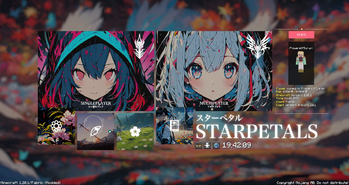
Credits to UwUCookies from the FancyMenu Discord for making the assets that I had used for my modpack's title screen/pause screen!
FancyMenu is misaligned? Try playing in fullscreen instead! Don't like fullscreen? Check the F.A.Q at the bottom for help!
I have not tested the pack on older systems so please be wary of that if you so choose to run it on a potato.
(And please note that starting the modpack up may take a while depending on your pc specs as there are a LOT of mods)
THE HELP BUTTON ON THE TITLE SCREEN DOES NOT WORK! IT IS INTENTIONALLY DESIGNED TO QUIT THE GAME
Features:
The Overworld
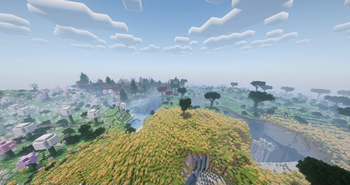
Tell me, do you like exploring? Do you like to get lost? Do like going places that don't lead anywhere? Do you like the serenity of exploring biomes? With 5 major mods that add to- and modify the overworld, you'll sure enjoy the vast scenerys that are waiting for you in this pack!
Now Including:
- Geophillic [bebebea_loste] - A subtle yet noticeble change to all existing vanilla Minecraft biomes
- Regions Unexplored [UHQ-GAMES] - A mod that adds 70+ biomes to your world for all your exploration needs
- Hybrid Aquatic [hybridlabs.mc] (not actually a link, it's just their name) - Ever thought the oceans were too boring? Well I did, this mod aims to fix that by improving all rivers, swamps, undersea caves, and of course the oceans as well
- Oh The Biomes We've Gone [Potion Studios/JT122406] - Another mod that adds many (over 50!) biomes! You can never have too much exploration!
- Wilder Wild [FrozenBlock/TreeTrain1] - 27 whole biome additions, I know crazy number right? (with some more changes to the existing vanilla biomes of course)
Yeah I Might've gone too far with the biomes, oh and of course there are many changes to the cave biomes as well. :)
Structures and villages!
Why explore when there's nothing to find? With over 20 structure mods you'll always come across something interesting on your travels! Of course we can't forget about all the new village changes that turn them from small bunches to sprawling towns! Having trouble finding a village? Try looking up! Some villagers have took to the skies to escape the dangers of the nights!
With so many structure mods it's hard to name any without spoiling too much so if you really want to see them all, the dependencies list in the versions tab should be able to help you out. :)
The Nether
More beautiful than ever, still as dangerous
STARRING:
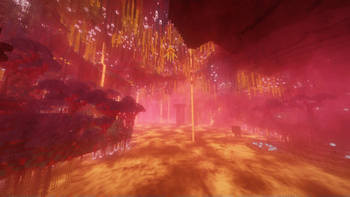
- BetterNether [BetterX/quiqueck] - An absolutely stunning rework of the nether dimension so big that I couldn't ask anything else of the mod. With a plethora of new changes ranging from tons of new biomes all the way down to new mobs, items, and structures.
Thankfully this is such a stable mod, I hadn't needed to do any debugging at all. :)
The END
Featuring:
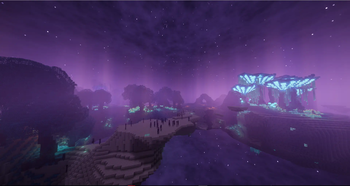
- BetterEND [BetterX/quiqueck] - From the same people who brought you the dazzling BetterNether also bring to you the stunning BetterEnd. Much like BetterNether, BetterEnd brings new biomes, blocks, items, materials, etc. However BetterEnd also features new mechanics such as their very own "Infusion Rituals" used to craft a whole plethora of things!
I've got nothing to comment here, the BetterX team honestly just knows their stuff. :)
The Otherside
And Finally:
- DeeperAndDarker [nitrodynamite18] - So you've done everything there is to do? You've gone from here to there and hopped dimensions like your hopping the fence to ditch school? Feeling bored? Needing a challange perhaps? Say no more! This new dimension requires you to kill a warden just to visit in the first place! With an abundance of content it's hard to stay away, but do take care to not wake the residents.
Spooky :)
And so many more QOL changes
Talking about every little thing is definitely going to turn this description into a novel, I suggest taking a look at the dependencies tab under the modpack versions if you want to see every little mod I've included. :)
F.A.Q.
Q I want to visit the Otherside but it's all so confusing that I don't know where to start?
A. Check out nitrodynamite18's Deeper and Darker WIKIQ. I dislike playing in fullscreen mode but I don't want the main menu to be misalgined?
A. Clicking the buttons: CTRL+ALT+C while in the main menu will bring up the FancyMenu edit bar, from there you can go to customization, go to layouts, go to STARPETALS, click edit layout and then you can click and drag/resize and reshape the buttons to your liking, toy with it enough and you can even change how the menu looks entirely.
The FancyMenu EDIT bar will either show up as the full bar or it will show up as a clickable white rectangle at the top right of the screen. :)
For any further questions; please refer to the discord server, this FAQ list will also be updated over time as more questions are asked
Available Versions
How to Set Up a Schlerbcraft Server
Order Server
Choose at least 6 GB RAM (8 GB recommended for Schlerbcraft). Based on player count: per 5 players.
Install Modpack in Dashboard
Open the modpack browser in the dashboard, search for "Schlerbcraft" and click "Install". The fabric loader and Minecraft 1.20.1 are configured automatically.
Start Server & Play
Start the server – all mods are loaded automatically. Share the server IP with friends and play together!
Frequently Asked Questions
Schlerbcraft server crashes or won't start – what to do?
Most common causes: insufficient RAM or wrong fabric loader. Check latest.log for "OutOfMemoryError" → increase RAM to at least 8 GB. For "Mixin" or "ClassNotFoundException" errors: modpack version and loader don't match. With Mado Hosting, loader and Minecraft version are auto-configured on modpack install – preventing most startup issues.
How much RAM does a Schlerbcraft server really need?
Minimum 6 GB, recommended 8 GB for stable performance. per 5 players. Important: Minecraft modpacks need more RAM than vanilla – plan extra per additional player. With Mado Hosting, you can scale RAM up live at any time without data loss (from €12/month).
Can I add custom mods to Schlerbcraft without conflicts?
Yes, but check compatibility: only use mods for the same loader (fabric) and same Minecraft version (1.20.1). Common issues: ID conflicts with recipe mods and incompatible coremod versions. The Mado dashboard mod browser only shows compatible mods and warns about known conflicts.
Schlerbcraft server lagging – performance tips
1) Increase RAM to 8 GB+. 2) Reduce server view-distance to 8 (server.properties). 3) Pre-generate chunks with the "Chunky" plugin. 4) Use /spark profiler to check which mods consume the most tick time. With Mado Hosting, all servers run on NVMe SSDs with dedicated CPU cores – eliminating hardware as a bottleneck.
Similar Modpacks
![Cobblemon Official Modpack [Fabric]](https://cdn.modrinth.com/data/5FFgwNNP/e7f9ee2e9d361623847853fe2ddce42f519ee64f.png)
![COBBLEVERSE - Pokemon Adventure [Cobblemon]](https://cdn.modrinth.com/data/Jkb29YJU/581ecf54530972afb18a04660afd820f2f24f6c7.png)
![Better MC [FABRIC] - BMC2](https://cdn.modrinth.com/data/shFhR8Vx/a19c2bcb51d38f32f138d3607e91cb2b7b8e387f_96.webp)


![Better MC [FORGE] - BMC4](https://cdn.modrinth.com/data/4BV47HRn/7f5ef7cc61b2593609aabef3ed07a866a4f11b73_96.webp)
Rent Schlerbcraft Server
Start your own server with automatic modpack installation.
Details
- License
- Creative Commons Zero v1.0 Universal
- Server-side
- Required
- Client-side
- Required
Supported Versions
Start your Schlerbcraft Server now
From €12.00/month with 8 GB RAM for the best performance.
Configure Server →