
Serene Pioneers 3
Serene Pioneers 3: Cozy Adventures, a Vanilla++ experience for builders and adventurers.
Screenshots
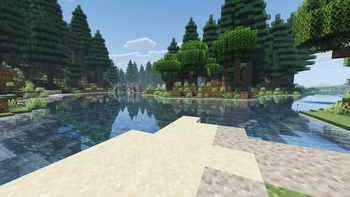
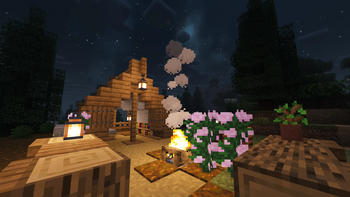


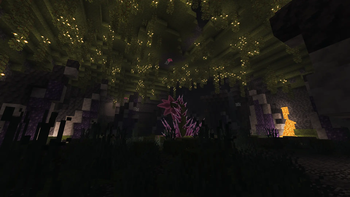
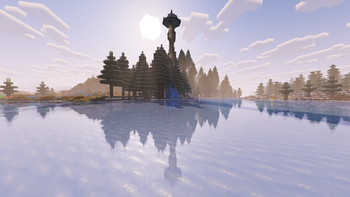
About this Modpack
Serene Pioneers 3: Cozy Adventures
Explore, gather, build, cook, relax!
The third season of Serene Pioneers, focusing on providing an immersive, cozy, fun and improved Vanilla++ experience.
Whether you want to just build a nice base, make big farms and cook all kinds of different foods, collect all kinds of fish, or go on adventures and explore new structures, dungeons and dimensions, this pack offers something for everyone. Just be cozy, immerse yourself in a world with new biomes and creatures.
The pack includes an ingame guide which purely aims to provide some general explanations and guidance for certain mods, items and mechanics.
Highlights
- New and interesting world generation and biomes provided by Biomes o' Plenty, Geophilic and Nature's Spirit
- Dozens upon dozens of new structures to explore in the Overworld
- Overhauled combat: New attack patterns, rolling and new critical hit mechanics
- An overhauled End which still stays true to vanilla provided by Enderscape
- Looking for a challenge? Take on the Bosses of Mass Destruction, defeat them and craft amazing items from their loot!
- Explore The Aether, conquer its dungeons and defeat the final boss!
- Lots of new building materials and furniture to build your dream home
- Cook dozens of new food items thanks to Farmer's Delight and its addons or brew all kinds of beverages with Brewin' and Chewin'
- Collect all kinds of new fish and put them on display thanks to Tide 2 and Hybrid Aquatic
- Some recipes have been altered or removed to better suit the pack
- Ships with a handful of optional resource packs that fit the theme of the pack and help increase immersion
- Ships with Complementary Shaders and EuphoriaPatches preconfigured to provide an even more beautiful experience
Configuration
The pack uses ConfiguredDefaults to handle configuration files. When you launch the pack for the first time it will copy all relevant configuration files into the config folder. If a config file already exists in that folder it will not be overwritten, unless during an update changes to specific settings have been made that need to be distributed to every client and server.
This also includes the options.txt file as well as the shaderpack configurations.
In order to restore a configuration to the pack's default you just have to delete the file and start the pack.
Notes regarding shaders
As mentioned the pack ships with Complementary Shaders and EuphoriaPatches included and preconfigured to provide a close to vanilla but still visually stunning experience. You are of course free to add and use whichever shaders you like. If you do not like the preconfigured settings for Complementary Shaders you just have to open the shader settings (Alt+F10 by default), edit the shaderpack settings and click on "Reset" in the top.
Notes for server owners
- Disable the mod
Mod loading screen(mod-loading-screen-....jar), otherwise the server will likely not boot - The pack includes a couple of server specific mods which are not configured and only included for convenience:
- MiniMOTD: Lets you fully customize the MOTD and icon, including an automatic message if the server is in maintenance mode
- Mainenance Mode: Lets you put the server into maintenance mode, making it so only select players can join as well as automatically making a backup if configured
- Simple Discord Link: Lets you link the ingame chat to a Discord server, allowing people to chat with each other even when they're not ingame
Available Versions
How to Set Up a Serene Pioneers 3 Server
Order Server
Choose at least 4 GB RAM (6 GB recommended for Serene Pioneers 3). Based on player count: per 8 players.
Install Modpack in Dashboard
Open the modpack browser in the dashboard, search for "Serene Pioneers 3" and click "Install". The fabric loader and Minecraft 1.21.1 are configured automatically.
Start Server & Play
Start the server – all mods are loaded automatically. Share the server IP with friends and play together!
Frequently Asked Questions
Serene Pioneers 3 server crashes or won't start – what to do?
Most common causes: insufficient RAM or wrong fabric loader. Check latest.log for "OutOfMemoryError" → increase RAM to at least 6 GB. For "Mixin" or "ClassNotFoundException" errors: modpack version and loader don't match. With Mado Hosting, loader and Minecraft version are auto-configured on modpack install – preventing most startup issues.
How much RAM does a Serene Pioneers 3 server really need?
Minimum 4 GB, recommended 6 GB for stable performance. per 8 players. Important: Minecraft modpacks need more RAM than vanilla – plan extra per additional player. With Mado Hosting, you can scale RAM up live at any time without data loss (from €8/month).
Can I add custom mods to Serene Pioneers 3 without conflicts?
Yes, but check compatibility: only use mods for the same loader (fabric) and same Minecraft version (1.21.1). Common issues: ID conflicts with recipe mods and incompatible coremod versions. The Mado dashboard mod browser only shows compatible mods and warns about known conflicts.
Serene Pioneers 3 server lagging – performance tips
1) Increase RAM to 6 GB+. 2) Reduce server view-distance to 8 (server.properties). 3) Pre-generate chunks with the "Chunky" plugin. 4) Use /spark profiler to check which mods consume the most tick time. With Mado Hosting, all servers run on NVMe SSDs with dedicated CPU cores – eliminating hardware as a bottleneck.
Rent Serene Pioneers 3 Server
Start your own server with automatic modpack installation.
Supported Versions
Start your Serene Pioneers 3 Server now
From €8.00/month with 6 GB RAM for the best performance.
Configure Server →