
Serverside Anticheat
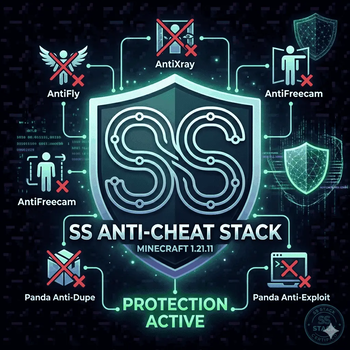
The SS Anti-Cheat Stack is a lightweight, server-side defense suite designed specifically for Minecraft 1.21.11. Built on the high-performance foundations of the SS Stack methodology.
Screenshots
About this Modpack
🛡️ SS Anti-Cheat Stack (1.21.11)
✨ Lightweight, Modular Server Security ✨
The SS Anti-Cheat Stack is a precision-tuned security suite for 1.21.11, designed to protect your server from competitive advantages and malicious exploits without sacrificing performance. This 100% server-side collection ensures fair play while maintaining the high TPS standards of the SS Stack philosophy.
🛠️ Security Deep-Dive & Configs
Click below to see how each module works and where to find its settings in your /config folder.
💎 Resource Protection (Anti-Xray)
Ore exploitation is the most common way players ruin a server economy.
- How it works: Uses server-side obfuscation to hide ores until they are actually visible.
- Config file:
antixray.json📂 - Pro-Tip: ||Use "Mode 2" in the config to generate fake ores that confuse cheaters even more!|| 🕵️
🕊️ Movement & Camera (AntiFly/Freecam)
Stop players from flying or spying through solid blocks.
- How it works: Monitors player physics and camera offsets to ensure they aren't bypassing vanilla limits.
- Config files:
antifly.jsonandantifreecam.json📂 - Pro-Tip: ||If players with high ping are getting kicked, increase the "threshold" values in these configs to be more lenient.|| 🐎
💰 Economy & Dupe Prevention (Panda)
Protect the integrity of your players' hard work.
- How it works: Hardens game logic against item duplication via menus, entities, or pistons.
- Config file:
panda-anti-dupe.json📂 - Pro-Tip: ||The mod automatically blocks most 1.21.11 dupe methods by default—no manual setup needed!|| ✨
🕵️ Exploit & Crash Defense
Keep the server online and safe from malicious "crashers."
- How it works: Scrubs incoming packets for malicious payloads or data floods.
- Config file:
panda-anti-exploit.json📂 - Pro-Tip: ||Check the logs in this config to see who is sending suspicious packets to your server.|| 📝
⚙️ Core Logic (MTS Anticheat)
The foundational layer for movement and action validation.
- How it works: Provides the baseline checks for combat reach and basic speed modifications.
- Config file:
mts-anticheat.properties📂
📋 Technical Specs
- Mod Loader: ⚙️ Fabric
- Version: 🎯 1.21.11
- Requirement: Server-Side Only (Players do not need to install this!).
- Compatibility: Built to work perfectly alongside the SS Optimization Stack.
SS Stack | Shielding Your Community 🛡️🚀
Available Versions
How to Set Up a Serverside Anticheat Server
Order Server
Choose at least 6 GB RAM (8 GB recommended for Serverside Anticheat). Based on player count: per 5 players.
Install Modpack in Dashboard
Open the modpack browser in the dashboard, search for "Serverside Anticheat" and click "Install". The fabric loader and Minecraft 1.21.11 are configured automatically.
Start Server & Play
Start the server – all mods are loaded automatically. Share the server IP with friends and play together!
Frequently Asked Questions
Serverside Anticheat server crashes or won't start – what to do?
Most common causes: insufficient RAM or wrong fabric loader. Check latest.log for "OutOfMemoryError" → increase RAM to at least 8 GB. For "Mixin" or "ClassNotFoundException" errors: modpack version and loader don't match. With Mado Hosting, loader and Minecraft version are auto-configured on modpack install – preventing most startup issues.
How much RAM does a Serverside Anticheat server really need?
Minimum 6 GB, recommended 8 GB for stable performance. per 5 players. Important: Minecraft modpacks need more RAM than vanilla – plan extra per additional player. With Mado Hosting, you can scale RAM up live at any time without data loss (from €12/month).
Can I add custom mods to Serverside Anticheat without conflicts?
Yes, but check compatibility: only use mods for the same loader (fabric) and same Minecraft version (1.21.11). Common issues: ID conflicts with recipe mods and incompatible coremod versions. The Mado dashboard mod browser only shows compatible mods and warns about known conflicts.
Serverside Anticheat server lagging – performance tips
1) Increase RAM to 8 GB+. 2) Reduce server view-distance to 8 (server.properties). 3) Pre-generate chunks with the "Chunky" plugin. 4) Use /spark profiler to check which mods consume the most tick time. With Mado Hosting, all servers run on NVMe SSDs with dedicated CPU cores – eliminating hardware as a bottleneck.
Similar Modpacks

![Cobblemon Official Modpack [Fabric]](https://cdn.modrinth.com/data/5FFgwNNP/e7f9ee2e9d361623847853fe2ddce42f519ee64f.png)
![COBBLEVERSE - Pokemon Adventure [Cobblemon]](https://cdn.modrinth.com/data/Jkb29YJU/581ecf54530972afb18a04660afd820f2f24f6c7.png)
![Better MC [FABRIC] - BMC2](https://cdn.modrinth.com/data/shFhR8Vx/a19c2bcb51d38f32f138d3607e91cb2b7b8e387f_96.webp)


Rent Serverside Anticheat Server
Start your own server with automatic modpack installation.
Supported Versions
Start your Serverside Anticheat Server now
From €12.00/month with 8 GB RAM for the best performance.
Configure Server →