
ShapCraft-ModPack
З використанням цього модпаку ви можете відчути гру на нашому сервері та не тільки на 99.99%. Using this modpack you can experience the game on our server and not only at 99.99%
Screenshots
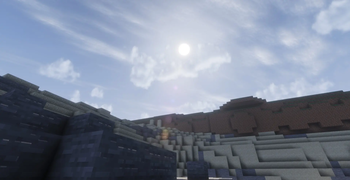
About this Modpack
ShapCraft-ModPack
English
ShapCraft-ModPack: With ShapCraft, your Minecraft experience becomes smoother, more expressive, and perfectly optimized!📌 General Info
🧱 Minecraft Version: 1.21.11
⚙️ Mod Loader: Fabric
🧩 Modpack Type: Client-side only (with a few server-supported features)
📦 Purpose:
Enhances the vanilla experience with performance boosts, beautiful visuals, mini-map utility, and immersive communication.
🌐 Compatibility:
While this is the official modpack made for the ShapCraft server, it is fully compatible and runs perfectly on 99.99% of any other Vanilla+ servers or in singleplayer.
🧩 What's Included
Sodium & Sodium Extra – Ultimate performance optimization and expanded video settings.
Iris Shaders – Flawless shader support, paired with Complementary Shaders - Reimagined and Solas Shader pre-included for breathtaking visuals.
Xaero's Minimap – A clean, highly customizable mini-map to navigate your world with ease.
Simple Voice Chat – Immersive proximity voice communication (requires server support).
Emotecraft & Player Animation Library – Custom animations and emotes to express yourself (requires server support/plugin for other players to see your emotes).
Fresh Animations – Gives vanilla mobs dynamic, lifelike movements (works via resource pack).
AppleSkin – Visualizes hunger, saturation, and food values directly on your HUD.
Mod Menu – A clean interface to view and configure all your installed mods.
Fabric API & Text Placeholder API – Essential core libraries for seamless mod compatibility.
🕹️ How to Use
Simple Voice Chat
Press V to open the voice chat settings. Works on servers that have the mod/plugin installed.
Xaero's Minimap
Press Y to open the minimap settings, customize your radar, and set waypoints.
Emotecraft
Press B (default) to open the emote wheel and show off your moves.
Shaders (Iris + Complementary/Solas)
Go to Options → Video Settings → Shader Packs to enable and switch between the gorgeous pre-installed shaders.
AppleSkin
Works automatically. Hover over food in your inventory or look at your hunger bar to see exactly how much saturation you'll get.
⚠️ Notes
Fresh Animations requires the resource pack to be active in your resource packs menu to see the enhanced mob animations.
Voice Chat and Emotecraft require server-side support to function fully with other players — otherwise, they stay inactive without breaking your game.
If any keybinds overlap (like Emotecraft or Minimap), you can easily rebind them in Options → Controls → Key Binds.
👥 Why should you choose ShapCraft?
Vanilla+ Experience: Perfect for players who want to keep the core game vanilla but love quality-of-life enhancements.
Insane Performance: Powered by Sodium, making it ideal for both low-end PCs needing an FPS boost and high-end PCs running heavy shaders.
Built for Multiplayer: Whether you play on our official ShapCraft server or any other vanilla-style SMP with friends, this pack delivers the ultimate experience.
Ukrainian
ShapCraft-ModPack З модпаком ShapCraft ваша гра стане набагато плавнішою, красивішою та живішою!📌 Основна інформація
🧱 Версія Minecraft: 1.21.11
⚙️ Завантажувач модів: Fabric
🧩 Тип модпаку: Клієнтський (з кількома функціями, що підтримують взаємодію з сервером)
📦 Призначення:
Покращує ванільний геймплей завдяки оптимізації, крутим візуальним ефектам, зручній міні-карті та новим можливостям спілкування.
🌐 Сумісність:
Це офіційний збірник для серверу ShapCraft, проте він чудово налаштований і працює на 99.99% будь-яких інших Vanilla+ серверів або в одиночній грі.
🧩 Що всередині
Sodium & Sodium Extra – найкраща оптимізація продуктивності та розширені налаштування графіки.
Iris Shaders – підтримка шейдерів. У комплект вже вбудовано чудові шейдери Complementary Shaders - Reimagined та Solas Shader.
Xaero's Minimap – акуратна та зручна міні-карта для легкого орієнтування у світі.
Simple Voice Chat – голосовий зв'язок прямо в грі (потребує підтримки сервером).
Emotecraft & Player Animation Library – круті анімації та емоції для вашого персонажа (для того, щоб інші бачили ваші емоції, бажано мати плагін на сервері).
Fresh Animations – додає мобам динамічні та реалістичні рухи (працює через текстурпак).
AppleSkin – показує рівень голоду, насичення та корисність їжі прямо на панелі індикаторів.
Mod Menu – зручний список усіх встановлених модів з можливістю їх налаштування.
Fabric API & Text Placeholder API – технічні бібліотеки для стабільної роботи.
🕹️ Як користуватися
Simple Voice Chat (Голосовий чат)
Натисніть V, щоб відкрити меню налаштувань звуку. Працює на серверах, де встановлено цей мод/плагін.
Xaero's Minimap (Міні-карта)
Натисніть Y, щоб відкрити налаштування карти, де можна ставити мітки (вейпоінти) та змінювати радар.
Emotecraft (Емоції)
Натисніть B (за замовчуванням), щоб відкрити колесо емоцій та показати свої рухи.
Шейдери (Iris + Complementary/Solas)
Перейдіть у Налаштування → Налаштування графіки → Набори шейдерів, щоб увімкнути один із вбудованих шейдерів.
AppleSkin
Працює автоматично. Просто наведіть на їжу в інвентарі або подивіться на смужку голоду.
⚠️ Важливі примітки
Не забудьте перевірити, чи увімкнено текстурпак Fresh Animations в меню ресурспаків, щоб анімації мобів працювали.
Simple Voice Chat та Emotecraft потребують серверних плагінів для повноцінної роботи з іншими гравцями. Якщо на сервері їх немає — моди просто спатимуть і не викликатимуть помилок.
Якщо якісь клавіші збігаються (наприклад, карта чи емоції), ви можете легко змінити їх у Налаштування → Керування → Призначення клавіш.
👥 Чому варто обрати саме наш модпак?
Ідеальний баланс: Ніякого зайвого мотлоху — лише корисні покращення, які залишають Minecraft ванільним.
Максимум FPS: Завдяки Sodium гра працюватиме плавно як на потужних ПК із шейдерами, так і на слабких пристроях.
Створено для спільноти: Незалежно від того, граєте ви на нашому сервері ShapCraft чи на будь-якому іншому SMP з друзями — цей пак стане вашим найкращим компаньйоном!
Available Versions
How to Set Up a ShapCraft-ModPack Server
Order Server
Choose at least 4 GB RAM (6 GB recommended for ShapCraft-ModPack). Based on player count: per 8 players.
Install Modpack in Dashboard
Open the modpack browser in the dashboard, search for "ShapCraft-ModPack" and click "Install". The fabric loader and Minecraft 1.21.11 are configured automatically.
Start Server & Play
Start the server – all mods are loaded automatically. Share the server IP with friends and play together!
Frequently Asked Questions
ShapCraft-ModPack server crashes or won't start – what to do?
Most common causes: insufficient RAM or wrong fabric loader. Check latest.log for "OutOfMemoryError" → increase RAM to at least 6 GB. For "Mixin" or "ClassNotFoundException" errors: modpack version and loader don't match. With Mado Hosting, loader and Minecraft version are auto-configured on modpack install – preventing most startup issues.
How much RAM does a ShapCraft-ModPack server really need?
Minimum 4 GB, recommended 6 GB for stable performance. per 8 players. Important: Minecraft modpacks need more RAM than vanilla – plan extra per additional player. With Mado Hosting, you can scale RAM up live at any time without data loss (from €8/month).
Can I add custom mods to ShapCraft-ModPack without conflicts?
Yes, but check compatibility: only use mods for the same loader (fabric) and same Minecraft version (1.21.11). Common issues: ID conflicts with recipe mods and incompatible coremod versions. The Mado dashboard mod browser only shows compatible mods and warns about known conflicts.
ShapCraft-ModPack server lagging – performance tips
1) Increase RAM to 6 GB+. 2) Reduce server view-distance to 8 (server.properties). 3) Pre-generate chunks with the "Chunky" plugin. 4) Use /spark profiler to check which mods consume the most tick time. With Mado Hosting, all servers run on NVMe SSDs with dedicated CPU cores – eliminating hardware as a bottleneck.
Similar Modpacks

![Cobblemon Official Modpack [Fabric]](https://cdn.modrinth.com/data/5FFgwNNP/e7f9ee2e9d361623847853fe2ddce42f519ee64f.png)
![COBBLEVERSE - Pokemon Adventure [Cobblemon]](https://cdn.modrinth.com/data/Jkb29YJU/581ecf54530972afb18a04660afd820f2f24f6c7.png)
![Better MC [FABRIC] - BMC2](https://cdn.modrinth.com/data/shFhR8Vx/a19c2bcb51d38f32f138d3607e91cb2b7b8e387f_96.webp)


Rent ShapCraft-ModPack Server
Start your own server with automatic modpack installation.
Supported Versions
Start your ShapCraft-ModPack Server now
From €8.00/month with 6 GB RAM for the best performance.
Configure Server →