
Shotbow MineZ Modpack
Modpack for the Shotbow.net MineZ
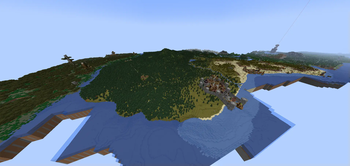
Screenshots
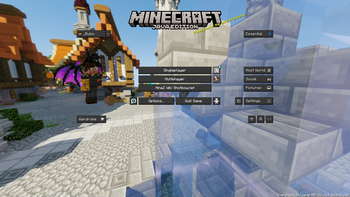

About this Modpack
MineZ Modpack for Shotbow Server
This modpack is designed for players on the MineZ server hosted by Shotbow. Its goal is to provide optimizations for smoother gameplay and enhance the experience with specially tailored mods and configurations.
What’s included in the modpack?
Game Optimization:
The modpack includes performance-boosting tools such as Sodium, and other optimization mods, enhancing the game’s performance across a wide range of hardware. With these optimizations, gameplay remains smooth even during intense interactions and large-scale exploration.Minimap with Marked Locations:
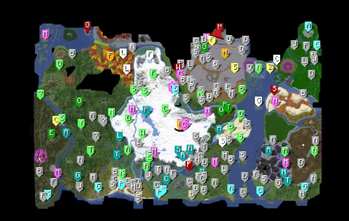
This modpack integrates a custom minimap (Xaero’s Minimap and Xaero’s Worldmap), specifically configured for MineZ gameplay. Key locations, such as towns, outposts, shrines, and hidden resource spots, are marked on the map. Each location is carefully labeled to help players navigate the MineZ world and locate critical points, shelters, and important resource areas.
Most locations are already marked, if any are missing please contact us. Through our discord server Discord Server LinkHUD and User Interface Improvements:
Additional mods, like EssentialGUI and BetterF3, enhance the user interface to make exploration more intuitive. Modified HUD elements give better access to critical gameplay information.Visual and Audio Enhancements:
The modpack includes optimized texture and sound packs that match the atmosphere of MineZ. Textures retain the dark and immersive style of the game world, while sounds add ambiance and provide audio cues for threats or helpful spatial orientation.Configurations for the MineZ Server:
All mods and settings are optimized for the shotbow.net server to ensure full compatibility and prevent any synchronization or stability issues. Everything is designed to maximize and enhance the experience of exploring and surviving in the MineZ world.
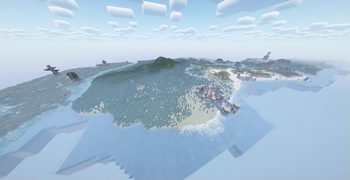
!!! Distant Horizons Map render !!!
Note if you play on version 1.1.0, 1.1.1 & 1.2.0 HQ+
We recommend turning off the Distant Horizons mod when entering the dungeons and before teleportation to Meridian (Spawn Island) because currently mod does not distinguish that these are different worlds and displays them together!
Below is the instructions on how to do it:
Distant Horizons ON/OFF instruction
- Mod Disabling instructions
Press the
ESCThen buttonsOptions
Then, next to the FOV changing belt, there will be a button with the icon, click it.
In the menu that opens, change the value ofEnable RenderingtoFalse
- Mod enabling instructions
Press the
ESCThen buttonsOptions
Then, next to the FOV changing belt, there will be a button with the icon, click it.
In the menu that opens, change the value ofEnable RenderingtoTrue
Information about Modpack
This modpack has been approved by the Shotbow.net's Staff team and fully complies with its the server's rules, however it has not been created nor maintained by them.
Controls
U- Mods settingsY- Essential Emote WheelC- ZoomM- World Map-- Zoom In Minimap=- Zoom Out In MinimapL- Waypoint List+- New WaypointN- Minimap display settingsO- Shaderpack ScreenG- Gamma On/Off
Waypoint Sets (Hold N key to switch)
!!! Not all are added yet !!!default (All cities, towns, houses, towers, castles, ruins and some more)
Dungeons (All entrances and exits to dungeons)
Winter Cave (All locations in Winter Cave system)
Swamp Cave (All locations in Swamp Cave system) | Added since Ver: 1.1.1
Bosses (All Bosses spawn locations)
Others (Locations not assigned to other categories or temporary designations)
Resourcepack (4) & Shaders (1)
Cubic Sun & Moon by JoeFly
Essential UI by KartoffelChipss
Fast Better Grass 1.21 by Fabulously Optimized
MineZ-1.2.0-official [Original download location: github.com]
since modpack version 1.2.0
MineZ-1.2.0-officialreplaced withprereleaseMineZ_Official_Textures-1.2.1
BSL Shaders by CaptTatsu
Complementary Reimagined
Available Versions
How to Set Up a Shotbow MineZ Modpack Server
Order Server
Choose at least 6 GB RAM (8 GB recommended for Shotbow MineZ Modpack). Based on player count: per 5 players.
Install Modpack in Dashboard
Open the modpack browser in the dashboard, search for "Shotbow MineZ Modpack" and click "Install". The fabric loader and Minecraft 1.21.1 are configured automatically.
Start Server & Play
Start the server – all mods are loaded automatically. Share the server IP with friends and play together!
Frequently Asked Questions
Shotbow MineZ Modpack server crashes or won't start – what to do?
Most common causes: insufficient RAM or wrong fabric loader. Check latest.log for "OutOfMemoryError" → increase RAM to at least 8 GB. For "Mixin" or "ClassNotFoundException" errors: modpack version and loader don't match. With Mado Hosting, loader and Minecraft version are auto-configured on modpack install – preventing most startup issues.
How much RAM does a Shotbow MineZ Modpack server really need?
Minimum 6 GB, recommended 8 GB for stable performance. per 5 players. Important: Minecraft modpacks need more RAM than vanilla – plan extra per additional player. With Mado Hosting, you can scale RAM up live at any time without data loss (from €12/month).
Can I add custom mods to Shotbow MineZ Modpack without conflicts?
Yes, but check compatibility: only use mods for the same loader (fabric) and same Minecraft version (1.21.1). Common issues: ID conflicts with recipe mods and incompatible coremod versions. The Mado dashboard mod browser only shows compatible mods and warns about known conflicts.
Shotbow MineZ Modpack server lagging – performance tips
1) Increase RAM to 8 GB+. 2) Reduce server view-distance to 8 (server.properties). 3) Pre-generate chunks with the "Chunky" plugin. 4) Use /spark profiler to check which mods consume the most tick time. With Mado Hosting, all servers run on NVMe SSDs with dedicated CPU cores – eliminating hardware as a bottleneck.
Similar Modpacks
![Cobblemon Official Modpack [Fabric]](https://cdn.modrinth.com/data/5FFgwNNP/e7f9ee2e9d361623847853fe2ddce42f519ee64f.png)
![COBBLEVERSE - Pokemon Adventure [Cobblemon]](https://cdn.modrinth.com/data/Jkb29YJU/581ecf54530972afb18a04660afd820f2f24f6c7.png)
![Better MC [FABRIC] - BMC2](https://cdn.modrinth.com/data/shFhR8Vx/a19c2bcb51d38f32f138d3607e91cb2b7b8e387f_96.webp)


![Better MC [FORGE] - BMC4](https://cdn.modrinth.com/data/4BV47HRn/7f5ef7cc61b2593609aabef3ed07a866a4f11b73_96.webp)
Rent Shotbow MineZ Modpack Server
Start your own server with automatic modpack installation.
Supported Versions
Start your Shotbow MineZ Modpack Server now
From €12.00/month with 8 GB RAM for the best performance.
Configure Server →