
Simplicity Arched
A huge upgrade to FPS, Ping, Input Lag, and a few more. Simplicity Arched Provides a few resource packs to improve the looks of your game as well!
Screenshots

About this Modpack
Simplicity Arched
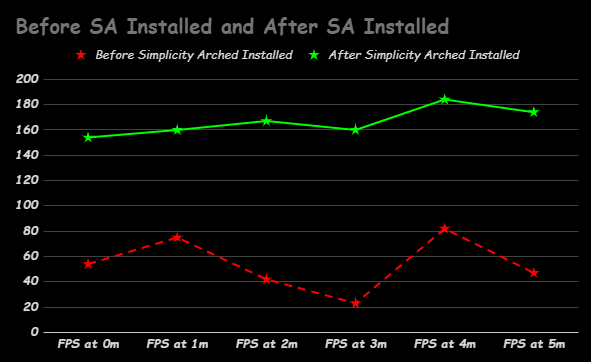
See Gallery for more charts
Description:
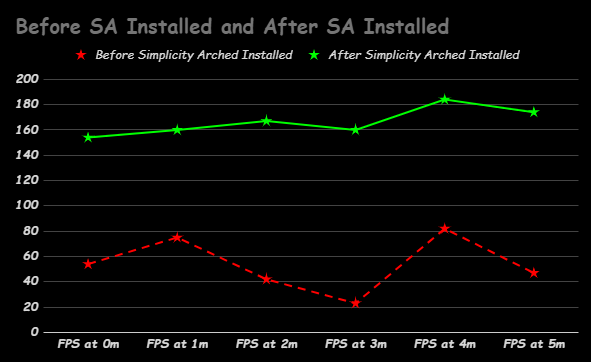
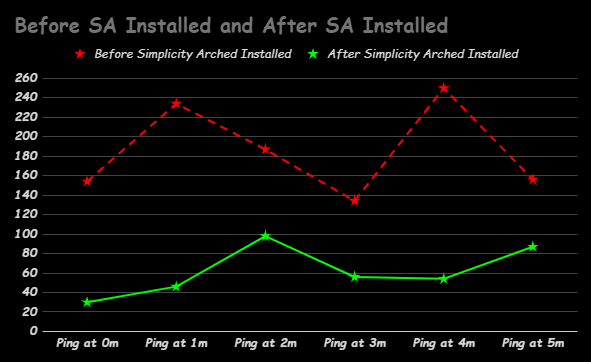
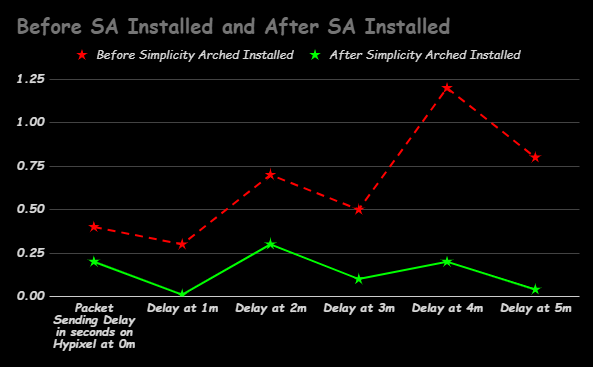
🚀 This is the Simplicity Arched (SA) modpack! Whether you have a fancy computer or a not-so-fancy one, we've got you covered. The picture above shows the diffrence between without and with Simplicity Arched, Without FPS are low and janky, with FPS are higher and smooth.
For Low-End computers: Imagine your game suddenly getting a superpower—up to 80-100+ extra FPS! That means smoother gameplay without sacrificing how cool your game looks.
For High-End computers: Ever felt frustrated with input delays, lag, or annoying ping issues? Say goodbye to those headaches! Our modpack fine-tunes your gaming setup for lightning-fast responses and zero lag.
Ready to level up your gaming experience? Dive in with our modpack and discover a whole new world of smooth, seamless gameplay.
✨Mods Used
Mods:
- Clumps
- Collision Fix
- Debugify
- Forge Config API Port
- ImmediatelyFast
- Ksyxis
- Presence Footsteps
- YetAnotherConfigLib
- AntiGhost
- AppleSkin
- bad packets
- Balm
- Concurrent Chunk Management Engine (Fabric)
- Chat Heads
- Clean Tooltips
- Cloth Config API
- Cull Leaves
- Durability Plus
- Dynamic FPS
- [EMF] Entity Model Features
- [ETF] Entity Texture Features
- Entity Culling
- Exordium
- Experimental Performance
- Fabric API
- Fabric Language Kotlin
- FastChest
- FerriteCore
- FPS - Display
- Hold That Chunk
- LambDynamicLights
- Language Reload
- LazyDFU
- Let Me Despawn
- Lithium
- Memory Leak Fix
- ModernFix
- Mod Menu
- More Culling
- Not Enough Animations
- Noxesium
- Nvidium
- Potions Re-Glint
- Reese's Sodium Options
- ServerCore
- Sodium Extra
- Sodium
- spark
- ThreadTweak
- Very Many Players (Fabric)
- Simple Voice Chat
Resourcepacks:
- Better Pinger
- Fast Better Grass
- Sounds & Music
- TWS's Outlined Ores
FAQ:
🧩Can I add my own mods?
Yes, infact I encurage you to add our own to the pack to fine-tune your gameplay. Note that the more mods you add the less the original modpack's intended function will actualy work. Some mods can interfere with the installed ones in the modpack without crashing the game with a imcompatiblity notice.
❔What is Simplicity Arched (SA) modpack?
- Simplicity Arched (SA) is a modpack designed to enhance gaming experiences for both low-end and high-end computers. It aims to optimize gameplay by improving FPS, reducing lag, and enhancing overall performance.
💾How does the modpack benefit low-end computers?
- For low-end computers, the modpack can provide up to 80-100+ extra FPS, resulting in smoother gameplay without compromising visual quality.
💽How does the modpack benefit high-end computers?
- High-end computers can benefit from reduced input delays, lag, and ping issues, leading to lightning-fast responses and a lag-free gaming experience.
👎Will using this modpack affect my gameplay experience negatively in any way?
- While the modpack is designed to enhance performance, individual experiences may vary depending on factors such as hardware specifications and compatibility with other mods on the client that are not in the modpack.
🌄Will this modpack ever me for Quilt or other mod loader types?
- No. That requires all the mods in this project to be that mod loader type. Even if every project had Forge or Quilt I still would not, I like to use fabric over most loaders and I dont like testing mod that arent fabric.
Performance Settings
Vsync: Vsync should be off unless you have a 80Hz+ refresh rate on your computer and arent planning on haveing to many other apps open.
Max Frame Rate: The max frame rate should be set to 100-180 on low end computers, on higher pcs, use 150-Unlimited
Distances: Render Distance, Simulation Distance, and Entity Distance should be all be set to the same, any numebr is fine but just remember this can serverly effect the modpack's main purpose. I recommend 5-10 on low end and 7-Max on Higher end
Resource packs: Use fast better grass to improve your expirence, no other packs are required unless you want them for looks, exept, bare bones if your comfortable with using it, it does give a extra 5-15 fps on some devices.
Thanks to the mod creators for making these mods and a huge thanks to modrinth staff who keep this site up.
Available Versions
How to Set Up a Simplicity Arched Server
Order Server
Choose at least 6 GB RAM (8 GB recommended for Simplicity Arched). Based on player count: per 5 players.
Install Modpack in Dashboard
Open the modpack browser in the dashboard, search for "Simplicity Arched" and click "Install". The fabric loader and Minecraft 1.20.4 are configured automatically.
Start Server & Play
Start the server – all mods are loaded automatically. Share the server IP with friends and play together!
Frequently Asked Questions
Simplicity Arched server crashes or won't start – what to do?
Most common causes: insufficient RAM or wrong fabric loader. Check latest.log for "OutOfMemoryError" → increase RAM to at least 8 GB. For "Mixin" or "ClassNotFoundException" errors: modpack version and loader don't match. With Mado Hosting, loader and Minecraft version are auto-configured on modpack install – preventing most startup issues.
How much RAM does a Simplicity Arched server really need?
Minimum 6 GB, recommended 8 GB for stable performance. per 5 players. Important: Minecraft modpacks need more RAM than vanilla – plan extra per additional player. With Mado Hosting, you can scale RAM up live at any time without data loss (from €12/month).
Can I add custom mods to Simplicity Arched without conflicts?
Yes, but check compatibility: only use mods for the same loader (fabric) and same Minecraft version (1.20.4). Common issues: ID conflicts with recipe mods and incompatible coremod versions. The Mado dashboard mod browser only shows compatible mods and warns about known conflicts.
Simplicity Arched server lagging – performance tips
1) Increase RAM to 8 GB+. 2) Reduce server view-distance to 8 (server.properties). 3) Pre-generate chunks with the "Chunky" plugin. 4) Use /spark profiler to check which mods consume the most tick time. With Mado Hosting, all servers run on NVMe SSDs with dedicated CPU cores – eliminating hardware as a bottleneck.
Similar Modpacks

![Cobblemon Official Modpack [Fabric]](https://cdn.modrinth.com/data/5FFgwNNP/e7f9ee2e9d361623847853fe2ddce42f519ee64f.png)
![COBBLEVERSE - Pokemon Adventure [Cobblemon]](https://cdn.modrinth.com/data/Jkb29YJU/581ecf54530972afb18a04660afd820f2f24f6c7.png)
![Better MC [FABRIC] - BMC2](https://cdn.modrinth.com/data/shFhR8Vx/a19c2bcb51d38f32f138d3607e91cb2b7b8e387f_96.webp)


Rent Simplicity Arched Server
Start your own server with automatic modpack installation.
Supported Versions
Start your Simplicity Arched Server now
From €12.00/month with 8 GB RAM for the best performance.
Configure Server →