
Simplifium
A lightweight, high-performance optimization modpack that boosts FPS while keeping the vanilla feel with essential quality-of-life features.
Screenshots
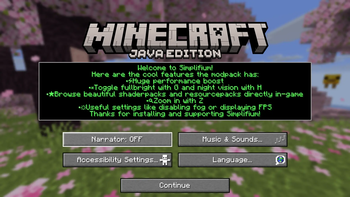

About this Modpack
Want a version of this modpack without all of the quality-of-life features? Use Smallifium.
NeoForge support coming soon.
What is Simplifium?
Simplifium is a lightweight optimization modpack designed to significantly boost performance using a list of only 25 mods.
The name is a blend of "Simplify" and the "-um" suffix, following the naming convention of many popular optimization mods (like Sodium or Lithium). True to its name, Simplifium avoids bloat and keeps the experience as close to vanilla as possible. While most of the mods focus on performance (settings can be found under Video Settings), a few others add essential quality-of-life features.
Why should I use Simplifium?
Performance
This modpack highly increases performance using mods like Sodium, Lithium, Entity Culling, FerriteCore, and more!
Quality-of-life features
Also, there are plenty of simple quality-of-life features like zoom; toggleable fullbright; shader and resourcepack support; the ability to browse, install and update resourcepacks, datapacks, shaderpacks and worlds and lots of useful settings like disabling fog or showing FPS.
Easy to play
Install the modpack, launch it, create a world and you're ready to play without even touching the settings.
Quick support for new versions
Small amount of mods=Not having to wait a lot for all of them to be updated=Not having to wait a lot for the modpack to be updated.
Fully client-side
This mod only uses client-side mods, which means when you have the modpack installed you can join servers.
Customizable
You can add any shaderpack, resourcepack, datapack, world, (everything mentioned before can be installed in-game) or mod you want.
Lightweight
This modpack can do everything mentioned before using just 25 mods (very little compared to other optimization modpacks).
Can I use this as a base for my own modpack?
Sure! Just give credits and don't just reupload the modpack without changing anything or with changing it just a little bit (Don't just add a few mods, make a big change to the modpack).
Credits
A huge thanks to all the mod creators who made this possible. You can find the specific mod list and links to their respective pages by checking any release in the Versions tab.
Thank you for downloading and supporting Simplifium!
By the way if you have any suggestions or found a bug create an issue here.
Available Versions
How to Set Up a Simplifium Server
Order Server
Choose at least 4 GB RAM (6 GB recommended for Simplifium). Based on player count: per 8 players.
Install Modpack in Dashboard
Open the modpack browser in the dashboard, search for "Simplifium" and click "Install". The fabric loader and Minecraft 26.1.2 are configured automatically.
Start Server & Play
Start the server – all mods are loaded automatically. Share the server IP with friends and play together!
Frequently Asked Questions
Simplifium server crashes or won't start – what to do?
Most common causes: insufficient RAM or wrong fabric loader. Check latest.log for "OutOfMemoryError" → increase RAM to at least 6 GB. For "Mixin" or "ClassNotFoundException" errors: modpack version and loader don't match. With Mado Hosting, loader and Minecraft version are auto-configured on modpack install – preventing most startup issues.
How much RAM does a Simplifium server really need?
Minimum 4 GB, recommended 6 GB for stable performance. per 8 players. Important: Minecraft modpacks need more RAM than vanilla – plan extra per additional player. With Mado Hosting, you can scale RAM up live at any time without data loss (from €8/month).
Can I add custom mods to Simplifium without conflicts?
Yes, but check compatibility: only use mods for the same loader (fabric) and same Minecraft version (26.1.2). Common issues: ID conflicts with recipe mods and incompatible coremod versions. The Mado dashboard mod browser only shows compatible mods and warns about known conflicts.
Simplifium server lagging – performance tips
1) Increase RAM to 6 GB+. 2) Reduce server view-distance to 8 (server.properties). 3) Pre-generate chunks with the "Chunky" plugin. 4) Use /spark profiler to check which mods consume the most tick time. With Mado Hosting, all servers run on NVMe SSDs with dedicated CPU cores – eliminating hardware as a bottleneck.
Similar Modpacks

![Cobblemon Official Modpack [Fabric]](https://cdn.modrinth.com/data/5FFgwNNP/e7f9ee2e9d361623847853fe2ddce42f519ee64f.png)
![COBBLEVERSE - Pokemon Adventure [Cobblemon]](https://cdn.modrinth.com/data/Jkb29YJU/581ecf54530972afb18a04660afd820f2f24f6c7.png)
![Better MC [FABRIC] - BMC2](https://cdn.modrinth.com/data/shFhR8Vx/a19c2bcb51d38f32f138d3607e91cb2b7b8e387f_96.webp)


Rent Simplifium Server
Start your own server with automatic modpack installation.
Supported Versions
Start your Simplifium Server now
From €8.00/month with 6 GB RAM for the best performance.
Configure Server →