
Simply More FPS
The best minecraft optimization pack! Double the fps, run minecraft on very old pc!
About this Modpack
Tired of lag, stuttering, and abysmal frame rates ruining your Minecraft experience?
[Optimization] FPS Boost Pack is scientifically engineered to be the BEST Fabric optimization modpack available today. We have meticulously assembled cutting-edge mods like Sodium, Lithium and many others to completely overhaul the game engine.
Expect to triple your FPS, slash your RAM consumption, and enjoy butter-smooth gameplay, transforming even older machines into high-performance gaming rigs. This pack is designed to maintain a strict Vanilla+ feel while delivering unparalleled speed and stability!
Example of our Fps Boost*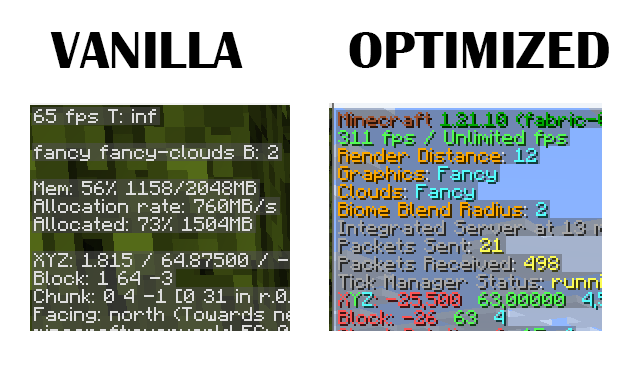
Key Features & Unbeatable Advantages
🏆 The Best Performance Engine: Built on the superior Sodium/Iris foundation, this pack delivers the highest FPS gains, crushing the limits of the default game engine. Experience lightning-fast chunk loading and crystal-clear rendering.
🌍 Universal Server Compatibility: Works flawlessly on ANY server! Since all optimizations are client-side, you can jump onto Vanilla servers, Realms, Hypixel, or any other server without needing the pack installed there.
🧠 Superior Game Logic (High TPS): Lithium and Alternate Current ensure the server-side logic runs efficiently. Say goodbye to tick lag and enjoy stable, responsive gameplay, even during intense Redstone activity.
📉 Massive RAM Reduction: FerriteCore is utilized to aggressively optimize memory usage. This means fewer out-of-memory crashes and a lightweight Minecraft, perfect for background use or systems with less RAM.
🖼️ Full Shader Support: Integrated with Iris Shaders, you get the best of both worlds: ultra-high FPS from Sodium and the visual fidelity of your favorite shaders.
✨ Comprehensive Quality of Life: Includes essential client mods like Mod Menu, BetterF3, and WTHIT to make configuration easy and provide crucial in-game information without performance cost.
🚀 Lightning-Fast Startup: Smooth Boot and optimized resource loading ensure you spend less time waiting and more time playing.
This pack cointains shaders from other creator:
Complementary Shaders - Reimagined (by EminGT)
Complementary Shaders - Unbound (by EminGT)
Photon Shaders (by sixthsurge)
RenderPearl (by Luracasmus)
Rethinking Voxels (by gri573)
*performance may vary based on your pc specification and operating system
Available Versions
How to Set Up a Simply More FPS Server
Order Server
Choose at least 4 GB RAM (6 GB recommended for Simply More FPS). Based on player count: per 8 players.
Install Modpack in Dashboard
Open the modpack browser in the dashboard, search for "Simply More FPS" and click "Install". The fabric loader and Minecraft 1.21.11 are configured automatically.
Start Server & Play
Start the server – all mods are loaded automatically. Share the server IP with friends and play together!
Frequently Asked Questions
Simply More FPS server crashes or won't start – what to do?
Most common causes: insufficient RAM or wrong fabric loader. Check latest.log for "OutOfMemoryError" → increase RAM to at least 6 GB. For "Mixin" or "ClassNotFoundException" errors: modpack version and loader don't match. With Mado Hosting, loader and Minecraft version are auto-configured on modpack install – preventing most startup issues.
How much RAM does a Simply More FPS server really need?
Minimum 4 GB, recommended 6 GB for stable performance. per 8 players. Important: Minecraft modpacks need more RAM than vanilla – plan extra per additional player. With Mado Hosting, you can scale RAM up live at any time without data loss (from €8/month).
Can I add custom mods to Simply More FPS without conflicts?
Yes, but check compatibility: only use mods for the same loader (fabric) and same Minecraft version (1.21.11). Common issues: ID conflicts with recipe mods and incompatible coremod versions. The Mado dashboard mod browser only shows compatible mods and warns about known conflicts.
Simply More FPS server lagging – performance tips
1) Increase RAM to 6 GB+. 2) Reduce server view-distance to 8 (server.properties). 3) Pre-generate chunks with the "Chunky" plugin. 4) Use /spark profiler to check which mods consume the most tick time. With Mado Hosting, all servers run on NVMe SSDs with dedicated CPU cores – eliminating hardware as a bottleneck.
Similar Modpacks

![Cobblemon Official Modpack [Fabric]](https://cdn.modrinth.com/data/5FFgwNNP/e7f9ee2e9d361623847853fe2ddce42f519ee64f.png)
![COBBLEVERSE - Pokemon Adventure [Cobblemon]](https://cdn.modrinth.com/data/Jkb29YJU/581ecf54530972afb18a04660afd820f2f24f6c7.png)
![Better MC [FABRIC] - BMC2](https://cdn.modrinth.com/data/shFhR8Vx/a19c2bcb51d38f32f138d3607e91cb2b7b8e387f_96.webp)


Rent Simply More FPS Server
Start your own server with automatic modpack installation.
Details
- License
- GNU Lesser General Public License v3.0 or later
- Server-side
- Unsupported
- Client-side
- Required
Supported Versions
Start your Simply More FPS Server now
From €8.00/month with 6 GB RAM for the best performance.
Configure Server →