
Simply Refined
Simply Refined is a carefully curated client-side pack focused on QoL improvements, beautiful visuals, and smooth performance.
Screenshots





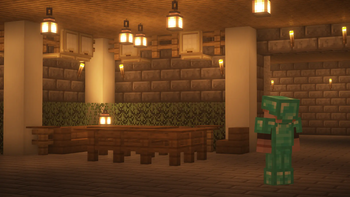
About this Modpack
Simply Refined is a carefully curated client-side pack focused on QoL improvements, beautiful visuals, and smooth performance.

✨ Included Features
💡 QoL Improvements
- AppleSkin adds useful food-related HUD improvements, displaying saturation, exhaustion, and food restoration information.
- Auth Me allows you to quickly re-validate your Minecraft session during
Invalid Sessionerrors when connecting to servers. - BetterF3 replaces Minecraft's default F3 menu with a highly customizable, more human-readable HUD.
- Block Meter allows you to measure areas with ease so you never have to count blocks manually again. Works perfectly with CalcMod!
- Bobby allows customizable render distances further than the server's view-distance setting.
- CalcMod brings a simple and easy-to-use calculator in your chat with shortcuts designed for Minecraft.
- Centered Crosshair fixes a Minecraft bug where the crosshair isn't actually centered.
- Chat Heads adds player heads to chat messages.
- Client Sort brings simple inventory sorting while remaining light and non-intrusive.
- Controlling adds a searchbar to your Controls settings so you can easily find a key binding in the menu.
- Cubes Without Borders allows you to play Minecraft in a borderless fullscreen window so you can easily use other applications while keeping the game open.
- Detail Armor Bar Reconstructed provides detailed information about your armor in the HUD.
- Essential allows you to host worlds, take and share screenshots more easily, and chat with other friends offline who also have Essential.
- Freecam allows you to move your camera separately from your player within your render distance, which is useful for inspecting builds or taking screenshots.
- Jade displays information about what you're looking at in Minecraft.
- JourneyMap adds a real-time map as you explore the world, with the ability to add custom waypoints.
- Language Reload adds quality-of-life improvements related to languages.
- Locator Heads adds player heads to the locator bar.
- Mod Menu allows you to view installed mods and adjust configurations.
- Numeral Ping replaces Minecraft's signal strength ping display with numeric values instead, allowing you to see exactly how much ping players have in servers.
- Remove Reloading Screen allows you to interact with menus without waiting for resource packs to load when making changes.
- ReplayMod allows you to record and replay your captured moments from a 3D perspective.
- Scribble adds useful buttons to books, allowing you to format and change the color of text without worrying about the
§symbol, and much more. - Simple Voice Chat adds proximity voice chat capabilities to Minecraft if supported by the server.
- Vivecraft adds VR support.
- Zoomify adds a highly customizable zoom key.
🌿 Aesthetics
- Iris Shaders adds shader support and is compatible with OptiFine shaderpacks.
- Complementary Shaders - Reimagined adds a warm and cozy vibe to your Minecraft world with unique visual elements for a vanilla feel.
- Bliss Shaders adds a scenic fantasy feel to your Minecraft world.
- 3D Skin Layers automatically renders the second layer of player skins in 3D.
- AmbientSounds makes sounds more immersive in your Minecraft world.
- BetterGrassify adds OptiFine's Fancy and Fast better grass implementation.
- Blur+ adds dynamic blur to all GUIs to remove distractions and improve menu aesthetics.
- Continuity adds support for connected textures.
- Cool Rain adds dynamic sounds to certain blocks during rainfall.
- Explosive Enhancement adds new particles to make explosions look better.
- Falling Leaves adds falling leaf particles to leaf blocks.
- Immersive Hotbar adds animations to your hotbar to make it more immersive and aesthetic when placing or picking up blocks, using tools or weapons, and scrolling in the hotbar.
- LambDynamicLights adds real-time dynamic lights to torches, lanterns, and more.
- Particle Effects adds uniquely textured particles for every effect in Minecraft.
- Realistic Rain replaces the default rain sounds to be more realistic, including rain and splash textures, and adds new thunder sounds.
- Sound Physics Remastered adds realistic sound attenuation, reverberation, and absorption through blocks, creating a highly immersive sound experience.
- Sounds adds a variety of new sound effects to the UI, chat messages, in-game actions, and block sounds.
- Visuality adds a variety of new particles for minor visual improvements.
- Wakes adds realistic splashes and wakes on water.
⚡ Performance & Compatibility Mods
- BadOptimizations adds optimizations to lightmap updates, sky color calculation, debug logic, and more.
- Concurrent Chunk Management (C2ME) improves chunk performance.
- Controlify adds controller support.
- Dynamic FPS reduces resource usage when Minecraft is in the background, idle, or on battery.
- Entity Culling increases FPS by hiding entities that aren't visible using asynchronous path-tracing.
- FerriteCore optimizes memory usage.
- ImmediatelyFast optimizes all immediate mode rendering using a custom buffer implementation.
- Lithium improves game logic optimization, including game physics, mob AI, block ticking, and more.
- More Culling increases FPS by adjusting multiple types of culling to improve performance.
- ServerCore improves performance and reduces lag spikes in Minecraft servers (can still provide some client-side benefits when connected to servers).
- Sodium improves framerate, micro-stutter, and fixes several graphical issues in Minecraft, among other rendering optimizations.
- Very Many Players (VMP) improves server performance at high player counts (may still help clients on large servers).
- [EMF] Entity Model Features adds support for OptiFine's Custom Entity Models (CEM).
- [ESF] Entity Sound Features allows for entity sound variation using OptiFine format property rules.
- [ETF] Entity Texture Features adds new entity texture features, including entity and player skin features.
⭐ Planned Updates
- A custom wiki with a useful performance guide and FAQ
- A Lite version of Simply Refined for lower-end computers
- Backporting for 1.16.5 — 1.21.5
Available Versions
How to Set Up a Simply Refined Server
Order Server
Choose at least 4 GB RAM (6 GB recommended for Simply Refined). Based on player count: per 8 players.
Install Modpack in Dashboard
Open the modpack browser in the dashboard, search for "Simply Refined" and click "Install". The fabric loader and Minecraft 26.1 are configured automatically.
Start Server & Play
Start the server – all mods are loaded automatically. Share the server IP with friends and play together!
Frequently Asked Questions
Simply Refined server crashes or won't start – what to do?
Most common causes: insufficient RAM or wrong fabric loader. Check latest.log for "OutOfMemoryError" → increase RAM to at least 6 GB. For "Mixin" or "ClassNotFoundException" errors: modpack version and loader don't match. With Mado Hosting, loader and Minecraft version are auto-configured on modpack install – preventing most startup issues.
How much RAM does a Simply Refined server really need?
Minimum 4 GB, recommended 6 GB for stable performance. per 8 players. Important: Minecraft modpacks need more RAM than vanilla – plan extra per additional player. With Mado Hosting, you can scale RAM up live at any time without data loss (from €8/month).
Can I add custom mods to Simply Refined without conflicts?
Yes, but check compatibility: only use mods for the same loader (fabric) and same Minecraft version (26.1). Common issues: ID conflicts with recipe mods and incompatible coremod versions. The Mado dashboard mod browser only shows compatible mods and warns about known conflicts.
Simply Refined server lagging – performance tips
1) Increase RAM to 6 GB+. 2) Reduce server view-distance to 8 (server.properties). 3) Pre-generate chunks with the "Chunky" plugin. 4) Use /spark profiler to check which mods consume the most tick time. With Mado Hosting, all servers run on NVMe SSDs with dedicated CPU cores – eliminating hardware as a bottleneck.
Similar Modpacks

![Cobblemon Official Modpack [Fabric]](https://cdn.modrinth.com/data/5FFgwNNP/e7f9ee2e9d361623847853fe2ddce42f519ee64f.png)
![COBBLEVERSE - Pokemon Adventure [Cobblemon]](https://cdn.modrinth.com/data/Jkb29YJU/581ecf54530972afb18a04660afd820f2f24f6c7.png)
![Better MC [FABRIC] - BMC2](https://cdn.modrinth.com/data/shFhR8Vx/a19c2bcb51d38f32f138d3607e91cb2b7b8e387f_96.webp)


Rent Simply Refined Server
Start your own server with automatic modpack installation.
Details
- License
- BSD 3-Clause "New" or "Revised" License
- Server-side
- Unsupported
- Client-side
- Required
Supported Versions
Start your Simply Refined Server now
From €8.00/month with 6 GB RAM for the best performance.
Configure Server →