
Slimecrew Frontier
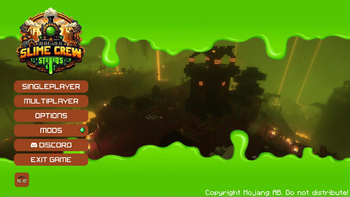
Encounter new mobs, embark on thrilling quests, and craft custom recipes that deepen your adventure. Unleash the power of innovative storage and automation tools like Framed Blocks and Refined Storage, redefining your gameplay.
Screenshots

About this Modpack
Description
This modpack, powered by the NeoForged mod loader, delivers an unparalleled gaming experience, featuring 🌄 sprawling landscapes and intricate structures courtesy of top-tier mods from YUNG and other notable creators. Encounter a rich array of 🐾 new mobs, delve into numerous quests 📜, and explore custom recipes 🍲. With cutting-edge additions like Framed Blocks 🧱, Sophisticated Backpacks 🎒, and Refined Storage 🗄️, this modpack redefines storage and automation. Experience revamped world generation 🌍 across all dimensions, immersing you in a world that honors the essence of Vanilla Minecraft, all while centering around the innovative Create mod 🛠️ and its many addons. Prepare for an adventure that captivates and elevates your Minecraft journey.
Included Content
Mods
Curseforge
- AllTheCompressed
- Apotheosis
- Apothic Attributes (AttributesLib)
- Aquaculture 2
- Chimes
- Chisels and Bits
- Crash Utilities
- Create Compressed
- Create Confectionery
- Create Design n' Decor
- Create WooderWheels
- GroovyModLoader (GML)
- Krypton Reforged
- KubeJS Delight
- Ore Excavation
- Placebo
- Sophisticated Backpacks
- Sophisticated Core
- Sophisticated Storage
- Time In A Bottle
- Time In A Bottle Curio Support
- When Dungeons Arise
Datapacks
- [Better End Cities (Vanilla)](https://modrinth.com/datapack/better-end-cities-(vanilla)) - [Create Renewable Ores](https://modrinth.com/datapack/create-renewable-ores) - [Ender Dragon Fight Remastered](https://modrinth.com/datapack/edf-remastered) - [End Remastered Yungs](https://discord.com/invite/D9cxayDNSP) - [Remove Terralith Intro Message](https://modrinth.com/datapack/remove-terralith-intro-message) - [Remove Oil Well](https://modrinth.com/datapack/disable-ad-astra-oil-wells) - [Repurposed Structures - Better Desert Temples Compat](https://modrinth.com/datapack/repurposed-structures-better-desert-temples-compat) - [Repurposed Structures - Better Dungeons Compat](https://modrinth.com/datapack/repurposed-structures-better-dungeons-compat) - [Repurposed Structures - Better Jungle Temples Compat](https://modrinth.com/datapack/repurposed-structures-better-jungle-temples) - [Repurposed Structures - Better Ocean Monuments Compat](https://modrinth.com/datapack/repurposed-structures-better-ocean-monuments-compat) - [Repurposed Structures - Better Strongholds Compat](https://modrinth.com/datapack/rsbtsc) - [Repurposed Structures - Better Villages Compat](https://modrinth.com/datapack/repurposed-structures-better-villages-compat) - [Terralith v2](https://modrinth.com/datapack/terralith-v2) - [Terrains](https://modrinth.com/datapack/terrains)Shaders
- [Sildurs Vibrant Shaders](https://www.curseforge.com/minecraft/customization/sildurs-vibrant-shaders)Resource Packs
- [Faithful 32x](https://www.curseforge.com/minecraft/texture-packs/faithful-32x)Requirements
- Forge: 47.1.61
- Minecraft: 1.20.1
Recommendations
Ensure you allocate at least 8GB of RAM
Available Versions
How to Set Up a Slimecrew Frontier Server
Order Server
Choose at least 6 GB RAM (8 GB recommended for Slimecrew Frontier). Based on player count: per 5 players.
Install Modpack in Dashboard
Open the modpack browser in the dashboard, search for "Slimecrew Frontier" and click "Install". The neoforge loader and Minecraft 1.20.1 are configured automatically.
Start Server & Play
Start the server – all mods are loaded automatically. Share the server IP with friends and play together!
Frequently Asked Questions
Slimecrew Frontier server crashes or won't start – what to do?
Most common causes: insufficient RAM or wrong neoforge loader. Check latest.log for "OutOfMemoryError" → increase RAM to at least 8 GB. For "Mixin" or "ClassNotFoundException" errors: modpack version and loader don't match. With Mado Hosting, loader and Minecraft version are auto-configured on modpack install – preventing most startup issues.
How much RAM does a Slimecrew Frontier server really need?
Minimum 6 GB, recommended 8 GB for stable performance. per 5 players. Important: Minecraft modpacks need more RAM than vanilla – plan extra per additional player. With Mado Hosting, you can scale RAM up live at any time without data loss (from €12/month).
Can I add custom mods to Slimecrew Frontier without conflicts?
Yes, but check compatibility: only use mods for the same loader (neoforge) and same Minecraft version (1.20.1). Common issues: ID conflicts with recipe mods and incompatible coremod versions. The Mado dashboard mod browser only shows compatible mods and warns about known conflicts.
Slimecrew Frontier server lagging – performance tips
1) Increase RAM to 8 GB+. 2) Reduce server view-distance to 8 (server.properties). 3) Pre-generate chunks with the "Chunky" plugin. 4) Use /spark profiler to check which mods consume the most tick time. With Mado Hosting, all servers run on NVMe SSDs with dedicated CPU cores – eliminating hardware as a bottleneck.
Similar Modpacks
![Cobblemon Official Modpack [Fabric]](https://cdn.modrinth.com/data/5FFgwNNP/e7f9ee2e9d361623847853fe2ddce42f519ee64f.png)
![COBBLEVERSE - Pokemon Adventure [Cobblemon]](https://cdn.modrinth.com/data/Jkb29YJU/581ecf54530972afb18a04660afd820f2f24f6c7.png)
![Better MC [FABRIC] - BMC2](https://cdn.modrinth.com/data/shFhR8Vx/a19c2bcb51d38f32f138d3607e91cb2b7b8e387f_96.webp)


![Better MC [FORGE] - BMC4](https://cdn.modrinth.com/data/4BV47HRn/7f5ef7cc61b2593609aabef3ed07a866a4f11b73_96.webp)
Rent Slimecrew Frontier Server
Start your own server with automatic modpack installation.
Supported Versions
Start your Slimecrew Frontier Server now
From €12.00/month with 8 GB RAM for the best performance.
Configure Server →