
Smooth Journey (Lite Version)
A lightweight optimization modpack for Fabric.
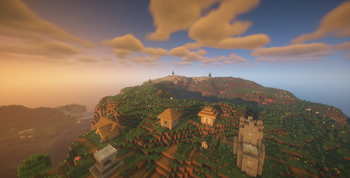
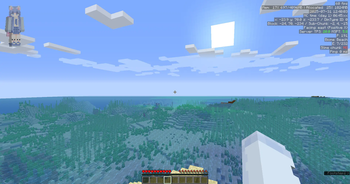
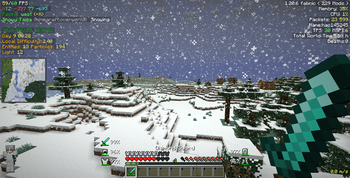
Screenshots
About this Modpack
If you want to install the Forge version of this modpack:
About Lite Version:
The full version of this modpack (Smooth Journey) without the redstone or assisted mods and the mods which support Optifine resourcepack features.
Mods not in the lite version
Boat HUD (from NFS Most Wanted 2005)
Carpet TIS Addition
Datapack Debugger
Elytra HUD (from MFS 2020)
[EMF] Entity Model Features
[ETF] Entity Texture Features
carpet
FabricSkyBoxes
GugleCarpetAddition
Item Scroller
Litematica
MagicLib
MaLiLib
Masa Gadget
MiniHUD
OptiGUI
Pistorder
Puzzle
Respackopts
TweakerMore
Tweakeroo
Yes Steve Model
This modpack tries to optimize Minecraft by using some optimized mods such as
Sodium and Entity Culling,while adding some utility mods like
Xaero's Minimap and World Preview.
Besides,it contains some good resoucepacks and shaders to provide a better visual experience.
(you can see them below)
You can know this modpack's features supported by some great mods in the "Features:" below.
At last,it's enjoyable for me to make a modpack.I hope you enjoy it.
Included mods,resourcepacks and shaders:
You can also go to the Versions page to know them.
Mods:
Optimized mods:
More Culling
ImmediatelyFast
Sodium
Sodium Extra
Reese's Sodium Options
Sodium Shadowy Path Blocks
Iris Shaders
Indium
Lithium
Dynamic FPS
Entity Culling
Packet Fixer
bad packets
Concurrent Chunk Management Engine (Fabric)
Noisium
lazy-language-loader
Krypton
Enhanced Block Entities
Very Many Players (Fabric)
Redstone or assisted mods:
Carpet
Carpet TIS Addition
Litematica
Tweakeroo
Item Scroller
MiniHUD
TweakerMore
Useful mods:
Xaero's World Map
Xaero's Minimap
XaeroPlus
Continuity
Cherished Worlds
Fabrishot
CustomHud
Quick Menu
Simple Voice Chat
AppleSkin
Not Enough Animations
Resourcify
LAN World Plug-n-Play (mcwifipnp)
Chat Heads
World Preview
Better Mount HUD
Mod Menu
Better Statistics Screen
Roughly Enough Items (REI)
Jade 🔍
ViaFabricPlus
Better "Add Server"
Tooltip Scroll
Controlling
Axolotl Item Fix
Inventoryhud
Main Menu Credits
Broken Lead Warner
Scoreboard Helper
Mica
RebindAllTheKeys
Symbol Chat
Notes
Resource Reload (F3+T) Everywhere
Music Notification
Chat Patches
No Chat Reports
Sound Physics Remastered
Isometric Renders
Inventory Profiles Next
Yes Steve Model
IMBlocker
Language Reload
RoughlyEnoughProfessions
Mods which support Optifine resourcepack features:
[EMF] Entity Model Features
[ETF] Entity Texture Features
OptiGUI
Puzzle
FabricSkyboxes
Dependency mods:
Cloth Config API
Fabric Language Kotlin
Fabric API
oωo (owo-lib)
Searchables
Architectury API
MaLiLib
Forge Config API Port
Resourcepacks:
XK Highlight Block
XK Redstone Display
Faithful 32x
Translations for Sodium
Masa Family Bucket Translation Pack
Shaders:
BSL Shaders
Complementary Shaders - Reimagined
Features:(Mod Name : Features)
Axolotl Item Fix:
- Makes the axolotl bucket item show the right axolotl type.
Better Add Server:
- saving when you press enter
- automatically filling in the server name when you enter the IP
- even converting names of existing servers using the default name "Minecraft Server" to more recognisable ones
Better Ping Display:
- Adds a configurable numerical ping display to the player list.
Better Statistics Screen:
- Improves the statistics screen and makes it more useful.
Broken Lead Warner
Carpet Mod:
- Takes full control over your vanilla game.
- Use command /carpet in your game to open its menu.
- Use command /carpet language to change language.
- (Can't use on servers which don't install this mod)
Chat Heads:
- Adds player heads next to their chat messages.
Chat Patches:
- Touches up a few aspects of Minecraft's mundane chat, with as much configurability as possible!
Cherished Worlds:
- Favorite/pin/bookmark certain worlds, which will always be at the top of the list and cannot be deleted.
Controlling:
- Adds the ability to search for keybinds using their name in the KeyBinding menu, this allows players to easily find a key binding in the menu.
Fabrishot:
- Press F9(default) to take high resolution screenshots.
Inventory HUD +:
- Show you your inventory , armor and potion effects while playing.
- Press O(default) to open config screen.
Isometric Renders:
- Creates high-resolution isometric screenshots of game objects.
- Use command /isorender to see its wiki.
Jade:
- Shows what you are looking at.
LAN World Plug-n-Play:
- When opening a world to LAN:
- Allows you to enable or disable pvp.
- Allows you to change server motd.
- Allows you to control other players' op permissions.
- Allows you to control how many players can join your world.
lazy-language-loader:
- Only reload the language instead of all the game resources when changing your language.
Mica:
- Enable Mica or Acrylic on Windows 11 21H2 22000 or later.
Music Notification:
- Display a toast notification when music is played in game.
- Provide a gui that allows you to play any music or sounds.
NotEnoughAnimations:
- Adding and improving animations in Third-Person.
Notes:
- Fully functional, clientside, in-game notepad.
Paperdoll:
- Get a customizable (bedrock like) preview of yourself.
Puzzle:
- Provide a united config for OptiFine replacement mods.
- (You can find it in the option menu next to the FOV or search it in the mod menu)
Quick Menu:
- Adds a configurable easy-to-access menu that runs basic repetitive commands.
- Hold G(default) to open its menu.
Resource Reload (F3+T) Everywhere
Resourcify:
- In-game resource pack, data pack and shader browser and updater.
Roughly Enough Items:
- Clean and Customizable. An easy way to browse recipes.
ScoreboardHelper:
- Provides a few extra functions to use Minecraft Scoreboard more easily.
- Press (default) to export scoreboard.
- Press .(default) to edit score.
Simple Voice Chat
Symbol Chat:
- Adds a symbol/emoji menu as well as writing in different unicode fonts.
Tooltip Scroll:
- Allows the tooltip GUI to be moved with the scrollwheel or configurable keys.
ViaFabricPlus:
- Fabric mod to connect to EVERY Minecraft server version (Release, Beta, Alpha, Classic, Snapshots, Bedrock) with QoL fixes to the gameplay.
World preview:
- Allows you to preview a map in the new world screen.
Xaero's World Map:
- Adds a full screen world map which shows you what you have explored in the world.
Inventory Profiles Next:
- Help you sort your inventory.
Litematica:
- A modern schematic mod.
- Press J(default) to open its menu.
- Press F10(default) to toggle the Easy Place mode.
- Press F12(default) to execute the currently selected tool operation.
Tweakeroo:
- Adds a bunch of configurable client-side tweaks.
- Press F7(default) to toggle FreeCamera.
- Press F8(default) to toggle GammaOverride.
- Hold C(default) to zoom.
- Look at a chest/shulkerbox and hold Alt(default) to see what's in it.
- Hold Shift(default) on a map in your inventory to see what it looks like.
- Hold Shift(default) on a shulkerbox in your inventory to see what's in it.
Item Scroller:
- Adds various shortcuts to move items easier in inventory screens.
- Search it in the mod menu to open its config screen.
MiniHUD:
- Allows displaying various "info lines" on the screen ("mini-F3").
- Press H(default) to open or close its HUD.
CustomHUD:
- A highly configurable variable-based text HUD.
- Search it in the mod menu to open its config screen.
Yes Steve Model:
- Allows players to customize player models and animations as they wish.
Frame rate test(on my computer)(same settings)
| Test | Vanilla | Smooth Journey |
|---|---|---|
| Look at sky | 720 | 870 |
| Look at a village (same seed) | 270 | 275 |
| Look at 1331 chests (use /fill ~ ~ ~ ~10 ~10 ~10 chest to generate) | 300 | 500 |
Available Versions
How to Set Up a Smooth Journey (Lite Version) Server
Order Server
Choose at least 4 GB RAM (6 GB recommended for Smooth Journey (Lite Version)). Based on player count: per 8 players.
Install Modpack in Dashboard
Open the modpack browser in the dashboard, search for "Smooth Journey (Lite Version)" and click "Install". The fabric loader and Minecraft 26.1.2 are configured automatically.
Start Server & Play
Start the server – all mods are loaded automatically. Share the server IP with friends and play together!
Frequently Asked Questions
Smooth Journey (Lite Version) server crashes or won't start – what to do?
Most common causes: insufficient RAM or wrong fabric loader. Check latest.log for "OutOfMemoryError" → increase RAM to at least 6 GB. For "Mixin" or "ClassNotFoundException" errors: modpack version and loader don't match. With Mado Hosting, loader and Minecraft version are auto-configured on modpack install – preventing most startup issues.
How much RAM does a Smooth Journey (Lite Version) server really need?
Minimum 4 GB, recommended 6 GB for stable performance. per 8 players. Important: Minecraft modpacks need more RAM than vanilla – plan extra per additional player. With Mado Hosting, you can scale RAM up live at any time without data loss (from €8/month).
Can I add custom mods to Smooth Journey (Lite Version) without conflicts?
Yes, but check compatibility: only use mods for the same loader (fabric) and same Minecraft version (26.1.2). Common issues: ID conflicts with recipe mods and incompatible coremod versions. The Mado dashboard mod browser only shows compatible mods and warns about known conflicts.
Smooth Journey (Lite Version) server lagging – performance tips
1) Increase RAM to 6 GB+. 2) Reduce server view-distance to 8 (server.properties). 3) Pre-generate chunks with the "Chunky" plugin. 4) Use /spark profiler to check which mods consume the most tick time. With Mado Hosting, all servers run on NVMe SSDs with dedicated CPU cores – eliminating hardware as a bottleneck.
Similar Modpacks

![Cobblemon Official Modpack [Fabric]](https://cdn.modrinth.com/data/5FFgwNNP/e7f9ee2e9d361623847853fe2ddce42f519ee64f.png)
![COBBLEVERSE - Pokemon Adventure [Cobblemon]](https://cdn.modrinth.com/data/Jkb29YJU/581ecf54530972afb18a04660afd820f2f24f6c7.png)
![Better MC [FABRIC] - BMC2](https://cdn.modrinth.com/data/shFhR8Vx/a19c2bcb51d38f32f138d3607e91cb2b7b8e387f_96.webp)


Rent Smooth Journey (Lite Version) Server
Start your own server with automatic modpack installation.
Supported Versions
Start your Smooth Journey (Lite Version) Server now
From €8.00/month with 6 GB RAM for the best performance.
Configure Server →