
Smooth Optimized
The leading optimization modpack, meticulously crafted through extensive research and fine-tuned for pure performance.
Screenshots
About this Modpack
Smooth Optimized 🏎️✨ – The Ultimate Minecraft Performance Modpack
🚀 Experience Minecraft Like Never Before!
Are you tired of lag, stuttering, and slow chunk loading ruining your Minecraft experience? Do you dream of silky-smooth gameplay, stunning visuals, and lightning-fast performance, all without needing a high-end PC? Smooth Optimized is the answer! This modpack is carefully designed to maximize FPS, reduce input lag, and enhance performance without sacrificing the beauty of your world.
🔥 Unleash the Power of Optimization!
Smooth Optimized isn’t just another performance modpack—it’s a finely tuned masterpiece, crafted to make Minecraft run as smoothly as possible. Whether you're exploring vast landscapes, building intricate structures, or diving into intense battles, this modpack ensures you never miss a frame.
✔️ Higher FPS – Enjoy insanely high frame rates, even on low-end PCs!
✔️ Zero Stutter Gameplay – Say goodbye to annoying FPS drops and input lag.
✔️ Faster Chunk Loading – Explore the world without waiting for terrain to render.
✔️ Optimized Resource Usage – Smooth performance without unnecessary strain on your system.
🎨 Enhanced Visuals Without Compromise
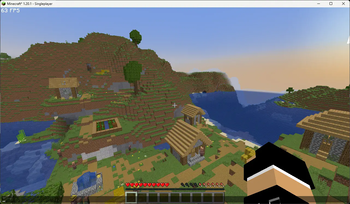
Why choose between performance and beauty when you can have both? Smooth Optimized comes with carefully selected visual improvements that keep Minecraft looking gorgeous while ensuring peak performance.
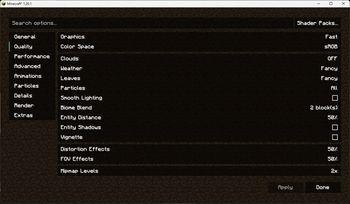
🌿 Crisp and Clear Textures – Sharper details with no FPS loss.
☀️ Smooth Lighting and Shadows – Enhancing the atmosphere while staying optimized.
💦 Beautiful Water and Clouds – Improved rendering without extra lag.
🔄 Seamless Animations – Every movement, every interaction, buttery smooth.
🛠️ The Best Performance Mods, Handpicked for You
Each mod in this pack is chosen for maximum efficiency and stability. From advanced rendering optimizations to memory management tweaks, every detail is crafted to deliver the ultimate Minecraft experience.
⚙️ Better Multi-threading – Uses your CPU efficiently to boost performance.
🔧 Reduced RAM Usage – Smooth gameplay with lower memory requirements.
🚄 Faster World Generation – No more waiting ages for chunks to load.
🎯 Optimized Entity Handling – Less lag, even in mob-heavy areas.
🌍 Perfect for All Playstyles
No matter how you enjoy Minecraft, Smooth Optimized ensures you get the best experience possible.
🏡 Builders – Instant block placement, smooth movement, and faster world rendering for large projects.
⚔️ Adventurers – Explore vast terrains effortlessly without frame drops.
🛠️ Redstone Engineers – Fluid interactions with no delay in circuits.
🎮 Multiplayer Players – Enjoy low-latency, high-performance gaming, even on servers.
💨 Say Goodbye to Lag and Hello to Fun!
With Smooth Optimized, you won’t have to worry about low FPS, slow rendering, or annoying stutters. Whether you’re on a high-end PC or a low-spec laptop, this modpack unlocks the full potential of Minecraft and allows you to experience the game as it was meant to be played—fast, fluid, and breathtakingly beautiful.
✅ Compatible with most mods and shaders
✅ Works with vanilla and modded Minecraft
✅ Easy to install and configure
✅ Regular updates for the latest optimizations
🌟 Download Smooth Optimized today and take your Minecraft experience to the next level! 🌟
Included Mods
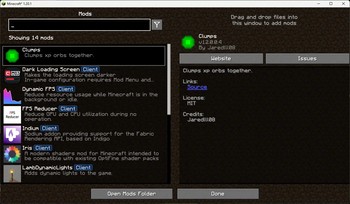
- Cloth Config API - Configuration Library for Minecraft Mods
- Sodium - The fastest and most compatible rendering optimization mod for Minecraft. Now available for both NeoForge and Fabric!
- Reese's Sodium Options - Alternative Options Menu for Sodium
- Starlight (Fabric) - Rewrites the light engine to fix lighting performance and lighting errors
- Dynamic FPS - Reduce resource usage while Minecraft is in the background, idle, or on battery.
- Indium - Sodium addon providing support for the Fabric Rendering API, based on Indigo
- Clumps - Clumps XP orbs together to reduce lag
- Iris Shaders - A modern shader pack loader for Minecraft intended to be compatible with existing OptiFine shader packs
- Lithium - No-compromises game logic optimization mod. Well suited for clients and servers of all kinds. Now available for Fabric and NeoForge!
- Dark Loading Screen - Makes the loading screen darker.
- LazyDFU - Makes the game boot faster by deferring non-essential initialization
- Fabric API - Lightweight and modular API providing common hooks and intercompatibility measures utilized by mods using the Fabric toolchain.
- Sodium Extra - A Sodium addon that adds features that shouldn't be in Sodium.
- FPS Reducer - Reduce GPU and CPU usage automatically when no user operation exists.
- Mod Menu - Adds a mod menu to view the list of mods you have installed.
- WI Zoom - WI Zoom is a Minecraft mod offering up to 50x zoom with smooth camera movement.
- LambDynamicLights - Adds dynamic lights to Minecraft as the most feature-complete and optimized dynamic lighting mod for Fabric.
Included Resource
- Faithful 32x - The original Minecraft texture feel, with double the resolution and double the fun!
Other Notes
Minecraft: Java Edition
Minimum Requirements:
- OS: Windows 10/11, macOS, or Linux
- CPU: Intel Core i3-3210 / AMD A8-7600 or equivalent
- RAM: 4 GB
- GPU: Intel HD Graphics 4000 / AMD Radeon R5 with OpenGL 4.4 support
- Storage: At least 1 GB (plus space for game saves and mods)
- Java Version: Latest version recommended
Recommended Requirements:
- OS: Windows 10/11, macOS, or Linux
- CPU: Intel Core i5-4690 / AMD A10-7800 or better
- RAM: 8 GB or more
- GPU: NVIDIA GeForce 700 series / AMD Radeon Rx 200 series or better
- Storage: SSD recommended
Available Versions
How to Set Up a Smooth Optimized Server
Order Server
Choose at least 6 GB RAM (8 GB recommended for Smooth Optimized). Based on player count: per 5 players.
Install Modpack in Dashboard
Open the modpack browser in the dashboard, search for "Smooth Optimized" and click "Install". The fabric loader and Minecraft 1.21.1 are configured automatically.
Start Server & Play
Start the server – all mods are loaded automatically. Share the server IP with friends and play together!
Frequently Asked Questions
Smooth Optimized server crashes or won't start – what to do?
Most common causes: insufficient RAM or wrong fabric loader. Check latest.log for "OutOfMemoryError" → increase RAM to at least 8 GB. For "Mixin" or "ClassNotFoundException" errors: modpack version and loader don't match. With Mado Hosting, loader and Minecraft version are auto-configured on modpack install – preventing most startup issues.
How much RAM does a Smooth Optimized server really need?
Minimum 6 GB, recommended 8 GB for stable performance. per 5 players. Important: Minecraft modpacks need more RAM than vanilla – plan extra per additional player. With Mado Hosting, you can scale RAM up live at any time without data loss (from €12/month).
Can I add custom mods to Smooth Optimized without conflicts?
Yes, but check compatibility: only use mods for the same loader (fabric) and same Minecraft version (1.21.1). Common issues: ID conflicts with recipe mods and incompatible coremod versions. The Mado dashboard mod browser only shows compatible mods and warns about known conflicts.
Smooth Optimized server lagging – performance tips
1) Increase RAM to 8 GB+. 2) Reduce server view-distance to 8 (server.properties). 3) Pre-generate chunks with the "Chunky" plugin. 4) Use /spark profiler to check which mods consume the most tick time. With Mado Hosting, all servers run on NVMe SSDs with dedicated CPU cores – eliminating hardware as a bottleneck.
Similar Modpacks

![Cobblemon Official Modpack [Fabric]](https://cdn.modrinth.com/data/5FFgwNNP/e7f9ee2e9d361623847853fe2ddce42f519ee64f.png)
![COBBLEVERSE - Pokemon Adventure [Cobblemon]](https://cdn.modrinth.com/data/Jkb29YJU/581ecf54530972afb18a04660afd820f2f24f6c7.png)
![Better MC [FABRIC] - BMC2](https://cdn.modrinth.com/data/shFhR8Vx/a19c2bcb51d38f32f138d3607e91cb2b7b8e387f_96.webp)


Rent Smooth Optimized Server
Start your own server with automatic modpack installation.
Supported Versions
Start your Smooth Optimized Server now
From €12.00/month with 8 GB RAM for the best performance.
Configure Server →