
Smooth Flow
The most optimized modpack, Made for those with low-end hardware seeking smooth gameplay.
Screenshots
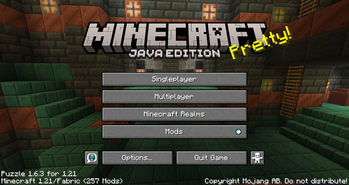
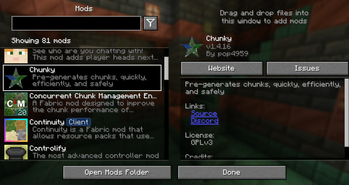
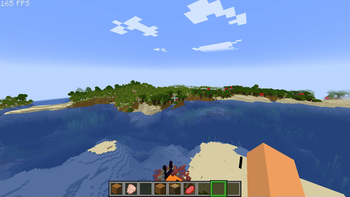

About this Modpack

Tired of lag in it's entirety? You came to the right place. SmoothFlow is a Minecraft modpack specifically designed to maximize FPS, reduce lag, and enhance gameplay—even on low-end systems.
Key Features:
- 🎮 Smooth Gameplay: Countless mods available to ensure smooth playtime & prevent lag spikes.
- 🚀 Best FPS: Enjoy consistent frame rates for seamless gameplay.
- 🎈 Lightweight & Hardware-Friendly: Optimized for low-end hardware, so you can skip the upgrades.
- ✨ Quality Of Life Improvements: Includes connected textures, zoom, and other enhancements for a richer Minecraft experience.
Have ideas or feedback? Join the conversation on our Discord!
Why was SmoothFlow made?
As a player with less-than-ideal hardware, I designed SmoothFlow to help people in similar situations play Minecraft more smoothly and quickly. Whether you're a veteran or first-timer, SmoothFlow will make your game flow like never before.
What is SmoothFlow?
SmoothFlow combines popular optimization modifications with lesser-known gems to prevent lag spikes and improve frame rate. While it isn't perfect, it's an excellent choice for those looking for greater FPS without the requirement for high-end gear. Got any suggestions? Put them in the ideas channel in the discord!
🎯 My Goals
SF is a modpack that takes inspiration from all of the optimization modpacks available on modrinth. My objective is to increase the number of frames per second (FPS) in order to achieve a smoother gameplay experience. This was accomplished by utilizing a variety of mods, both well-known and unknown. Special thanks to the modding community—SmoothFlow wouldn't exist without you! If you enjoy this pack, consider supporting the incredible mod developers.
For the list of mods, View this list here:
Mods
Almanac
Animatica
Architectury
Bad Optimizations
Better F3
Better Stats
C2ME
Calc Mod
Capes
Chat Heads
Chunky
Cicada Lib
Cloth Config
Collective
Continuity
Controlify
Creative Core
Cubes Without Borders
Cull Leaves
Cull Particles
Debugify
Dynamic FPS
E4MC
Eating Animation
Effective
Enhanced Block Entities
Entity Model Features
Entity Sound Features
Entity Texture Features
Entity culling
Entity View Distance
Exordium
Fabric API
Fabric Language Kotlin
Fabric Skyboxes
Fabrishot
Fadeless
Falling Leaves
Fast Quit
FerriteCore
Fix Keyboard on Linux
FPS Display
FSB Interop
....and many more!
For the full list, download and check it out!
Note: If you are an owner of one of these mods, and you don't want it there, just DM me in my discord to tell me to get it removed.
Contacts:
Contacts
Discord: taco78
Gmail: [email protected] (i dont use this a lot)
Available Versions
How to Set Up a Smooth Flow Server
Order Server
Choose at least 4 GB RAM (6 GB recommended for Smooth Flow). Based on player count: per 8 players.
Install Modpack in Dashboard
Open the modpack browser in the dashboard, search for "Smooth Flow" and click "Install". The fabric loader and Minecraft 1.21.1 are configured automatically.
Start Server & Play
Start the server – all mods are loaded automatically. Share the server IP with friends and play together!
Frequently Asked Questions
Smooth Flow server crashes or won't start – what to do?
Most common causes: insufficient RAM or wrong fabric loader. Check latest.log for "OutOfMemoryError" → increase RAM to at least 6 GB. For "Mixin" or "ClassNotFoundException" errors: modpack version and loader don't match. With Mado Hosting, loader and Minecraft version are auto-configured on modpack install – preventing most startup issues.
How much RAM does a Smooth Flow server really need?
Minimum 4 GB, recommended 6 GB for stable performance. per 8 players. Important: Minecraft modpacks need more RAM than vanilla – plan extra per additional player. With Mado Hosting, you can scale RAM up live at any time without data loss (from €8/month).
Can I add custom mods to Smooth Flow without conflicts?
Yes, but check compatibility: only use mods for the same loader (fabric) and same Minecraft version (1.21.1). Common issues: ID conflicts with recipe mods and incompatible coremod versions. The Mado dashboard mod browser only shows compatible mods and warns about known conflicts.
Smooth Flow server lagging – performance tips
1) Increase RAM to 6 GB+. 2) Reduce server view-distance to 8 (server.properties). 3) Pre-generate chunks with the "Chunky" plugin. 4) Use /spark profiler to check which mods consume the most tick time. With Mado Hosting, all servers run on NVMe SSDs with dedicated CPU cores – eliminating hardware as a bottleneck.
Similar Modpacks

![Cobblemon Official Modpack [Fabric]](https://cdn.modrinth.com/data/5FFgwNNP/e7f9ee2e9d361623847853fe2ddce42f519ee64f.png)
![COBBLEVERSE - Pokemon Adventure [Cobblemon]](https://cdn.modrinth.com/data/Jkb29YJU/581ecf54530972afb18a04660afd820f2f24f6c7.png)
![Better MC [FABRIC] - BMC2](https://cdn.modrinth.com/data/shFhR8Vx/a19c2bcb51d38f32f138d3607e91cb2b7b8e387f_96.webp)


Rent Smooth Flow Server
Start your own server with automatic modpack installation.
Supported Versions
Start your Smooth Flow Server now
From €8.00/month with 6 GB RAM for the best performance.
Configure Server →