
SpeedyMC3
The client build is designed to optimize and make the gameplay more enjoyable. modpack has Russian language.
Screenshots
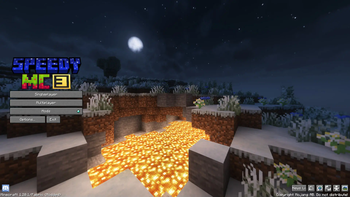
About this Modpack
Summary 🧾
Collection of mods at the moment counts in itself:
- Stable mods for optimization
- Mod for voice chat and compatibility with Replay Mod
- Popular and useful resource packs (disabled by standard)
- Several shaders
This collection was collected specifically for players who like to build and just enjoy communication or mini-games on the servers, for this and created this collection of mods in it collected useful and purely visual mods in addition complements it all mods for optimization.
Opportunity to express yourself! 🤠
The compilation contains mods for creating your own game characters, as well as customization of existing ones.
- Mod Figura (has its own discord)
has more opportunities for customization and scripting
- More costumistic
gives the opportunity to create and use: hats, masks, cloaks, jackets, and belt accessories.
Pros of the modpack 🟢
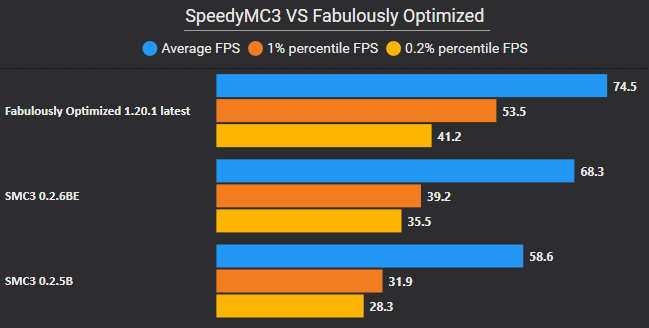
- Good optimization that is compatible with the mods in modpack
RAM consumption will noticeably decrease to about 2 GB
Loading chunks will create less lags
- Shader support
Support for most shaders with OptiFine thanks to Iris Shaders
- Support for resource packs
Custom textures and models of mobs and items
Did you find the problem? 👨🏻💻
Found a problem, want to ask or suggest something?
Feel free to contact Issue tracker
Available Versions
How to Set Up a SpeedyMC3 Server
Order Server
Choose at least 4 GB RAM (6 GB recommended for SpeedyMC3). Based on player count: per 8 players.
Install Modpack in Dashboard
Open the modpack browser in the dashboard, search for "SpeedyMC3" and click "Install". The fabric loader and Minecraft 1.20.1 are configured automatically.
Start Server & Play
Start the server – all mods are loaded automatically. Share the server IP with friends and play together!
Frequently Asked Questions
SpeedyMC3 server crashes or won't start – what to do?
Most common causes: insufficient RAM or wrong fabric loader. Check latest.log for "OutOfMemoryError" → increase RAM to at least 6 GB. For "Mixin" or "ClassNotFoundException" errors: modpack version and loader don't match. With Mado Hosting, loader and Minecraft version are auto-configured on modpack install – preventing most startup issues.
How much RAM does a SpeedyMC3 server really need?
Minimum 4 GB, recommended 6 GB for stable performance. per 8 players. Important: Minecraft modpacks need more RAM than vanilla – plan extra per additional player. With Mado Hosting, you can scale RAM up live at any time without data loss (from €8/month).
Can I add custom mods to SpeedyMC3 without conflicts?
Yes, but check compatibility: only use mods for the same loader (fabric) and same Minecraft version (1.20.1). Common issues: ID conflicts with recipe mods and incompatible coremod versions. The Mado dashboard mod browser only shows compatible mods and warns about known conflicts.
SpeedyMC3 server lagging – performance tips
1) Increase RAM to 6 GB+. 2) Reduce server view-distance to 8 (server.properties). 3) Pre-generate chunks with the "Chunky" plugin. 4) Use /spark profiler to check which mods consume the most tick time. With Mado Hosting, all servers run on NVMe SSDs with dedicated CPU cores – eliminating hardware as a bottleneck.
Similar Modpacks


![Cobblemon Official Modpack [Fabric]](https://cdn.modrinth.com/data/5FFgwNNP/e7f9ee2e9d361623847853fe2ddce42f519ee64f.png)
![COBBLEVERSE - Pokemon Adventure [Cobblemon]](https://cdn.modrinth.com/data/Jkb29YJU/581ecf54530972afb18a04660afd820f2f24f6c7.png)
![Better MC [FABRIC] - BMC2](https://cdn.modrinth.com/data/shFhR8Vx/a19c2bcb51d38f32f138d3607e91cb2b7b8e387f_96.webp)

Rent SpeedyMC3 Server
Start your own server with automatic modpack installation.
Supported Versions
Start your SpeedyMC3 Server now
From €8.00/month with 6 GB RAM for the best performance.
Configure Server →