
SquareIo ModPack
This is a pre-made modpack for SquareIO Skyblock
Screenshots
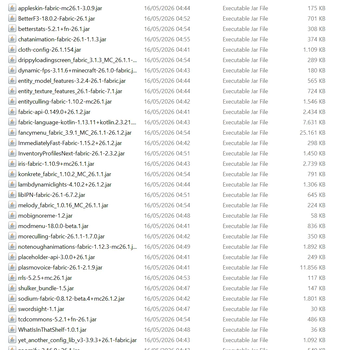
About this Modpack
🌌 SquareIO Companion Pack | Official Client Modpack

Welcome to the official client-side companion modpack for SquareIO, the ultimate unlimited, open-world Skyblock Infinite server!
While SquareIO is built natively on a heavily customized server architecture that allows 100% vanilla clients to connect, using this official modpack unlocks the definitive multiplayer experience. It features seamless proximity voice chat, jaw-dropping performance optimizations, fluid animations, and vital client-side quality-of-life utilities.
🚀 Key Features of this Pack
🎙️ Immersive Proximity Voice Chat
- Plasmo Voice: Fully configured to hook straight into the server's dedicated voice ports. Talk seamlessly with your neighbors across the open void without needing third-party software. Press
Vin-game to set up your microphone!
⚡ Next-Gen Performance Suite (No OptiFine Needed)
- Sodium: Massive FPS multiplication using a completely rewritten modern rendering engine.
- ImmediatelyFast & Entity Culling: Drastically speeds up rendering for menus, text, HUD elements, particles, and hidden chests/mobs. Perfect for massive skyblock automated farms.
- Dynamic FPS: Automatically lowers resource usage when you alt-tab to check Discord or guides.
🎭 Visual & Animation Overhauls
- Iris Shaders: Full, seamless support for your favorite modern shader packs.
- Not Enough Animations: Syncs perfectly with the server to show smooth, realistic 3rd-person animations for eating, drinking, rowing, and more.
- LambDynamicLights: Items like torches and lanterns emit actual light in real-time while held in your hand or dropped on the floor.
- Zoomify: Smooth, customizable cinematic zoom transitions (replicates the classic
Ckey feel).
🛠️ Quality of Life Utilities
- Shulker Box Tooltip: Preview Shulker box contents instantly by hovering and pressing
Shift. - AppleSkin: Visualizes exact hunger and saturation values directly on your food bar.
- Inventory Profiles Next: Sleek client-side inventory and chest sorting mechanics.
- Axolotl Client Side: Allows you to safely walk and navigate while looking in your inventory.
🌌 About the Server: SquareIO
SquareIO is a borderless, multiplayer world driven by Modrinth's revolutionary Skyblock Infinite progression mechanics. Instead of traditional bedrock box islands, travel across an endless void, build massive bridges, meet neighbors, and team up naturally.
- ♾️ Open-World Skyblock: Fully seamless, infinite void exploration.
- 🏝️ 17 Unique Starter Islands: Choose carefully from 17 distinct layouts to start your sky empire.
- 🌾 Dedicated Resource World: A resettable
/resourcesworld so you never run out of blocks. - 📈 Free In-Game Rankups: 8 distinct, completely free gameplay tiers to unlock powerful utilities.
- 🤝 Vanilla Friendly: Powered by Patbox's server-side mods, meaning un-modded vanilla friends can still join you any time.
🎮 How to Get Started
- Click Install on this modpack inside the Modrinth App.
- Launch the profile.
- Head to Multiplayer -> Add Server, paste the SquareIO server IP, and connect!
- Once inside, press
Vto configure your proximity chat settings, and type/islandto start your Skyblock adventure!
Available Versions
How to Set Up a SquareIo ModPack Server
Order Server
Choose at least 6 GB RAM (8 GB recommended for SquareIo ModPack). Based on player count: per 5 players.
Install Modpack in Dashboard
Open the modpack browser in the dashboard, search for "SquareIo ModPack" and click "Install". The fabric loader and Minecraft 26.1.2 are configured automatically.
Start Server & Play
Start the server – all mods are loaded automatically. Share the server IP with friends and play together!
Frequently Asked Questions
SquareIo ModPack server crashes or won't start – what to do?
Most common causes: insufficient RAM or wrong fabric loader. Check latest.log for "OutOfMemoryError" → increase RAM to at least 8 GB. For "Mixin" or "ClassNotFoundException" errors: modpack version and loader don't match. With Mado Hosting, loader and Minecraft version are auto-configured on modpack install – preventing most startup issues.
How much RAM does a SquareIo ModPack server really need?
Minimum 6 GB, recommended 8 GB for stable performance. per 5 players. Important: Minecraft modpacks need more RAM than vanilla – plan extra per additional player. With Mado Hosting, you can scale RAM up live at any time without data loss (from €12/month).
Can I add custom mods to SquareIo ModPack without conflicts?
Yes, but check compatibility: only use mods for the same loader (fabric) and same Minecraft version (26.1.2). Common issues: ID conflicts with recipe mods and incompatible coremod versions. The Mado dashboard mod browser only shows compatible mods and warns about known conflicts.
SquareIo ModPack server lagging – performance tips
1) Increase RAM to 8 GB+. 2) Reduce server view-distance to 8 (server.properties). 3) Pre-generate chunks with the "Chunky" plugin. 4) Use /spark profiler to check which mods consume the most tick time. With Mado Hosting, all servers run on NVMe SSDs with dedicated CPU cores – eliminating hardware as a bottleneck.
Similar Modpacks


![Cobblemon Official Modpack [Fabric]](https://cdn.modrinth.com/data/5FFgwNNP/e7f9ee2e9d361623847853fe2ddce42f519ee64f.png)
![COBBLEVERSE - Pokemon Adventure [Cobblemon]](https://cdn.modrinth.com/data/Jkb29YJU/581ecf54530972afb18a04660afd820f2f24f6c7.png)
![Better MC [FABRIC] - BMC2](https://cdn.modrinth.com/data/shFhR8Vx/a19c2bcb51d38f32f138d3607e91cb2b7b8e387f_96.webp)

Rent SquareIo ModPack Server
Start your own server with automatic modpack installation.
Details
- License
- GNU Lesser General Public License v3.0 or later
- Server-side
- Unsupported
- Client-side
- Required
Supported Versions
Start your SquareIo ModPack Server now
From €12.00/month with 8 GB RAM for the best performance.
Configure Server →