SsprtPack
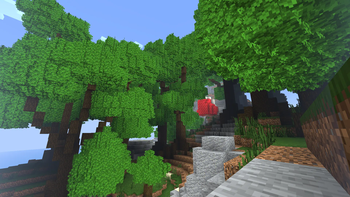
This modpack slightly optimizes the game and uses mods for different particles, graphical improvements, sound improvements of steps.
Screenshots

About this Modpack

About modpack:
This modpack slightly optimizes the game and uses mods for different particles, graphical improvements, sound improvements of steps.
You can set up graphical and optimization mods using the "Mod sets" mod.
If you liked this modpack according to the description, you can download it.
Size:
Modpack size after installation is about 226 MB.
Small help:
If you experience FPS drops when opening your inventory, go to the settings of the "Flow" mod and turn off everything except dimming.
Optimization mods
Dynamic FPS by juliand665
Entity Culling by tr7zw
Enhanced Block Entities by FoundationGames
Cull Less Leaves by isxander
Lithium by jellysquid3
Memory Leak Fix by fxmorin
Krypton by astei
Indium by comp500
FerriteCore by malte0811
Very Many Players (Fabric) by ishland
Noxesium by Aeltumn
More Culling by fxmorin
ModernFix by embeddedt
Graphic mods
Wakes by Goby56
Visuality by PinkGoosik
[EMF] Entity Model Features by Traben
[ETF] Entity Texture Features by Traben
Advancement Plaques by Grend
ChatAnimation by Ezzenix
Chat Heads by dzwdz
Adaptive Tooltips by isxander
Explosive Enhancement by Superkat32
Legendary Tooltips by Grend
LambDynamicLights by LambdAurora
ItemPhysic by creativemd
Flow by mineblock11
Postmortal Particles by Superkat32
Model Gap Fix by MehVahdJukaar
ItemPhysic by creativemd
ItemPhysic Lite by creativemd
All mods
All mods
Adaptive Tooltips
Advanced HUD
Advancement Plaques
AntiGhost
BedrockIfy
Better Statistics Screen
Better Trim Tooltips
BetterF3
CIT Resewn
Camera Utils
Chat Heads
ChatAnimation
Cloth Config API
Continuity
CreativeCore
Cull Less Leaves
DashLoader
DeathLog
Debugify
Dynamic Crosshair
Dynamic FPS
Eating Animation
Emotecraft
Enhanced Block Entities
Entity Culling
Explosive Enhancement
Fabric API
Fabric Language Kotlin
FabricSkyboxes
Falling Leaves
FerriteCore
Figura
Flow
Forge Config API Port
Iceberg
ImmediatelyFast
Indium
Iris Shaders
ItemPhysic
ItemPhysic Lite
Krypton
LambDynamicLights
Language Reload
Legendary Tooltips
Lithium
M.R.U
Main Menu Credits
Memory Leak Fix
MidnightLib
Mod Menu
Mod Sets
Model Gap Fix
ModernFix
More Culling
Not Enough Animations
Noxesium
Postmortal Particles
Presence Footsteps
Prism
Recursive Resources
Reese's Sodium Options
ReplayMod
Resource Pack Overrides
Resourcify
Shulker Box Tooltip
SkinShuffle
Smooth Particles
Sodium
Sodium Extra
Starlight (Fabric)
Stendhal
ThreadTweak
Trimmed
Very Many Players (Fabric)
Visuality
Wakes
Waxed Icons
YetAnotherConfigLib
Your Options Shall Be Respected (YOSBR)
Zoomify
[EMF] Entity Model Features
[ETF] Entity Texture Features
bendy-lib
oωo (owo-lib)
playerAnimator
Russian
О модпаке:
Этот модпак немного оптимизирует игру и в нём используются моды на разные частицы , графические улучшения, звуковые улучшения шагов.
Если вам понравился этот модпак по описанию можете его скачать.
Размер:
Размер модпака после установки около 226МБ.
Небольшая помощь:
Если у вас возникают просадки фпс при открытии инвенторя, зайдите в настройки мода "Flow" и отключите всё кроме затемнения.
Available Versions
How to Set Up a SsprtPack Server
Order Server
Choose at least 4 GB RAM (6 GB recommended for SsprtPack). Based on player count: per 8 players.
Install Modpack in Dashboard
Open the modpack browser in the dashboard, search for "SsprtPack" and click "Install". The fabric loader and Minecraft 1.20.1 are configured automatically.
Start Server & Play
Start the server – all mods are loaded automatically. Share the server IP with friends and play together!
Frequently Asked Questions
SsprtPack server crashes or won't start – what to do?
Most common causes: insufficient RAM or wrong fabric loader. Check latest.log for "OutOfMemoryError" → increase RAM to at least 6 GB. For "Mixin" or "ClassNotFoundException" errors: modpack version and loader don't match. With Mado Hosting, loader and Minecraft version are auto-configured on modpack install – preventing most startup issues.
How much RAM does a SsprtPack server really need?
Minimum 4 GB, recommended 6 GB for stable performance. per 8 players. Important: Minecraft modpacks need more RAM than vanilla – plan extra per additional player. With Mado Hosting, you can scale RAM up live at any time without data loss (from €8/month).
Can I add custom mods to SsprtPack without conflicts?
Yes, but check compatibility: only use mods for the same loader (fabric) and same Minecraft version (1.20.1). Common issues: ID conflicts with recipe mods and incompatible coremod versions. The Mado dashboard mod browser only shows compatible mods and warns about known conflicts.
SsprtPack server lagging – performance tips
1) Increase RAM to 6 GB+. 2) Reduce server view-distance to 8 (server.properties). 3) Pre-generate chunks with the "Chunky" plugin. 4) Use /spark profiler to check which mods consume the most tick time. With Mado Hosting, all servers run on NVMe SSDs with dedicated CPU cores – eliminating hardware as a bottleneck.
Similar Modpacks

![Cobblemon Official Modpack [Fabric]](https://cdn.modrinth.com/data/5FFgwNNP/e7f9ee2e9d361623847853fe2ddce42f519ee64f.png)
![COBBLEVERSE - Pokemon Adventure [Cobblemon]](https://cdn.modrinth.com/data/Jkb29YJU/581ecf54530972afb18a04660afd820f2f24f6c7.png)
![Better MC [FABRIC] - BMC2](https://cdn.modrinth.com/data/shFhR8Vx/a19c2bcb51d38f32f138d3607e91cb2b7b8e387f_96.webp)


Rent SsprtPack Server
Start your own server with automatic modpack installation.
Supported Versions
Start your SsprtPack Server now
From €8.00/month with 6 GB RAM for the best performance.
Configure Server →