
Star UI
A simple tool for improving visual games.
Screenshots
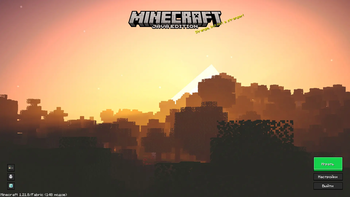
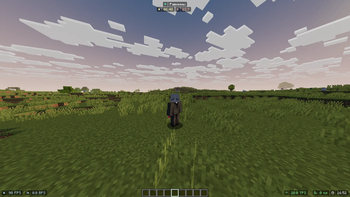
About this Modpack
Description in English
Star UI - Minecraft (Fabric) pack for 1.21.8, built for a smooth and beautiful gameplay experience.
The main goals are optimization, UI convenience, and visual improvements.
No server-side installation required — works on any vanilla servers.
🔧 Optimization and Performance
- BadOptimizations — various tweaks to reduce system load.
- C2ME — improves multithreaded chunk loading.
- Dynamic FPS — lowers resource usage when the game is unfocused or minimized.
- EntityCulling — prevents rendering of entities not visible to the player.
- FerriteCore — reduces RAM usage.
- ImmediatelyFast — speeds up GUI and interface rendering.
- Lithium — optimizes game logic.
- Noisium — improves performance of terrain noise generation.
- Sodium + Sodium Extra — massive FPS boost with extended graphics settings.
- ThreadTweak — distributes workload across threads for better performance.
🎨 Graphics and Visual Enhancements
- Iris — shader support (compatible with Sodium).
- ScalableLux — improved lighting and effects.
- Zoomify — quick zoom feature (similar to OptiFine).
- Bobby — keeps chunks loaded beyond the render distance.
- MoreCulling — optimizes block and object rendering.
- SmoothScroll — smooth scrolling in GUIs.
- Minecraft Cursor — custom in-game cursors.
🖥️ UI and Convenience
- Alan's Unified UI — enhanced and unified menus.
- BetterF3 — advanced debug screen (F3).
- Mod Menu — menu to manage installed mods.
- StarHUD — customizable HUD elements.
- ShulkerBoxTooltip — preview Shulker Box contents in inventory.
- Mouse Tweaks — improved inventory interactions.
- Elytra Key — dedicated keybind for Elytra.
- FastQuit — lets you leave the world instantly without waiting for saves.
- Xaero’s Minimap — in-game minimap.
- Xaero’s World Map — full world map.
🛡️ Security and Control
- No Chat Reports — disables Mojang’s chat reporting system (safer chat).
- Chat Heads — displays player heads in chat.
⚙️ Libraries
- Fabric API — core library required for most Fabric mods.
- Cloth Config — library for mod configuration screens.
- Fabric Language Kotlin — adds support for Kotlin-based mods.
- Placeholder API — API for mods using placeholders.
📌 Summary
This pack:
- ✅ Boosts FPS and reduces lag.
- ✅ Improves UI and HUD usability.
- ✅ Enhances visuals and adds shader support.
- ✅ Fully client-side, compatible with all servers.
Description in Russian
Star UI - Сборка Minecraft (Fabric) для 1.21.8, собранная для комфортной и красивой игры.
Основная цель — оптимизация, удобство интерфейса и улучшение визуала.
Серверной части не требует, работает на любых ванильных серверах.
🔧 Оптимизация и производительность
- BadOptimizations — разные оптимизации, снижающие нагрузку.
- C2ME — улучшает многопоточность загрузки чанков.
- Dynamic FPS — снижает использование ресурсов, когда игра свернута.
- EntityCulling — отключает прорисовку невидимых сущностей.
- FerriteCore — уменьшает расход оперативной памяти.
- ImmediatelyFast — ускорение отрисовки GUI и интерфейсов.
- Lithium — оптимизация логики игры.
- Noisium — оптимизация генерации шума (terrain noise).
- Sodium + Sodium Extra — мощный прирост FPS, гибкие настройки графики.
- ThreadTweak — распределение потоков для повышения производительности.
🎨 Графика и визуальные улучшения
- Iris — поддержка шейдеров (работает с Sodium).
- ScalableLux — улучшенное освещение и эффекты.
- Zoomify — удобный Zoom (как в OptiFine).
- Bobby — сохраняет чанки за пределами прорисовки.
- MoreCulling — оптимизация прорисовки блоков и объектов.
- SmoothScroll — плавная прокрутка в интерфейсах.
- Minecraft Cursor — кастомные курсоры.
🖥️ Интерфейс и удобство
- Alan's Unified UI — улучшенное и унифицированное меню.
- BetterF3 — расширенный отладочный экран (F3).
- Mod Menu — меню для управления установленными модами.
- StarHUD — кастомизация HUD (панели интерфейса).
- ShulkerBoxTooltip — предпросмотр содержимого шалкеров в инвентаре.
- Mouse Tweaks — удобное управление предметами в инвентаре.
- Elytra Key — отдельная клавиша для использования элитр.
- FastQuit — позволяет быстро выходить из мира без ожидания сохранения.
- Xaero’s Minimap — миникарта.
- Xaero’s World Map — полноценная карта мира.
🛡️ Безопасность и контроль
- No Chat Reports — отключает систему жалоб Mojang (безопасный чат).
- Chat Heads — отображает головы игроков в чате.
⚙️ Библиотеки
- Fabric API — основная библиотека для модов Fabric.
- Cloth Config — библиотека для настроек модов.
- Fabric Language Kotlin — поддержка Kotlin-модов.
- Placeholder API — API для модов, использующих плейсхолдеры.
📌 Итог
Эта сборка:
- ✅ Повышает FPS и снижает лаги.
- ✅ Делает интерфейс и HUD более удобными.
- ✅ Улучшает графику и добавляет поддержку шейдеров.
- ✅ Полностью клиентская, подходит для игры на любых серверах.
Available Versions
How to Set Up a Star UI Server
Order Server
Choose at least 4 GB RAM (6 GB recommended for Star UI). Based on player count: per 8 players.
Install Modpack in Dashboard
Open the modpack browser in the dashboard, search for "Star UI" and click "Install". The fabric loader and Minecraft 1.21.8 are configured automatically.
Start Server & Play
Start the server – all mods are loaded automatically. Share the server IP with friends and play together!
Frequently Asked Questions
Star UI server crashes or won't start – what to do?
Most common causes: insufficient RAM or wrong fabric loader. Check latest.log for "OutOfMemoryError" → increase RAM to at least 6 GB. For "Mixin" or "ClassNotFoundException" errors: modpack version and loader don't match. With Mado Hosting, loader and Minecraft version are auto-configured on modpack install – preventing most startup issues.
How much RAM does a Star UI server really need?
Minimum 4 GB, recommended 6 GB for stable performance. per 8 players. Important: Minecraft modpacks need more RAM than vanilla – plan extra per additional player. With Mado Hosting, you can scale RAM up live at any time without data loss (from €8/month).
Can I add custom mods to Star UI without conflicts?
Yes, but check compatibility: only use mods for the same loader (fabric) and same Minecraft version (1.21.8). Common issues: ID conflicts with recipe mods and incompatible coremod versions. The Mado dashboard mod browser only shows compatible mods and warns about known conflicts.
Star UI server lagging – performance tips
1) Increase RAM to 6 GB+. 2) Reduce server view-distance to 8 (server.properties). 3) Pre-generate chunks with the "Chunky" plugin. 4) Use /spark profiler to check which mods consume the most tick time. With Mado Hosting, all servers run on NVMe SSDs with dedicated CPU cores – eliminating hardware as a bottleneck.
Similar Modpacks

![Cobblemon Official Modpack [Fabric]](https://cdn.modrinth.com/data/5FFgwNNP/e7f9ee2e9d361623847853fe2ddce42f519ee64f.png)
![COBBLEVERSE - Pokemon Adventure [Cobblemon]](https://cdn.modrinth.com/data/Jkb29YJU/581ecf54530972afb18a04660afd820f2f24f6c7.png)
![Better MC [FABRIC] - BMC2](https://cdn.modrinth.com/data/shFhR8Vx/a19c2bcb51d38f32f138d3607e91cb2b7b8e387f_96.webp)


Rent Star UI Server
Start your own server with automatic modpack installation.
Supported Versions
Start your Star UI Server now
From €8.00/month with 6 GB RAM for the best performance.
Configure Server →