
Stay-Clear!
Improve your minecraft graphics and world generation with better performance!
Screenshots
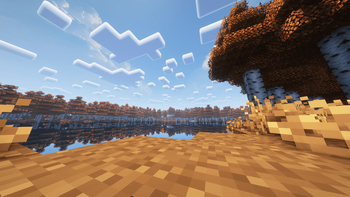
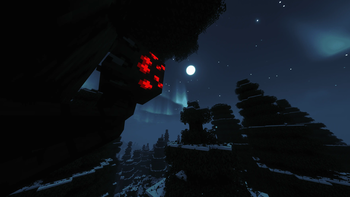
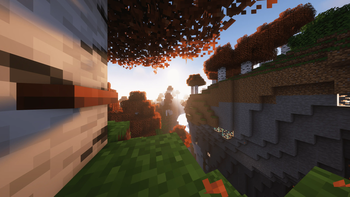
About this Modpack
What's Stay-Clear!
Stay-Clears! is a Fabric-based Minecraft modpack focused on graphics, world generation and performance improvement, our modpack's goal is to improve optimization and give a perfect balance between comfort and performances.
What Stay-Clear! Offers
✔️ A visually improved main menu.
Using fancy main menu, we were able to revisit the main menu and improve its visuals and functions.
✔️ A global game optimization.
Using several mods such as sodium and starlight, we were able to improve the game's performance.
✔️ Improved and more satisfying gameplay.
Using a number of sound and utility mods, we've made the game more satisfying and enjoyable.
✔️ A reworked HUD for better visual comfort.
Using a combination of mods, we were able to improve the game's HUD, such as the visibility of nicknames and the full display of the HUD on horseback.
✔️ Improved sound quality.
Using sound mods such as Simplevoicechat and Soundphysics, the game now features 3D sound reverberation and voice chat.
Tips
Complementary shader is recommended for better performance, but try to avoid shaders unless you have a suitable computer.
Take in consideration that the screenshots are not here to flatter the visual of our modpack, but to show the results we can have without sacrifice graphics
Other and Disclaimers
Other
Join the Stay-Clear! Discord community if you have any questions.

Disclaimers
I'm not a professional at all, I only do this for fun, so there can be a lot of bugs.
Take into consideration that the modpack won't do miracles on performance: the modpack aims for a good compromise between performance, gameplay and graphics.
Partnership

Translations
Français
Qu'est-ce que Stay-Clear!
Stay-Clears ! est un modpack Minecraft basé sur fabric et axé sur les graphismes, la génération de monde et l'amélioration des performances, le but de notre modpack est d'améliorer l'optimisation et de donner un équilibre parfait entre le confort et les performances.
Ce que Stay-Clear ! offre
✔️ Un menu principal visuellement amélioré
En utilisant le menu principal fantaisie, nous avons pu revisiter le menu principal et améliorer son aspect visuel et ses fonctions.
✔️ Une optimisation globale du jeu.
En utilisant plusieurs mods tels que sodium et starlight, nous avons pu améliorer les performances du jeu.
✔️ Un gameplay amélioré et plus satisfaisant.
En utilisant un certain nombre de mods sonores et utilitaires, nous avons rendu le jeu plus satisfaisant et plus agréable.
✔️ Un HUD retravaillé pour un meilleur confort visuel.
En utilisant une combinaison de mods, nous avons pu améliorer le HUD du jeu, comme la visibilité des surnoms et l'affichage complet du HUD à cheval.
✔️ Amélioration de la qualité du son.
En utilisant des mods sonores tels que Simplevoicechat et Soundphysics, le jeu dispose maintenant d'une réverbération sonore en 3D et d'un chat vocal.
Astuces
Complementary shader est recommandé pour de meilleures performances, mais essayez d'éviter les shaders à moins d'avoir un ordinateur adapté.
Prenez en considération que les captures d'écran ne sont pas là pour flatter le visuel de notre modpack, mais pour montrer les résultats que l'on peut avoir sans sacrifier les graphismes.
Divers et avertissements
Autres
Rejoint le Discord Stay-Clear! si tu as des quelconques questions.
Avertissements
Je ne suis pas un professionnel du tout, je fais ça pour le plaisir, donc il peut y avoir beaucoup de bugs.
Prenez en considération que le modpack ne fera pas des miracles sur les performances, le modpack cherche avant tout un bon compromis entre les performances et le gameplay.
Available Versions
How to Set Up a Stay-Clear! Server
Order Server
Choose at least 4 GB RAM (6 GB recommended for Stay-Clear!). Based on player count: per 8 players.
Install Modpack in Dashboard
Open the modpack browser in the dashboard, search for "Stay-Clear!" and click "Install". The fabric loader and Minecraft 1.19.2 are configured automatically.
Start Server & Play
Start the server – all mods are loaded automatically. Share the server IP with friends and play together!
Frequently Asked Questions
Stay-Clear! server crashes or won't start – what to do?
Most common causes: insufficient RAM or wrong fabric loader. Check latest.log for "OutOfMemoryError" → increase RAM to at least 6 GB. For "Mixin" or "ClassNotFoundException" errors: modpack version and loader don't match. With Mado Hosting, loader and Minecraft version are auto-configured on modpack install – preventing most startup issues.
How much RAM does a Stay-Clear! server really need?
Minimum 4 GB, recommended 6 GB for stable performance. per 8 players. Important: Minecraft modpacks need more RAM than vanilla – plan extra per additional player. With Mado Hosting, you can scale RAM up live at any time without data loss (from €8/month).
Can I add custom mods to Stay-Clear! without conflicts?
Yes, but check compatibility: only use mods for the same loader (fabric) and same Minecraft version (1.19.2). Common issues: ID conflicts with recipe mods and incompatible coremod versions. The Mado dashboard mod browser only shows compatible mods and warns about known conflicts.
Stay-Clear! server lagging – performance tips
1) Increase RAM to 6 GB+. 2) Reduce server view-distance to 8 (server.properties). 3) Pre-generate chunks with the "Chunky" plugin. 4) Use /spark profiler to check which mods consume the most tick time. With Mado Hosting, all servers run on NVMe SSDs with dedicated CPU cores – eliminating hardware as a bottleneck.
Similar Modpacks

![Cobblemon Official Modpack [Fabric]](https://cdn.modrinth.com/data/5FFgwNNP/e7f9ee2e9d361623847853fe2ddce42f519ee64f.png)
![COBBLEVERSE - Pokemon Adventure [Cobblemon]](https://cdn.modrinth.com/data/Jkb29YJU/581ecf54530972afb18a04660afd820f2f24f6c7.png)
![Better MC [FABRIC] - BMC2](https://cdn.modrinth.com/data/shFhR8Vx/a19c2bcb51d38f32f138d3607e91cb2b7b8e387f_96.webp)


Rent Stay-Clear! Server
Start your own server with automatic modpack installation.
Details
- License
- BSD 3-Clause "New" or "Revised" License
- Server-side
- Optional
- Client-side
- Optional
Supported Versions
Start your Stay-Clear! Server now
From €8.00/month with 6 GB RAM for the best performance.
Configure Server →