
StealthCore
Fast, Smooth, Unstoppable – PvP Ready | View Gallery for Information
Screenshots
About this Modpack
⚡ StealthCore
Fast, Smooth, Unstoppable — PvP Ready
A lightweight, client-side Fabric modpack built for competitive Minecraft. Every mod earns its place. Nothing is wasted.
🎯 Overview
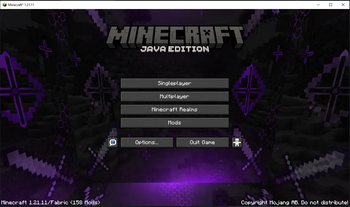
StealthCore is a combat-focused optimization modpack for Minecraft Java Edition 1.21.1 & 1.21.11 running on Fabric. It's fully client-side — drop into any server and every feature works immediately, no server-side install needed.
The goal is simple: more FPS, sharper controls, cleaner UI, better information — everything a serious player needs and nothing they don't.
⚔️ Combat Features
| Feature | Description |
|---|---|
| Fast Block Placement | Snappier, more responsive block placement for clutch builds and fights |
| Quick Elytra Swapper | Instantly swap elytra ↔ chestplate with a custom keybind |
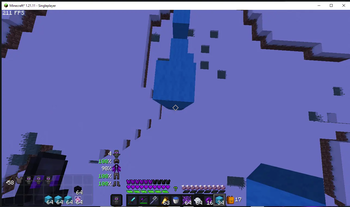
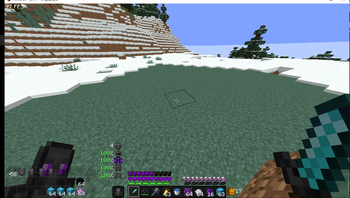
| Totem Counter | Always-visible count of totems in your inventory |
| Saturation Gain Icons | Real-time HUD icons showing hunger and saturation state |
| Optimized Settings for PvP | Pre-tuned game settings ready from first launch |
🖥️ Interface & HUD
- Custom HUD — Press
Oto open the live HUD editor. Move, resize, and toggle any element - PreOptimized HUD — A clean default layout ships ready to go, no setup required
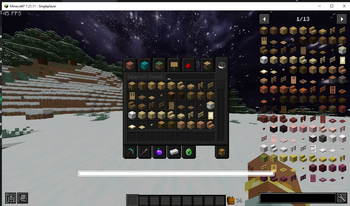
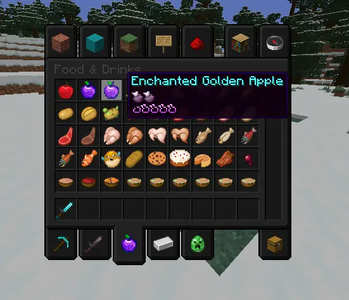
- Darked Themed UI — Full dark aesthetic across all menus and inventory screens
- Better F3 — Cleaner, reorganized debug screen so you find info instantly
- Task Manager via
F12— In-game CPU/RAM overlay without alt-tabbing (1.21.11 only)
📚 Information & QoL
- Just Enough Items (Integrated) — In-inventory recipe lookup and item info
- Optimized Enchanted Books — Clearer, more readable enchantment tooltips for smarter gearing decisions
🚀 Performance
- Lightweight by design — No bloat, no redundant mods, no unnecessary rendering
- Client-side only — Works on any standard Java server out of the box
- Chunky (included) — Pre-generate chunks before playing for maximum smoothness
⚠️ Chunky will not boost FPS unless configured and run. See the Chunky mod page for setup.
🎨 Visuals
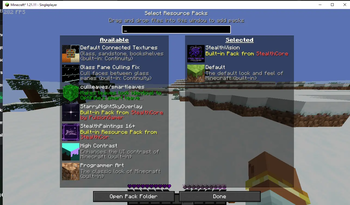
- Optimized PvP Texturepack — Sharp, clean visuals with minimal performance cost, enabled by default
- StealthPaints (Disabled by default) — Optional custom paintings pack. Enable in resource pack settings when ready
🔞 By enabling StealthPaints you confirm you are 16 or older
🔓 Account Switcher
Switch Minecraft accounts in-game without restarting. Both premium and cracked accounts are supported.
📋 Details
| Loader | Fabric |
| Versions | 1.21.1 · 1.21.11 |
| Environment | Client-side only |
| Tags | Combat · Lightweight · Optimization · Multiplayer |
| License | CC-BY-NC-4.0 |
| Author | KairoVeynn |
🛠️ Installation
- Install Modrinth App or Prism Launcher
- Search StealthCore → Install
- Launch — settings and HUD are pre-configured
- Press
Oto customize your HUD - Press
F12to monitor system performance (1.21.11) - Optionally enable StealthPaints in resource pack settings
StealthCore — because every millisecond counts.
Available Versions
How to Set Up a StealthCore Server
Order Server
Choose at least 4 GB RAM (6 GB recommended for StealthCore). Based on player count: per 8 players.
Install Modpack in Dashboard
Open the modpack browser in the dashboard, search for "StealthCore" and click "Install". The fabric loader and Minecraft 1.21.11 are configured automatically.
Start Server & Play
Start the server – all mods are loaded automatically. Share the server IP with friends and play together!
Frequently Asked Questions
StealthCore server crashes or won't start – what to do?
Most common causes: insufficient RAM or wrong fabric loader. Check latest.log for "OutOfMemoryError" → increase RAM to at least 6 GB. For "Mixin" or "ClassNotFoundException" errors: modpack version and loader don't match. With Mado Hosting, loader and Minecraft version are auto-configured on modpack install – preventing most startup issues.
How much RAM does a StealthCore server really need?
Minimum 4 GB, recommended 6 GB for stable performance. per 8 players. Important: Minecraft modpacks need more RAM than vanilla – plan extra per additional player. With Mado Hosting, you can scale RAM up live at any time without data loss (from €8/month).
Can I add custom mods to StealthCore without conflicts?
Yes, but check compatibility: only use mods for the same loader (fabric) and same Minecraft version (1.21.11). Common issues: ID conflicts with recipe mods and incompatible coremod versions. The Mado dashboard mod browser only shows compatible mods and warns about known conflicts.
StealthCore server lagging – performance tips
1) Increase RAM to 6 GB+. 2) Reduce server view-distance to 8 (server.properties). 3) Pre-generate chunks with the "Chunky" plugin. 4) Use /spark profiler to check which mods consume the most tick time. With Mado Hosting, all servers run on NVMe SSDs with dedicated CPU cores – eliminating hardware as a bottleneck.
Similar Modpacks

![Better MC [FABRIC] - BMC2](https://cdn.modrinth.com/data/shFhR8Vx/a19c2bcb51d38f32f138d3607e91cb2b7b8e387f_96.webp)
![Better MC [FORGE] - BMC4](https://cdn.modrinth.com/data/4BV47HRn/7f5ef7cc61b2593609aabef3ed07a866a4f11b73_96.webp)


Rent StealthCore Server
Start your own server with automatic modpack installation.
Details
- License
- Creative Commons Attribution Non Commercial 4.0 International
- Server-side
- Unsupported
- Client-side
- Required
Supported Versions
Start your StealthCore Server now
From €8.00/month with 6 GB RAM for the best performance.
Configure Server →