
Stevenies
A Minecraft modpack made for the Belgian streamer SauverSteven's community server. Includes gameplay, performance and multiplayer improvements.
Screenshots
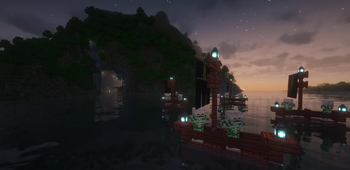
About this Modpack
English
Stevenies is a Minecraft modpack made for the community server of the Belgian streamer SauverSteven.
It focuses on an enhanced multiplayer experience with improved communication, exploration, automation, and performance.
✨ Features
- ⚰️ Corpse – Recover your inventory safely after death.
- 🗺️ Ancient Structures – Discover new structures across the world.
- 🌿 Better Leaves – Visual enhancement for a more natural environment.
- ⚡ Spark – Server performance monitoring and optimization.
- 💎 Lootr & Iron Chests – New ways to explore and manage your loot.
- 🌅 Complementary Shaders – Beautiful lighting and graphics.
- ⚙️ Create – Advanced automation and contraption building.
- ✈️ Create Aeronautics – Add flying machines and aerial mechanics to Create.
This modpack is designed for both server and client use.
It provides a light, stable, and creative experience for community play sessions with friends.
🔗 Credits
This modpack contains mods from CurseForge:
Français
Stevenies est un modpack Minecraft créé pour le serveur communautaire du streamer Belge SauverSteven.
Il met l’accent sur une expérience multijoueur améliorée avec une meilleure communication, exploration, automatisation et performance.
✨ Caractéristiques
- ⚰️ Corpse – Récupérez vos objets en toute sécurité après la mort.
- 🗺️ Ancient Structures – Découvrez de nouvelles structures à travers le monde.
- 🌿 Better Leaves – Feuillage amélioré pour un environnement plus naturel.
- ⚡ Spark – Suivi et optimisation des performances serveur.
- 💎 Lootr & Iron Chests – Nouveau système de coffres et de butin.
- 🌅 Complementary Shaders – Graphismes et lumières retravaillés.
- ⚙️ Create – Automatisation avancée et construction de mécanismes.
- ✈️ Create Aeronautics – Ajoute des machines volantes et des mécaniques aériennes à Create.
Ce modpack est conçu pour une utilisation client et serveur, idéal pour des sessions communautaires stables, fluides et créatives entre amis.
🔗 Crédits
Ce modpack inclut des mods provenant de CurseForge :
Available Versions
How to Set Up a Stevenies Server
Order Server
Choose at least 4 GB RAM (6 GB recommended for Stevenies). Based on player count: per 5 players.
Install Modpack in Dashboard
Open the modpack browser in the dashboard, search for "Stevenies" and click "Install". The neoforge loader and Minecraft 1.21.1 are configured automatically.
Start Server & Play
Start the server – all mods are loaded automatically. Share the server IP with friends and play together!
Frequently Asked Questions
Stevenies server crashes or won't start – what to do?
Most common causes: insufficient RAM or wrong neoforge loader. Check latest.log for "OutOfMemoryError" → increase RAM to at least 6 GB. For "Mixin" or "ClassNotFoundException" errors: modpack version and loader don't match. With Mado Hosting, loader and Minecraft version are auto-configured on modpack install – preventing most startup issues.
How much RAM does a Stevenies server really need?
Minimum 4 GB, recommended 6 GB for stable performance. per 5 players. Important: Minecraft modpacks need more RAM than vanilla – plan extra per additional player. With Mado Hosting, you can scale RAM up live at any time without data loss (from €8/month).
Can I add custom mods to Stevenies without conflicts?
Yes, but check compatibility: only use mods for the same loader (neoforge) and same Minecraft version (1.21.1). Common issues: ID conflicts with recipe mods and incompatible coremod versions. The Mado dashboard mod browser only shows compatible mods and warns about known conflicts.
Stevenies server lagging – performance tips
1) Increase RAM to 6 GB+. 2) Reduce server view-distance to 8 (server.properties). 3) Pre-generate chunks with the "Chunky" plugin. 4) Use /spark profiler to check which mods consume the most tick time. With Mado Hosting, all servers run on NVMe SSDs with dedicated CPU cores – eliminating hardware as a bottleneck.
Similar Modpacks


![Cobblemon Official Modpack [Fabric]](https://cdn.modrinth.com/data/5FFgwNNP/e7f9ee2e9d361623847853fe2ddce42f519ee64f.png)
![COBBLEVERSE - Pokemon Adventure [Cobblemon]](https://cdn.modrinth.com/data/Jkb29YJU/581ecf54530972afb18a04660afd820f2f24f6c7.png)
![Better MC [FABRIC] - BMC2](https://cdn.modrinth.com/data/shFhR8Vx/a19c2bcb51d38f32f138d3607e91cb2b7b8e387f_96.webp)

Rent Stevenies Server
Start your own server with automatic modpack installation.
Supported Versions
Start your Stevenies Server now
From €8.00/month with 6 GB RAM for the best performance.
Configure Server →