
SuperBOptimized
A clean, lightweight performance foundation designed to boost FPS while remaining a perfect, bloat free template for your own custom modpacks.
Screenshots
About this Modpack
SBO'zed
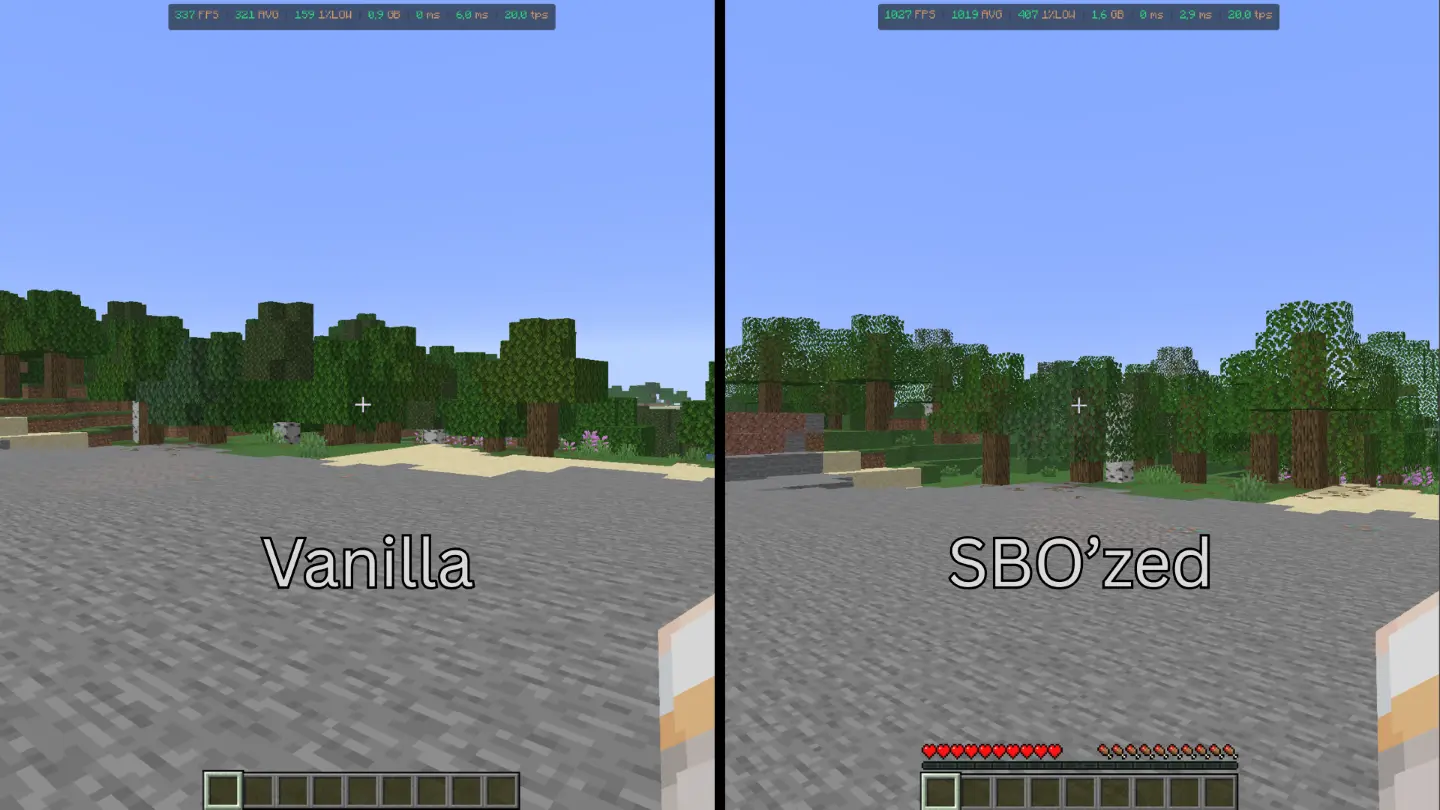
SBO'zed is a performance-focused foundation for Minecraft. It provides a stable, consistent baseline for players who want to maximize frame rates and eliminate micro-stutters, all while keeping the game feeling like a clean, vanilla-plus experience.
Why use SBO'zed?
Instead of manually searching for and configuring individual performance mods, SBO'zed offers a pre-tuned, reliable setup. It is designed for anyone who wants a smoother gaming experience without adding unnecessary content, complex UI changes, or hidden background processes.
Core Features
Engine Optimization: Integrates essential, high-efficiency mods specifically chosen to stabilize your frame-times. This keeps your 1% lows high, resulting in a much smoother feel during gameplay.
Lean and Efficient: Contains only the necessary components to improve performance. By avoiding excess additions, the pack remains lightweight and highly compatible with your favorite content mods.
Simple Foundation: A modular design that serves as an ideal starting point. You can easily add your own mods on top, knowing that the performance layer is already handled.
Purpose
This project is intended for players who need a reliable, high-performance base that they can trust. Whether you are looking to boost your FPS on an older system or want a rock-solid foundation to build your own personal modpack, SBO'zed provides the stability you need to focus on playing the game.
Credits & Mod List
Mod Name - Developers
- BadOptimizations - Myuui
- BetterGrassify - marcin212
- Bobby - Johni0702
- C2ME - ishland
- Cloth Config - shedaniel
- Clumps - Jaredlll08
- Entity Culling - tr7zw
- Fabric API - Modmuss50
- FerriteCore - malte0811
- Forge Config API Port - Asek3
- ImmediatelyFast - RaphiMC
- Ixeris - Bencoezen
- Ksyxis - CptSpaceToaster
- Lithium - JellySquid3
- ModernFix - embeddedt
- Mod Menu - Prospector
- MoreCulling - FX_PR0JECT
- Not Enough Vulkan - hpd
- Placeholder API - supersaiyansubtlety
- RRLS - CptSpaceToaster
- ScalableLux - SuperCoder79
- ServerCore - Asek3
- SuperFastMath - PhiPro
- ThreadTweak - CptSpaceToaster
- VMP - Relativity-MC
- VulkanMod - VulkanMod
- XXLPackets - CptSpaceToaster
License
This project is licensed under the CC-BY 4.0 license. You are free to modify and distribute this work, provided you give appropriate credit to the original creator.
Available Versions
How to Set Up a SuperBOptimized Server
Order Server
Choose at least 4 GB RAM (6 GB recommended for SuperBOptimized). Based on player count: per 8 players.
Install Modpack in Dashboard
Open the modpack browser in the dashboard, search for "SuperBOptimized" and click "Install". The fabric loader and Minecraft 26.1.2 are configured automatically.
Start Server & Play
Start the server – all mods are loaded automatically. Share the server IP with friends and play together!
Frequently Asked Questions
SuperBOptimized server crashes or won't start – what to do?
Most common causes: insufficient RAM or wrong fabric loader. Check latest.log for "OutOfMemoryError" → increase RAM to at least 6 GB. For "Mixin" or "ClassNotFoundException" errors: modpack version and loader don't match. With Mado Hosting, loader and Minecraft version are auto-configured on modpack install – preventing most startup issues.
How much RAM does a SuperBOptimized server really need?
Minimum 4 GB, recommended 6 GB for stable performance. per 8 players. Important: Minecraft modpacks need more RAM than vanilla – plan extra per additional player. With Mado Hosting, you can scale RAM up live at any time without data loss (from €8/month).
Can I add custom mods to SuperBOptimized without conflicts?
Yes, but check compatibility: only use mods for the same loader (fabric) and same Minecraft version (26.1.2). Common issues: ID conflicts with recipe mods and incompatible coremod versions. The Mado dashboard mod browser only shows compatible mods and warns about known conflicts.
SuperBOptimized server lagging – performance tips
1) Increase RAM to 6 GB+. 2) Reduce server view-distance to 8 (server.properties). 3) Pre-generate chunks with the "Chunky" plugin. 4) Use /spark profiler to check which mods consume the most tick time. With Mado Hosting, all servers run on NVMe SSDs with dedicated CPU cores – eliminating hardware as a bottleneck.
Similar Modpacks

![Cobblemon Official Modpack [Fabric]](https://cdn.modrinth.com/data/5FFgwNNP/e7f9ee2e9d361623847853fe2ddce42f519ee64f.png)
![COBBLEVERSE - Pokemon Adventure [Cobblemon]](https://cdn.modrinth.com/data/Jkb29YJU/581ecf54530972afb18a04660afd820f2f24f6c7.png)
![Better MC [FABRIC] - BMC2](https://cdn.modrinth.com/data/shFhR8Vx/a19c2bcb51d38f32f138d3607e91cb2b7b8e387f_96.webp)


Rent SuperBOptimized Server
Start your own server with automatic modpack installation.
Details
- License
- Creative Commons Attribution 4.0 International
- Server-side
- Unsupported
- Client-side
- Required
Supported Versions
Start your SuperBOptimized Server now
From €8.00/month with 6 GB RAM for the best performance.
Configure Server →