
Survival 3D
The ultimate modpack which turns survival minecraft into Awesome 3D look without changing vanilla taste.
Screenshots
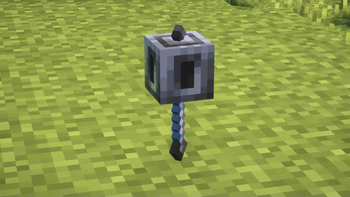
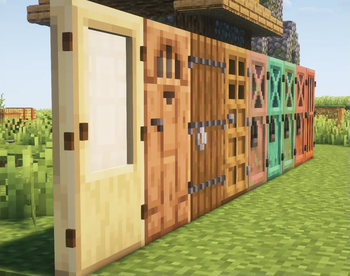
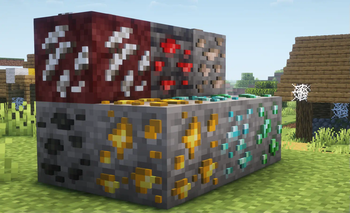
About this Modpack
Survival 3D is a specially made modpack for players seeking a beautiful and engaging survival experience. It enhances the game's look with high-quality textures, realistic shaders, and small visual improvements, creating a three-dimensional work of art. The great part is that it keeps the original gameplay of Minecraft's survival mode intact.

Key Features of Survival 3D
1. Enhanced Visuals with 3D Details
The modpack introduces incredible 3D textures that make every block look more realistic. From stone blocks with depth to wooden planks with visible grain, every detail pops out, creating a highly immersive environment.
2. Stunning Shaders
Survival 3D includes shaders that add dynamic lighting, realistic shadows, and vibrant water reflections. These shaders give the game a cinematic feel while still keeping the familiar Minecraft style.
3. HD Resource Packs
The HD resource packs included in the modpack provide detailed textures without overwhelming the game. Grass, leaves, and ores have realistic touches, making your survival adventures visually satisfying.
4. 3D Mob Models
Mobs now have 3D models that make them look more alive. Cows, zombies, and even creepers have subtle animations that add depth to their appearance while staying true to their classic designs.
5. Performance Optimization
Worried about lag? Survival 3D is optimized to run smoothly on most PCs. By balancing high-quality visuals and performance, the modpack ensures a seamless experience even on mid-range setups.
6. Vanilla Gameplay Unchanged
Despite all the visual upgrades, Survival 3D keeps the core gameplay mechanics untouched. Crafting, mining, and surviving feel just like vanilla Minecraft, ensuring a familiar yet enhanced experience.
Why Choose Survival 3D?
Stay True to Vanilla
For players who love the simplicity of vanilla survival but want a fresh look, Survival 3D strikes the perfect balance. You get the beauty of mods without losing the essence of Minecraft.
Conclusion
Survival 3D is the best modpack for those wanting to enhance their Minecraft gameplay. It features amazing graphics, realistic shaders, and keeps the classic Minecraft feel. This modpack turns survival mode into a breathtaking 3D experience. Whether you’re an experienced player or just enjoy building, Survival 3D will impress you.
My Discord - https://discord.gg/PNCGPUHTkr
Available Versions
How to Set Up a Survival 3D Server
Order Server
Choose at least 6 GB RAM (8 GB recommended for Survival 3D). Based on player count: per 5 players.
Install Modpack in Dashboard
Open the modpack browser in the dashboard, search for "Survival 3D" and click "Install". The fabric loader and Minecraft 1.21.8 are configured automatically.
Start Server & Play
Start the server – all mods are loaded automatically. Share the server IP with friends and play together!
Frequently Asked Questions
Survival 3D server crashes or won't start – what to do?
Most common causes: insufficient RAM or wrong fabric loader. Check latest.log for "OutOfMemoryError" → increase RAM to at least 8 GB. For "Mixin" or "ClassNotFoundException" errors: modpack version and loader don't match. With Mado Hosting, loader and Minecraft version are auto-configured on modpack install – preventing most startup issues.
How much RAM does a Survival 3D server really need?
Minimum 6 GB, recommended 8 GB for stable performance. per 5 players. Important: Minecraft modpacks need more RAM than vanilla – plan extra per additional player. With Mado Hosting, you can scale RAM up live at any time without data loss (from €12/month).
Can I add custom mods to Survival 3D without conflicts?
Yes, but check compatibility: only use mods for the same loader (fabric) and same Minecraft version (1.21.8). Common issues: ID conflicts with recipe mods and incompatible coremod versions. The Mado dashboard mod browser only shows compatible mods and warns about known conflicts.
Survival 3D server lagging – performance tips
1) Increase RAM to 8 GB+. 2) Reduce server view-distance to 8 (server.properties). 3) Pre-generate chunks with the "Chunky" plugin. 4) Use /spark profiler to check which mods consume the most tick time. With Mado Hosting, all servers run on NVMe SSDs with dedicated CPU cores – eliminating hardware as a bottleneck.
Similar Modpacks
![Cobblemon Official Modpack [Fabric]](https://cdn.modrinth.com/data/5FFgwNNP/e7f9ee2e9d361623847853fe2ddce42f519ee64f.png)
![COBBLEVERSE - Pokemon Adventure [Cobblemon]](https://cdn.modrinth.com/data/Jkb29YJU/581ecf54530972afb18a04660afd820f2f24f6c7.png)
![Better MC [FABRIC] - BMC2](https://cdn.modrinth.com/data/shFhR8Vx/a19c2bcb51d38f32f138d3607e91cb2b7b8e387f_96.webp)


![Better MC [FORGE] - BMC4](https://cdn.modrinth.com/data/4BV47HRn/7f5ef7cc61b2593609aabef3ed07a866a4f11b73_96.webp)
Rent Survival 3D Server
Start your own server with automatic modpack installation.
Supported Versions
Start your Survival 3D Server now
From €12.00/month with 8 GB RAM for the best performance.
Configure Server →