
Survival Recrafted
Minecraft Vanilla is too easy, Survival Recrafted modpack changes that.
Screenshots
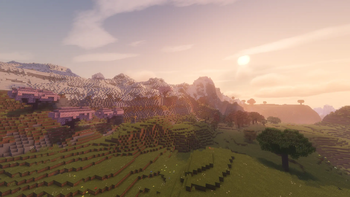
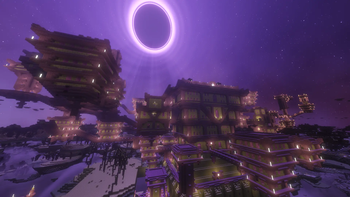
About this Modpack
Survival Recrafted - A complete, immersive survival overhaul
Survival Recrafted is a carefully curated Minecraft modpack designed to take the core survival experience and polish it to absolute perfection. Survival Recrafted completely overhauls the game with thirst mechanics, deadly temperatures, new mobs and an unforgiving early game.
Even just surviving the first night is an actual achievement.
✨ Key Features
- High Performance: Optimized with the best Fabric performance mods to ensure high FPS
- Overhauled Early Game: Forget punching trees. You will need to scavenge rocks, sticks and craft primitive flint tools just to get your first piece of wood.
- Dynamic Difficulty: As you get stronger, so does the world. Mobs will scale in difficulty the further you travel and the longer you survive.
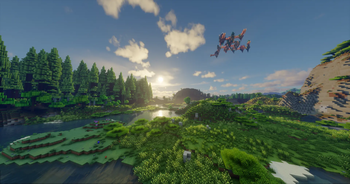
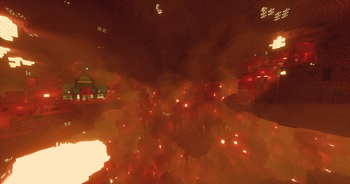
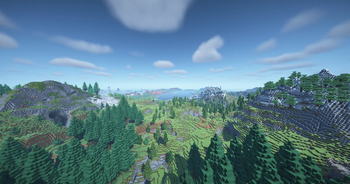
- Visual Enhancements: Shaders for cinematic lighting and 3D Textures.
- Vanilla Style: No complex tech or magic mods, just pure Minecraft survival, recrafted.
🌎 How to Survive & Objectives
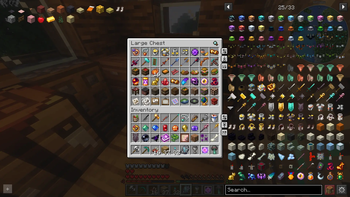
- How to get started: You can't chop down a tree with your bare fists anymore. You have to collect rocks, sticks and flint from the ground. Make a Crafting Rock, put it down and place the sticks and flint like in a crafting table, and then hit the Crafting Rock a few times with a rock to craft the tools. You can cut down trees only by using a Flint Axe. Many crafting recipes have been changed. Open your inventory, in the top left you will see a list of items that you have to craft, click on the item to see the crafting recipe.
- Thirst & Temperature: Hunger is no longer your only concern. You have to drink fresh water from a river, or purify it. Craft warm clothes to survive the snowy biomes, and stay cool in the scorching desert.
- Scaling Difficulty: As you progress, survive longer, and travel further, the world actively scales in difficulty. Mobs become stronger, deal more damage and spawn more.
- Objectives: Your main objective is to defeat the overhauled Ender Dragon. Open the Advancements tab, on the right side you will see some pinned advancements that you have to unlock in order to progress through the modpack.
⚙️ Technical Recommendations
- RAM Allocation: You should allocate 6 GB to 8 GB of RAM for the smoothest experience.
- Mods: You can see all the mods installed in this modpack by checking the versions tab, select a version and all the mods installed are under the Dependencies list.
- Mod Settings: You can easily tweak this modpack in Mod Menu, almost every mod can be customized. If you don't like something you can turn the feature off or just remove that mod.
- Shaders: You can enable shaders in video settings! The modpack comes with Bliss, Cmplementary and BSL Shaders for cinematic lighting.
💬 Feedback & Bug Reports
If you have suggestions, questions or need help feel free to write me.
Spoiler
Contact me via Email: [email protected]
The foundation of this modpack has been thoroughly balanced and finalized.
I plan to keep updating the modpack and adding mods or other assets in the future.
Available Versions
How to Set Up a Survival Recrafted Server
Order Server
Choose at least 6 GB RAM (8 GB recommended for Survival Recrafted). Based on player count: per 5 players.
Install Modpack in Dashboard
Open the modpack browser in the dashboard, search for "Survival Recrafted" and click "Install". The fabric loader and Minecraft 1.21.1 are configured automatically.
Start Server & Play
Start the server – all mods are loaded automatically. Share the server IP with friends and play together!
Frequently Asked Questions
Survival Recrafted server crashes or won't start – what to do?
Most common causes: insufficient RAM or wrong fabric loader. Check latest.log for "OutOfMemoryError" → increase RAM to at least 8 GB. For "Mixin" or "ClassNotFoundException" errors: modpack version and loader don't match. With Mado Hosting, loader and Minecraft version are auto-configured on modpack install – preventing most startup issues.
How much RAM does a Survival Recrafted server really need?
Minimum 6 GB, recommended 8 GB for stable performance. per 5 players. Important: Minecraft modpacks need more RAM than vanilla – plan extra per additional player. With Mado Hosting, you can scale RAM up live at any time without data loss (from €12/month).
Can I add custom mods to Survival Recrafted without conflicts?
Yes, but check compatibility: only use mods for the same loader (fabric) and same Minecraft version (1.21.1). Common issues: ID conflicts with recipe mods and incompatible coremod versions. The Mado dashboard mod browser only shows compatible mods and warns about known conflicts.
Survival Recrafted server lagging – performance tips
1) Increase RAM to 8 GB+. 2) Reduce server view-distance to 8 (server.properties). 3) Pre-generate chunks with the "Chunky" plugin. 4) Use /spark profiler to check which mods consume the most tick time. With Mado Hosting, all servers run on NVMe SSDs with dedicated CPU cores – eliminating hardware as a bottleneck.
Similar Modpacks
![Cobblemon Official Modpack [Fabric]](https://cdn.modrinth.com/data/5FFgwNNP/e7f9ee2e9d361623847853fe2ddce42f519ee64f.png)
![COBBLEVERSE - Pokemon Adventure [Cobblemon]](https://cdn.modrinth.com/data/Jkb29YJU/581ecf54530972afb18a04660afd820f2f24f6c7.png)
![Better MC [FABRIC] - BMC2](https://cdn.modrinth.com/data/shFhR8Vx/a19c2bcb51d38f32f138d3607e91cb2b7b8e387f_96.webp)


![Better MC [FORGE] - BMC4](https://cdn.modrinth.com/data/4BV47HRn/7f5ef7cc61b2593609aabef3ed07a866a4f11b73_96.webp)
Rent Survival Recrafted Server
Start your own server with automatic modpack installation.
Supported Versions
Start your Survival Recrafted Server now
From €12.00/month with 8 GB RAM for the best performance.
Configure Server →