
SyrupSMP Official Modpack
Play SyrupSMP the way it’s meant to be — curated mods for chill survival, community fun, and waffle-fueled nights.
Screenshots
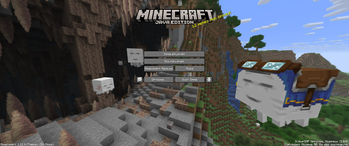
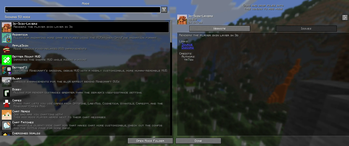
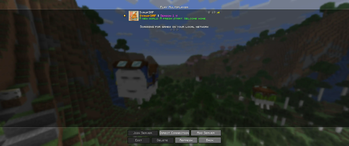


About this Modpack
🧇 SyrupSMP Official Modpack




Welcome to the SyrupSMP — our cozy, community-first Minecraft server modpack.
This pack brings smooth performance, quality-of-life tweaks, and a sprinkle of visual sweetness to your vanilla adventures, so you can focus on building, exploring, and making friends.
✨ What’s Inside?
This lightweight pack is built for Minecraft 1.21.6 (Fabric) and comes loaded with performance boosts, QoL improvements, visual upgrades, and community-friendly features, including:
Optimizations & Smooth Performance:
Sodium, Lithium, FerriteCore, ImmediatelyFast, More Culling — to keep your FPS high and your PC happy.Beautiful Visuals & Shaders:
Iris Shaders, LambDynamicLights, Visuality, Blur+, OptiGUI, Sound Physics Remastered — make your world feel alive (shaders are optional if your PC needs a break).Better HUD & Interface:
BetterF3, MiniHUD, Inventory HUD+, Better Mount HUD, Xaero’s Minimap & World Map — more info at a glance, when you need it.Smoother Building:
Litematica, Tweakeroo, Model Gap Fix, Shulker Box Tooltip — plan, tweak, and organize your builds with ease.Enhanced Chat & Social:
Chat Heads, Chat Patches, Emoji Type, Simple Voice Chat, CraftPresence — stay connected, vibe together.Comfort & Convenience:
AppleSkin, Inventory Profiles Next, FastQuit, Freecam, Debugify, Dynamic FPS, Cubes Without Borders — small changes, big comfort.
…and many more tweaks — like capes, controller support, animated textures, better culling, and more. We’ve customized configs, bundled recommended shaders & resource packs, and tested it all so you don’t have to.
🫧 How It Works
✅ You don’t need this modpack to join the server — it’s fully optional!
But we recommend it for the best SyrupSMP experience — extra cozy, smooth, and just a little bit fancier.
📌 Play solo or together: You can use this pack for singleplayer too — but we’d love to see you in our Discord!
📅 Season-based: SyrupSMP runs in 8-month-long seasons. We keep the modpack updated along the way.
🎉 Join the Community
🔗 Join our Discord! — make friends, get server info, and be part of the SyrupSMP family.
🍁 Stay cozy. Stay syrupy. See you in-game!
✨ Click to view shaders & resource packs
Shaders
- Complementary Shaders - Unbound: Gorgeous, flexible shaders with great performance.
Resource Packs
- Recolourful Containers GUI + HUD: Fresh, colorful visuals for your containers and HUD.
- Translations for Sodium: Adds missing language files for Sodium.
- VanillaTweaks: Small vanilla tweaks for a cleaner look.
- Enchanted Covers: Adds unique custom textures to enchanted books
- Stefan's Enchanted Books: Gives each enchanted book a distinct, detailed texture
📜 Click to view full mod list
- [EMF] Entity Model Features: Adds support for OptiFine's Custom Entity Models (CEM)
- [ETF] Entity Texture Features: Adds new entity & player skin texture features
- 3D Skin Layer: Makes player skins’ second layer fully 3D
- Animatica: Loads MCPatcher/OptiFine animated textures
- AppleSkin: Improves food HUD info
- Better Mount HUD: Better HUD when riding mounts
- Better Third Person: Improves the third-person camera view with smoother angles and controls
- BetterF3: Customizable debug HUD
- Blur+: Blurs background when in menus
- Bobby: Lets you render beyond server view distance
- Capes: Use capes from Optifine, LabyMod, MinecraftCapes
- Chat Heads: Shows player heads in chat
- Chat Patches: Improves Minecraft’s chat features
- Cherished Worlds: Pin/bookmark worlds
- Cloth Config API: Config screens library
- Continuity: Adds efficient connected textures and seamless glass for a prettier world
- Controlify: Adds controller support
- CraftPresence: Discord Rich Presence customization
- Cubes Without Borders: Borderless fullscreen
- Debugify: Fixes 70+ Mojang bugs
- Dynamic FPS: Saves resources when idle or backgrounded
- Emoji Type: Type emojis/symbols easily
- Entity Culling: Smarter rendering for visible entities
- Fabric API: Core Fabric hooks
- Fabric Language Kotlin: Kotlin support for Fabric
- FastQuit: Return to title screen faster
- FerriteCore: Reduces memory usage
- Forge Config API Port: Cross-ecosystem config library
- Freecam: Control camera freely (e.g. for building)
- ImmediatelyFast: Faster GPU rendering
- Inventory Profiles Next: Auto-sort, swap tools, chest dump
- Inventory HUD+: Shows inventory on-screen
- Iris Shaders: Modern shader loader
- LambDynamicLights: Dynamic lights
- Language Reload: QoL for language packs
- libIPN: Library for Inventory Profiles Next
- Litematica: Modern schematics mod
- Lithium: General performance mod
- Main Menu Credits: Add info to title screen
- MaLiLib: Library for client mods
- MiniHUD: “Mini F3” HUD, overlays
- MixinTrace: Debug mixins in crash reports
- Mod Menu: See installed mods in-game
- Model Gap Fix: Fixes block/item model gaps
- More Chat History: Longer chat history
- More Culling: More rendering performance tweaks
- OptiGUI: Custom in-game GUI textures
- Puzzle: Resource pack features for OptiFine alternatives
- Reese's Sodium Options: Better Sodium options screen
- Remove Reloading Screen: Load packs in background
- Shulker Box Tooltip: View shulker contents in inventory
- Simple Voice Chat: Proximity voice chat
- Sodium: Fast rendering optimization
- Sodium Extra: Adds extra features for Sodium
- Sound Physics Remastered: Realistic sound propagation
- Tweakeroo: Tons of building tweaks
- UniLib: Common utilities library
- Variants-CIT: A streamlined Custom Item Textures (CIT) format with standardized item variants
- Visuality: Extra particles and visuals
- Xaero's Minimap: Corner minimap
- Xaero's World Map: Full-screen world map
- YetAnotherConfigLib (YACL): Config library
- Your Options Shall Be Respected (YOSBR): Provides default options
- Zoomify: Infinite custom zoom mod
Available Versions
How to Set Up a SyrupSMP Official Modpack Server
Order Server
Choose at least 4 GB RAM (6 GB recommended for SyrupSMP Official Modpack). Based on player count: per 8 players.
Install Modpack in Dashboard
Open the modpack browser in the dashboard, search for "SyrupSMP Official Modpack" and click "Install". The fabric loader and Minecraft 1.21.6 are configured automatically.
Start Server & Play
Start the server – all mods are loaded automatically. Share the server IP with friends and play together!
Frequently Asked Questions
SyrupSMP Official Modpack server crashes or won't start – what to do?
Most common causes: insufficient RAM or wrong fabric loader. Check latest.log for "OutOfMemoryError" → increase RAM to at least 6 GB. For "Mixin" or "ClassNotFoundException" errors: modpack version and loader don't match. With Mado Hosting, loader and Minecraft version are auto-configured on modpack install – preventing most startup issues.
How much RAM does a SyrupSMP Official Modpack server really need?
Minimum 4 GB, recommended 6 GB for stable performance. per 8 players. Important: Minecraft modpacks need more RAM than vanilla – plan extra per additional player. With Mado Hosting, you can scale RAM up live at any time without data loss (from €8/month).
Can I add custom mods to SyrupSMP Official Modpack without conflicts?
Yes, but check compatibility: only use mods for the same loader (fabric) and same Minecraft version (1.21.6). Common issues: ID conflicts with recipe mods and incompatible coremod versions. The Mado dashboard mod browser only shows compatible mods and warns about known conflicts.
SyrupSMP Official Modpack server lagging – performance tips
1) Increase RAM to 6 GB+. 2) Reduce server view-distance to 8 (server.properties). 3) Pre-generate chunks with the "Chunky" plugin. 4) Use /spark profiler to check which mods consume the most tick time. With Mado Hosting, all servers run on NVMe SSDs with dedicated CPU cores – eliminating hardware as a bottleneck.
Similar Modpacks

![Cobblemon Official Modpack [Fabric]](https://cdn.modrinth.com/data/5FFgwNNP/e7f9ee2e9d361623847853fe2ddce42f519ee64f.png)
![COBBLEVERSE - Pokemon Adventure [Cobblemon]](https://cdn.modrinth.com/data/Jkb29YJU/581ecf54530972afb18a04660afd820f2f24f6c7.png)
![Better MC [FABRIC] - BMC2](https://cdn.modrinth.com/data/shFhR8Vx/a19c2bcb51d38f32f138d3607e91cb2b7b8e387f_96.webp)


Rent SyrupSMP Official Modpack Server
Start your own server with automatic modpack installation.
Supported Versions
Start your SyrupSMP Official Modpack Server now
From €8.00/month with 6 GB RAM for the best performance.
Configure Server →